
Using a CAM with your TV
If you have a digital TV, you may find that it has a CI slot, which is built to accept a CAM. On this page, we’ll explain what a CI slot and a CAM are, and how to use them.
|
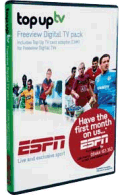 ESPN NOT AVAILABLE WITH A CAM:
What is a CI Slot?
If you have a fairly new digital TV set, you may find that it has a slot somewhere, typically covered up with a blanking plate. If you remove the blanking plate, you’ll see that something can be slid into that slot.
This slot is known as a CI slot, or Common Interface slot, and it’s designed to accept a CAM, which will allow you to get a subscription TV service, such as ESPN.
What is a CAM?
 The lovely lady to the right is modeling a CAM with a Top Up TV subscription card. The CAM is a small metal adapter, known as a Conditional Access Module that slides into the CI slot on a digital TV set. A CAM measures 10 x 5.5cm.
The CAM has its own slot, into which you can slide a credit-card-sized subscription card.
The upshot is that if you got a CAM and a subscription card, your TV would be able to watch extra content on a subscription-basis.
What can I get with a CAM and CI Slot?
A few years back, you could use a CAM in your TV to watch Setanta Sports. They were offering subscription to their Setanta 1 sports service to Freeview users for £9.99 a month – that was until they went bust in June 2009.
Now, you can use a CAM to get the ESPN UK channel on a subscription basis.
Getting ESPN with a CAM
It is no longer possible to get ESPN with a CAM. ESPN UK has been acquired by BT Sport
How do I get a CAM?
If you have a CI slot on your telly and you want to sign up to a subscription service such as ESPN, then you need to get a CAM. When you have a CAM, you insert a viewing card into the CAM, then insert the CAM into your TV.
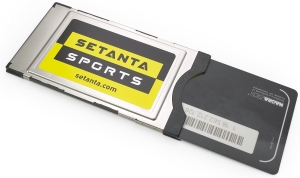
Setanta Sports CAM with subscription card
How to install a CAM
Assuming you have a CAM and a subscription card, here’s how you set it up:
- Insert the subscription card into the CAM – The card goes in chip-first, with the gold chip facing upwards
- Next, turn your TV off and insert the CAM into the TV’s CI slot. Do this carefully, without using too much force – the CAM may stick out. Normally the CAM logo will be facing forward, but not all TV manufacturers do it this way. If the CAM doesn’t slide in easily, you may have the CAM round the wrong way
- Switch on the TV. The CAM should be automatically detected.
- At this point, it’s a good idea to perform a channel rescan, to ensure that your TV has the correct Freeview channel lineup
- It’s then a case of waiting for your card to be activated. With ESPN, the advice is to tune in to Channel 5 on Freeview, and stay on that channel for about 60 minutes to allow the card to receive its activation code over the air.
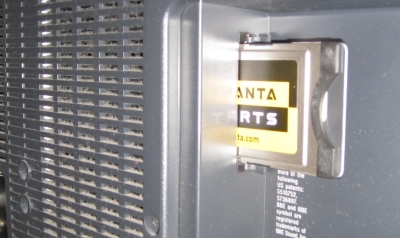
CAM being inserted into TV set’s CI Slot
Problems with your CAM?
Not entitled? Some users reported messages such as “You are not entitled to watch this programme” when tuning to a subscription channel on Freeview. Most likely cause was that the module/card has not inserted correctly, or the card had not received the over-the-air command to activate the subscription
No module? If you’re getting a “No module” message, chances are the module is either not inserted correctly, not suitable for your TV, or can’t be inserted correctly as the pins in the TV are damaged.
Some things to try:
- If you’re being told that you’re not subscribed or not entitled, it could be that your card has not been activated yet. Call your provider and ask them to send the activation code again. This is sent over-the-air and could take an hour or so to get through. You should leave the TV tuned to the channel you want activated (i.e. Channel 34 for ESPN)
- If you still haven’t got the activation signal, try switching off the TV, removing and re-inserting the card and CAM, switching the TV back on, and switching between channels (i.e. channel 1, channel 5, channel 34, etc.)
- Ensure that the CAM is inserted correctly (the right way up), and it’s pushed home firmly
- Check that the pins are not bent or damaged. If you look at the bottom of the CAM, you will see two rows of holes – these push into two rows of pins on the TV. If the pins are bent, the card won’t connect properly (you may been a torch and mirror to see into the CI slot.
- From your digital TV set, go to the on-screen menu, and look through the various options. There should be a screen somewhere that allows you to confirm that the module is inserted, and check that the smartcard is present. It should also confirm the date of your subscription. See the screenshot below for an example.
- If it looks like your module still isn’t being recognised, you need to work out if the problem is with the CI slot in the telly, the CAM, or the card. One easy way to tell is to take your card and CAM to a friend / relative’s house and try them in their TV’s CI slot (if they have one) – This will let you work out where the problem is.
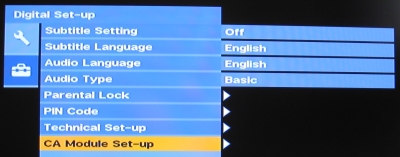
Accessing the Module set-up on a Sony Bravia TV
f you’re still having no luck, it’s possible that you are not using the right type of CAM, or that your TV or set-top box doesn’t support the type of CAM or subscription card you’re trying to use.
Got a question about CI slots or CAMs? Ask in our help forum |
Your Questions
Q. Why does the CAM work for Sky Sports 1 & 2 in my PVR, but not in my TV?
Our understanding is that there is currently a restriction imposed by Sky on the Top Up TV system. The restriction doesn’t seem to apply to ESPN, but does to Sky Sports 1 and Sky Sports 2. We understand that Sky does not approve of customers being able to use their subscription card in other equipment – probably to prevent people using their cards in other properties. Sky cards in Sky boxes have a similar restriction, where the subscription card is tied to a specific box. If you need to change your card so that it works in a different device, call Top Up TV and they may be able to arrange the switch for you.
Q. Is the CAM a generic thing, or does it only work with a specific card?
There are different types of CAM on the market – although physically they look the same, they use different types of decryption technology (such as VideoGuard, Nagravision and Viaccess). If you’re looking to buy one, make sure it’s compatible with your TV system and subscription card
Q. I used to get Setanta Sports. Can I now get ESPN?
After Setanta’s collapse in June 2009, Disney-owned ESPN took over some of the rights to key sporting events, such as Barclays Premier League and Clydesdale Bank Premier League football. ESPN’s UK channel started in August 2009 and is available to users with a suitable CAM and CI slot.
If you have previously watched Setanta Sports with a CAM, you should be able to get ESPN. Your existing Top Up TV or Setanta Sports viewing card can still be used (you will need to call 08444 152020 to get it re-activated though. You can try the alternative number 01592 587200 which is slightly cheaper).
Other links:
- ESPN in the UK – More detail on what Setanta offered before its demise in June 2009
- Setanta Help – Advice to former Setanta subscribers
- Topping Up Freeview – Help with getting more channels
- Freeview Help – Need some advice on Freeview?

Hi
I have just bought an LG tv with pcmcia slot
I am trying to view programs from the astra 2 satellite
The tv finds over 100 stations, including sky news which is what I am after and which is freeview.
When I try to watch sky news on the tv I get the message ‘no ci module’
Can you advise what cam and card combination I will need to buy to view sky news from astra 2
Thank you
Chris
Hi, I am loking for the same info for a Sony Bravia TV, but to watch Setanta Sports on Satellite via the CAM
THANKS
What does the cam and the ci do for the tv??
Hi,I’m Burundian(BURUNDI) in Central Africa have just bought TV-TECHNIKA 2nd Hand from UK and when i do press automatic research i find over 60 chanel. When I try to watch one of them on the tv I get the message <>. Where can-i buy that CAM modul and how much.
Please advice.
Thank you and kind regards
am a ghanaian and i am using akai digital tv, where will i get the cam and which card should i used
am a ghanaian and i am usinng lg digital satellite tv,
when i do press automatic research i find over 60 chanel. When I try to watch one of them the only thing I see is no ci module . please where will I get the cam and which card should i
used
Where can i get cam to buy
Does CAM works everywhere or specific places.
If it works everywhere, am in Ghana, where can i buy CAM and Card?
Thanks
I have an 7hyr old digital TV which does no have a cam. Is it possible to get a cam which will enable me to use my tv subscritpion card with this old TV?
Am also in ghana wre can i get some to bye? Pls!
Pls i want some to bye in Ghana
It is amazing how unhelpful freeview are with their robot answering machine. Noone seems to know including panasonic what the ourpise of the card cam slot is on their freeview tv. Bad customer service from both.
Does CI CAM work in Ghana and where can get one that is compatible with LG. Thanks
Is it possible to get CAM transmission in Nigeria, and where to get CAM to buy for my CI slot in Nigeria.
hi, i am in nairobi kenya and i just bought a vitron digital tv but i cant access some channels, it keeps saying” NO CAM MODULE” please help if you can
My digital TV doesn’t have where to insert the CAM what do I do
Kisumu,,,,its telling me no CAM MODULE
What+answers+or
I’m+in+south+Africa+were+.Can+I+get+Cum+module+in+south+Africa
lol 2018 and still no answers
It doesn’t look like you’re getting one i’m afraid….
Where can I get a CI card from
VITRON TV I CANNOT SEE WHERE TO INSERT CAM
VITRON TV MOST CHANNELS REQUIRES CAM MODULE
once you buy a card do you still have to sign up to a subscription as some cards can range up to €100 ,so if a sub on top of card price it seems very expensive. plus whats the best card to go for & how so you know what channels come with each CI card
Where+can+i+get+the+CAM+++CI+to+buy
For those looking for CAM’s and cards, try https://www.satshop.co.uk/viewing-cards/c/27?dynNav=Type::Cams;