
Humax FoxSat – Freesat HD Receiver Explored
This page contains information about the Humax FoxSat HD set-top box – this box was released in May 2008 to receive the free-to-view satellite TV service, Freesat.
On the day of Freesat’s launch, the Humax Foxsat receiver is pretty much the only set-top box available – and it’s hard-to-find!
We managed to get our hands on one on the first day of launch – and our podcast boys are evaluating the Humax and Freesat. Take a listen to their early findings – Freesat audio update.
Humax Foxsat HD AvailabilityHumax Freesat HD PVR recorder now available. More |
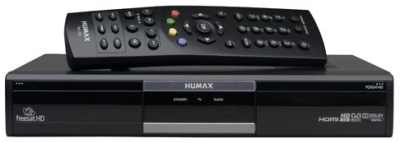
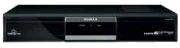
The Humax Foxsat-HD
Humax Foxsat-HD Review
After lots of phone calls to confused retailers, and lots of hassle, the Radio and Telly team were able to get hold of the Foxsat on the day of launch, 6th May 2008.
Initial impressions are that this is a very capable receiver. It’s well designed, comes from a respected name in the digital TV receiver market, and delivers a great picture.
At launch, the box is available for £149.99 from Currys and Argos, although stocks in the UK were scarce.
We connected our shiny new Humax to our existing Sky Digital dish, switched on, and it worked. We were prompted to perform an over-the-air software update straight off, which took only a couple of minutes and took us from v1.00.00 to 1.00.03.
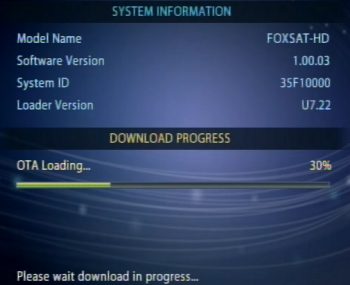
Then we had to set up our preferred language, and enter our postcode. The postcode is used, we assume, to confirm we’re in the UK, and to decide which regional TV service we get. After that, time for a channel scan:
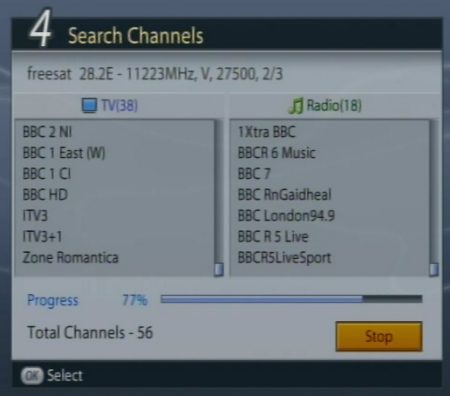
Scanning for channels
The box correctly found all of the channels (Freesat channel list), and we were off and running
Freesat EPG
One of the most important aspects of any receiver these days, is the EPG, the Electronic Programme Guide. The Freesat one’s pretty good – 7 days of programming – nice and easy to navigate. You can use the four coloured keys on the remote to switch between a table or list view. There’s also:
- Searching: From the blue “Find” tab, you can search the 7 days of programming listings for keywords, genre and time-of-day
- Schedule: For making a “reservation” so that you can get the box to switch to another channel (for a connected DVD recorder)
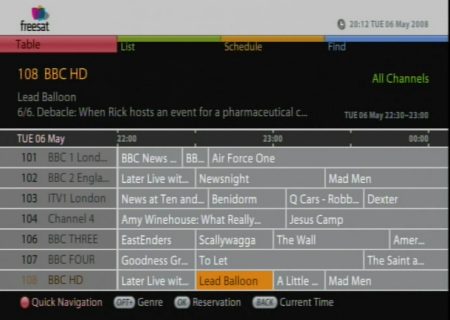
Freesat EPG on a Humax FoxSat
Using the service is pretty straightforward, with no surprises. Nice touch is the rather detailed ‘status bar’ that you can pop up at the bottom of the screen to see info on what you’re watching:
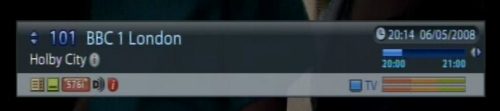
You can choose channels from a channel browser, with tabs for all channels, favourites, genres or High Definition. See our Channel list
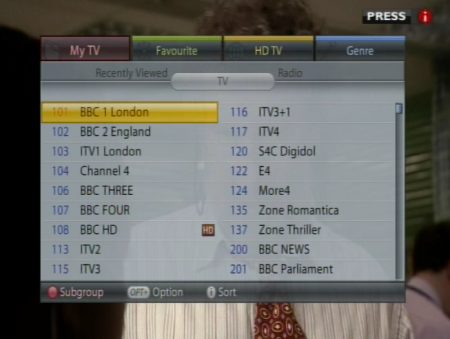
Onscreen channel selector
The hardware
 The Humax FoxSat HD is a well-made bit of kit. It has two compartments at the front – one for some pretty small buttons (power, nav, menu, guide, TV/radio), and a rather redundant panel on the right – pop it open and it’s blank – but just the right shape to house a subscription-card slot. As Freesat is Subscription-free… no card needed.
Later on this page, we look at the connectors on the back of the unit – but special mention here for the Ethernet port (possibly for surfing, or on-demand content in the future?).
The remote control’s nothing too exciting – fairly straightforward, but not overly exciting or sleek – well laid out though, with few unneeded buttons
There’s also good support for software updates: Over-the-air software updates are supported and apparently, the USB port can be used to update the box software as well.
Getting other channels
Freesat gets its channels from the same satellite as Sky Digital, and there are several other satellite TV and radio channels available – these are called Free-to-Air channels, and are not part of the Freesat offering.
The good news is that the Humax FoxSat is capable of getting them – you have to put the box into “Non-Freesat” mode. To scan for channels, go to the menu and select Setup > Manual Tune. When we checked (May 2008), we could see 476 TV and radio channels in non-Freesat mode.
See our Freesat FAQ for more on getting non-Freesat channels, and to see a sample of some of the extra channels.
Oh – to switch back to Freesat mode after playing with the other channels, go to: Menu > STB Mode > Freesat.
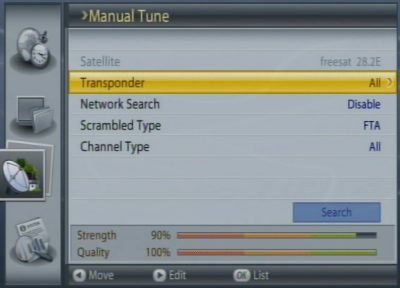
Scanning for other channels
Humax FoxSat-HD Summary
Yes – we like. Nice styling, great picture quality (and subscription-free HD’s lovely!). Decent connectivity, easy to use, slightly bulky, but usable remote, and no obvious flaws (after two day of testing, at least!).
Got a question o0n the Foxsat-HD? Ask in our Humax Box Forum
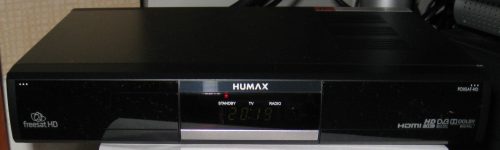
The Humax Foxsat-HD
Humax FoxSat HD Availability
Humax Foxsat HD UK availability:
Humax Freesat HD PVR recorder now available. More |
 £149 from
Humax Foxsat-HD Menus
We know there’s a bunch of you that like to know what’s hidden behind the Foxsat menus – here’s an overview:
- Settings: TV Setup (SCART modes, audio, Dolby Digital, Lipsync, Picture format), Language, Time, Parental control, Other (info display time, OSD transparency, power saving, auto standby), STB Mode (Freesat or non-Freesat)
- Edit channels: Edit channel list, Edit Favourite list
- Setup: Freesat Tune, Manual Tune, Software Update, Factory Reset
- System: Diagnostics, Network (IP setup)
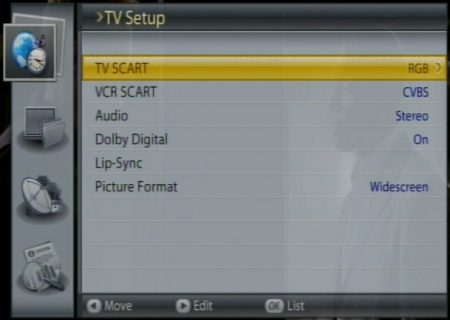
Humax Foxsat-HD Setup screen
Humax FoxSat HD Connectors
Here’s a quick look at what’s on the back of the Foxsat HD box:
- LNB In (Satellite co-ax input)
- 2 x SCART sockets
- HDMI Output
- Ethernet RJ45 network in
- USB port
- Component out phono outs ( Y, Pb, Pr)
- Video out phono
- Stereo Output L/R phonos
- SP/DIF socket

Back of the Humax Foxsat HD
Humax Foxsat HD Specifications
A collection of other spec snippets on this Humax:
- Dimensions: 280 x 200 x 45mm
- Frequency range: 950MHz-2150MHz
- Video resolutions: 1080i, 720p, 576p, 576i
- Supplied with: SCART lead, HDMI lead (for high-def), RCA leads, remote, Duracell clone batteries, user guide.
Humax FoxSat HD FAQ
Can I access channels other than the Freesat channels?
- Yes – you can manually add channels via Menu > Setup > Manual Tune. We cover this in our review. Humax Foxsat Channels
Where can I get a user manual for the Humax Foxsat?
- Available for download as a PDF from www.humaxdigital.com/freesat/support_manual.asp
Does the Humax Foxsat support subtitles?
- Visually impaired users note that the Foxsat does support subtitles and Audio Description.
Secret menu?
- Advanced users may want to follow the coloured steps, with care. Red, Green, Yellow, Blue, Green, Yellow, Blue
- Asked by site visitor Gerwyn Gibbs, who adds: “My plasma is 1080i at 50/60 enabled for component.” According to the Argos listing, the Foxsat supports “YPrPb/RGB component analogue HD output.”. Seems to be confirmed by this thread at Digital Spy
RF Output?
- The Humax Foxsat does not have an aerial (co-ax) RF output, so as standard can’t be connected to a TV set that doesn’t have SCART, HDMI or video phono inputs – it also can’t be used to distribute its output over standard co-ax aerial cable to other rooms in the home. If you need an RF output, you’ll need an RF modulator, which converts from SCART to RF.
USB Port?
We’ve been asked if it’s possible to plug an external hard drive into the USB and play movies & music through this box, effectively using it as a media player. From what we understand, this isn’t possible at this time. The USB port is currently for software upgrades.
Got a question on Freesat or the Humax FoxSat? Try our Freesat FAQ, or ask in our Humax Forum |
Useful Links
- More on Freesat? See our Freesat page
- Answers to common questions in our Freesat FAQ
- Got a question about Humax set-top boxes? Ask in our Humax forum
- Freesat channel listings: Freesat channels
- Information on free satellite – See our Free Satellite page
- If your question isn’t answered, please leave a message in our Freesat forum

Is it possible to get french or spanish speaking programs?
iam still using the humax foxsat hd box weve had for over 5 years now but it wont seem to update as its still on january 2010 on update list is there a way to update by usb still for this box ?
Is it possible to delete dead TP’s in non-freesat mode
if so how do you do it?, also what is the latest software
and how do I get it and download it? I’m new to this box
and need advice. please can you help?
hi
Where do I download the software maker
humax ir 4100hd and humax ir 4000
thanks
Foxsat – HD is locked on Standby
do i get sky sports ?
do+i+get+sky+sports+?
I+need+to+know+how+to+get+getytube