
DAB Radio – Pure One DAB Radio Reviewed
Our hands-on review of the very capable portable digital radio from Pure.
What is the Pure One?
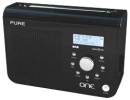 The Pure One is a DAB digital radio tuner with FM. It was originally released in May 2006, and was updated a couple of years later to become known as the “Pure One Classic”.
There are two other members of the “one” family – a cut-down “Pure One Mini” and the stereo version, the Pure One Elite. On this page, we’re looking at the Classic.
Pure is one of the respected names in DAB radio production, and we’re happy to recommend this radio for reception of the digital radio channels available in the UK.
The Pure One Classic can run on mains, batteries (up to 80 hours DAB playback), or using an optional charger pack. With the updated “Classic”, support has been added fro Pure’s ReVu service (which lets you pause and rewind digital radio for up to 15 minutes).
The Pure One supports Intellitext, for on-demand access to broadcast scrolling text information from radio stations, as well as textSCAN for better control of radio text.
The Pure One supports 30 station presets (for either DAB or FM stations), has a clock and a sleep timer. It’s also capable of supporting the proposed DAB+ standard (via a software upgrade).
Pure One Classic Availability:
|
Pure One Review
When digital radio receivers first appeared, a good percentage of them were ugly, over-priced brutes. The Pure One, first released in May 2006, has three strong selling points: they sound great, cost around £50, and looks a lot better than many of the wooden DAB sets that’ve been released over the years.
Using the Pure is straightforward. To get the one up-and-running, it’s a case of powering up the radio (mains or battery), extending the eight-section aerial, then switching on. The display shows “Pure One”, and the radio starts scanning for channels (a progress bar shows progress of scanning). For us, this took under a minute. The One is then loaded with all available DAB stations, and listening can begin.
We’re pretty impressed with this set – for a 3inch speaker, the sound is pretty good – warm and clear. The Pure One Classic only has a mono speaker, which for use in a kitchen or bedroom shouldn’t be a problem. There’s a stereo version available, the “Pure One Elite”, should you require stereo.
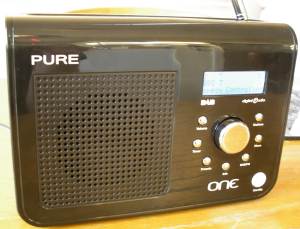
The scrolling display on the Pure One is blue backlit, supports two rows of 16 characters, and is very readable. It’s a good size, doesn’t look bulky, like many radios of this size and spec, and it sounds good. The provision of a large telescopic aerial is also a handy thing if you’re in a poor signal area.
The original Pure One was updated in late 2008 with some nice extras. First off, the renamed “Pure One Classic” saw the addition of Pure’s ReVu – which allows you to pause and rewind 15 minutes of DAB radio. The number of presets was increased for 20 to 30, battery life was extended, and the radio now includes the hardware required for the DAB+ service (which may be introduced into the UK in the coming years). The Classic now includes an iPod input as well.
Below is a quick summary of the menu options, useful for those looking to find out what the buttons and options supported are:
- Menu options: Intellitext, Backlight settings, Station order, Software upgrade
- Info display options: set to scroll text transmitted by the station (show/track information), Time and Date, Programme type, signal strength, signal quality, bit rate, multiplex name and multiplex info (ID and frequency)
DAB stations transmit scrolling information (programme details, track listings, sports info, etc). When the radio is in standby, it the Intellitext feature can still gather this radio text information on the last station you were listening to. By using the Intellitext service, you can scroll through older radio text information.
Additionally, the Pure One has textSCAN, which allows you to pause radio text, then move backwards or forwards through the ‘paused’ text (handy for writing down a phone number or web address).
Timer:
We’ve by asked by one visitor what the timer facilities on the Pure One are. The Pure One has a Kitchen Timer, which allows setting of a countdown timer (settable countdown time from 23 hrs 59mins), at the end of which an alarm will sound. It also has a Sleep timer, meaning that the radio can be set to switch off after 15, 30, 45 60 or 90 minutes.
The Pure One has no daily ‘wake-up’ alarm.
Summary:
As a DAB radio, this is a good solid purchase – the unit has a good aerial capable of pulling in signals, sounds and looks good, and has some nice features. Recommended!
Pure One Specification:
- Power: 240 Mains (DVC transformer supplied – VDC at 800mA), 6 ‘C’ size batteries, or the Pure ChargePAK. Life on alkaline batteries is approx 80 hours, or 40 hours on the ChargePak
- Size: 210 x 145 x 72 mm
- Output: 3.5mm stereo headphone socket
- Speaker: 3 inch mono
- DAB: Band III (174-240MHz)
- Presets: The Pure One has 30 radio station presets, which can be used for storing either DAB or FM stations as required.
Our take? The Pure One Classic is a top low price DAB/FM radio that we don’t hesitate to recommend.
Got a question? See our FAQ below, or ask in our DAB radio forum…
Pure One Frequently Asked Questions
| Software updates | The Pure One has a mini-USB port to support software updates that are released via the Pure website. Here’s how to perform a software upgrade on your One.
The whole process only takes a couple of minutes |
| Aerial | The Pure One has a telescopic 8-segment aerial, and doesn’t support connection of an external aerial |
| Stereo headphones | “Does the Pure ONE provide stereo output through the headphone socket ?” (Karl Williams).Yes, the Pure One does have a stereo headphone output, via standard 3.5mm socket |
| EPG? | The Pure One does not have an EPG (Electronic Programme Guide). |
| Supplied with…? | The Pure One is supplied with a mains transformer and a 20 page manual (hidden below a panel in the packaging ) |
| Batteries | The Pure One takes six ‘C’ batteries, and using alkaline batteries, you can expect around 35 hours of listening. You can also use rechargeable batteries (NiMh or NiCd) in the radio instead of alkaline batteries, but there is a potentially better solution – the Pure ChargePak: Pure ChargePak Pure ChargePakThe ChargePak C6X (suitable for EVOKE-2 XT Evoke-3 and Pure ONE), slots into the battery compartment and gives up to 20 hours on a single charge. Having the PureOne plugged into the mains will allow the ChargePak to be recharged. The Pure ChargePak C6X is available directly from Pure. Pure ChargePaks are available from online retailers such as Amazon. We’ve had reports that the ChargePak on Amazon is the C6, not the C6X, but one of the reviews states it works with his One. We’re confused, so you may want to check it’s a C6X before buying |
| Mains transformer | 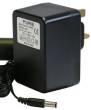 The mains transformer supplied with the original Pure One in the UK is rated at 9VDC (230VAC) with an output power of 0.8A. It measures 55 x 80 x 80 mm.Spare or replacement mains transformers can be purchased directly from Pure. Last time we checked, these were priced £10. The mains transformer supplied with the original Pure One in the UK is rated at 9VDC (230VAC) with an output power of 0.8A. It measures 55 x 80 x 80 mm.Spare or replacement mains transformers can be purchased directly from Pure. Last time we checked, these were priced £10. |
| Backlight | A question from site visitor Mike Thurston: “I have the Pure One DAB. The backlight goes off after 5 seconds. Why?”
|
| DAB and FM | Two questions from site visitor Josephine: “Are the presets for the Pure One, 20 in total, i.e. a combination of DAB and FM, or 20 DAB plus 20 FM? Also, does the DAB/FM button toggle from the station being listened to, to its counterpart in the alternative format (presuming the said station has been input as a preset on both DAB and FM, of course)?”
|
| Home hi-fi? | The Pure One doesn’t have a Line Level connector for connection to a hi-fi. If you’re looking to add DAB radio to your hi-fi set-up, take a look at DAB Adapters.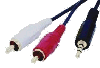 One other option is to use the Pure One Headphone socket to connect to a hi-fi – You can connect from the 3.5mm headphone socket to two male phono plugs. This will let you to connect to your stereo’s line level AUX input, although note that you will need to turn the headphone volume down to a low setting to avoid overloading the line-in. You can find a suitable lead at AdvancedMP3players or Maplin (Part: L32BA) One other option is to use the Pure One Headphone socket to connect to a hi-fi – You can connect from the 3.5mm headphone socket to two male phono plugs. This will let you to connect to your stereo’s line level AUX input, although note that you will need to turn the headphone volume down to a low setting to avoid overloading the line-in. You can find a suitable lead at AdvancedMP3players or Maplin (Part: L32BA) |
| USB Port | The Pure One has a mini-USB port to support software updates. The USB port cannot be used for MP3 player connectivity. A standard USB 2.0 to USB-mini lead (not supplied) can be used to connect to a PC for software upgrades – a suitable USB connectivity lead is available from Maplin. |
| Reset? | To reset the Pure One, press and hold the Menu button for three seconds – you’ll be prompted to press the Select button to confirm the reset |
Handy links
- DAB radio models – View comments on the range of DAB receivers
- DAB forum – Get talking and ask for advice in our Digital Radio forum

Mine has a software version of 1.3. Is there any benefit to upgrading as I can’t find out what this offers?