
Looking to record satellite TV programmes? Here’s some general information on how to record from Sky and Freesat.
If you’ve got satellite TV, chances are you want to record TV shows or movies at some point – but how do you do it?
On this page, we look at the following options:
- Get a PVR – These are boxes with a built-in hard-disc recorder.
- Record from Sky or Freesat onto DVD or videotape
- Record onto your computer
Hard-Disc Recorders / PVRs
These offer the most flexible way to record satellite TV. The boxes contain a built-in hard disc and can record tens of hours of high quality TV – no DVDs or videotape required.
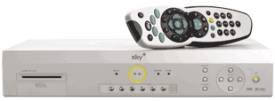
Sky’s Sky+ PVR
PVRs (Personal Video Recorders) come with an on-screen programme guide to make recording simple, and normally offer Series Link to make sure you don’t miss a show. With a PVR, you can archive recorded programmes to DVD or videotape if required.
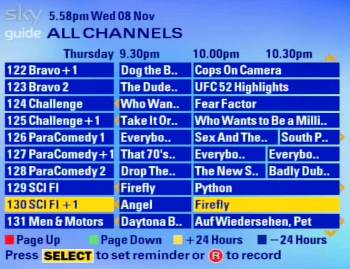
Sky’s Programme Guide
| Sky Digital? |
Note: While you continue to subscribe to Sky Digital for your TV service, Sky+ is free. If you stop subscribing but want to carry on using Sky+, Sky will charge you £10 a month |
| Freesat (from BBC / ITV)? |  There are several Freesat PVRs out there. We recommend the Humax Foxsat HDR which has two tuners, so you can record one channel while watching another. There are several Freesat PVRs out there. We recommend the Humax Foxsat HDR which has two tuners, so you can record one channel while watching another. |
| Free-to-air? |
You can get 200 free-to-view channels without a subscription with a suitable decoder pointed at the Sky satellites (Free satellite TV) There are several PVRs that work with the free-to-air satellite channels – Take a look at Maplin’s selection of satellite PVRs. Twin-tuner models and HD models are available.
|
 Consider getting yourself Sky+ box. More details at
 Recording onto DVD (or VHS)
If you have a satellite TV receiver, you should be able to connect this to a DVD recorder (or a video recorder) and record satellite shows. You can also dub recording made onto a Sky+ box onto video or DVD.
To record from Sky or Freesat onto DVD, you’ll need a DVD recorder that can record from a SCART socket using "Line In". Most DVD recorders support this.
Typically, you’re only able to record the channel that’s tuned in – so you can’t watch one channel whilst watching a different channel.
Here’s how to set it up:
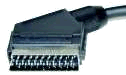 The most common way to record from a satellite receiver to a recorder is to connect from a SCART socket on the satellite box to a SCART socket on the recorder using a SCART lead.
Once you’ve made the connection, you’ll need to set the recorder so that it can ‘see’ and record the output of the set-top box. Here’s how:
- Connect a SCART lead from the satellite receiver set-top box to a SCART socket on your recorder.
- Next, connect the recorder to your TV (preferably using a SCART lead, but if not, using a TV aerial lead)
- Now, switch your TV to the recorder’s playback channel (as if you were watching a DVD or a video)
 Finally, set your recorder so that it’s using the input from the SCART socket using the recorder’s remote control – this may be labeled "Line In/AUX/AV", or have an icon like the one to the right. Refer to your recorder’s manual if you’re not sure how to record an external input.
Once you’ve set the recorder to the SCART feed, you should see the output of your satellite box on your TV screen via your recorder.
That should be it – record a test sample onto your recorder and play it back.
Got a TV with Freesat built in? Help on recording from an IDTV
Recording Satellite TV on your PC
You can use your PC’s hard drive to record from your satellite receiver, or even get a dedicated satellite receiver for your PC.
See our Satellite TV on a PC page for more.
Your questions:
Q. I have an HD satellite receiver. Can I record HD onto DVD?
A. To record in HD onto DVD, you need a Blu-Ray recorder and Blu-Ray blank discs – however, HD content is protected by HDCP copy protection which prevents most types of HD content being transferred to an HD disc. You should be able to record at standard definition though.
Need more help? Ask in our Satellite forum
|
Other pages on this site:
- Satellite FAQ – Common questions on satellite reception answered
- Copy recordings from a Sky+ box – How to copy recordings to DVD or a PC
- Sky Information – General information on Sky Digital
- Freesat – Information on the Free-to-view satellite service
- UK Satellite TV forum – Talk about Sky, Freesat and other UK satellite TV services
- Sky Help – Advice and questions on Sky Digital
- FrequencyCast TV & Tech – Our regular podcasts, where we discuss digital TV and satellite TV services

I had a. Bush TV and DVD player combined with a video recorder too. When I tried looking for the DVD recorder to try and record shows from the sky TV HD box. The new models are combined with freeview or freesat which I don’t use. The older models only work with certain recordable DVD discs or don’t work with the TV when trying to set the TV thing up. Any way around this issue would be ideal. I fed up with not having a DVD recorder that’s not easy to set up. With the least possible hassle. The normal DVD player or PC or android tablet or video recorder don’t cause this much hassle.
What do I do to record sky programes ,as when I push the record button and leave the tv on it records but when I push the record button and turn the tv off it does not record what do I have to do?
HOW DO I RECORD A PROGRAM WITH MY SKY HANDSET
I got a Panasonic flat screen TV and sky+HD box and a video recorder I am on free sat how do I record TV programs. Thank you
Need+a+3/4+channel+freeview+box+any+suggestions+please
Can i record programs from my satalite dish to my Manhattan Freesat recorder my dish is converted to pick up freeview channels plus all the normal terrestrial channels
Many Thanks
Anthony.