
TV Remote Controls – Help and Advice
Got a problem with your TV remote control? Looking for a replacement? Or thinking about an all-in-one controller? Perhaps we can help.
Lost TV Remote Control?
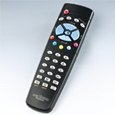 If you’ve lost a remote control for your TV, DVD recorder, Freeview, Cable TV or satellite TV set top box, take a look at the range of replacement remote controls available from Partmaster.
If they don’t stock a replacement, consider a universal controller, that can handle multiple remote control devices.
Our favourite is the Kameleon range – a stylish multi-device controller that has been pre-programmed with information on a huge number of remote controls.
If you don’t fancy a Kameleon, there’s a wide range of generic remote control replacements available from Argos or Maplin Electronics.
Failing that, contact the manufacturer of the equipment, to see if they can sell you a replacement. If you’re really stuck – try asking for advice in our forum.
Broken TV Remote Control?
Is your set-top box not responding to commands from your remote control? Here’s some things to try:
- Change the batteries in the remote control for a new set of alkaline batteries
- Check that the batteries are in correctly – the right way round
- Check that there is nothing blocking the infrared port on the remote control
- Check that there is nothing blocking the infrared port on the TV
- Check that you are pointing the control at the TV (no obstacles in the way)
- Switch off whatever you’re trying to control at the mains for 1 minute, then try again – set-top boxes sometimes lock up requiring a reboot.
Still no joy? The remote control could be damaged – see the section about replacement remote controls. If you need more help, please ask in our forum
Remote Control Extender
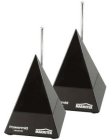 Need to control your TV from another room?
A Remote Control Extender lets you control your TV and digital satellite system from other rooms in your house wirelessly. They are normally composed of two units – an infrared signal transmitter and an infrared signal receiver. Infrared signal receiver senses infrared signals from any AV equipment remote like VCR, Digital Sat/Satellite receiver and cable box Hi-Fi remotes.
Have a look on Amazon.co.uk
If you have Sky and a wired aerial connection to your second TV, you can make use of a solution such as Sky TV Link.
Also note that some Wireless AV senders support Infrared remote controlling as well as wireless video.
Control TV set from a Sky / BT Vision / Top Up TV remote
It’s possible to use a Sky Digital, BT Vision and Top Up TV remote control to control your TV set’s volume and to change channels. Typically you need to programme your remote control with a 3 or 4 digit infrared number that corresponds with the TV manufacturer’s control codes.
- Programming a Sky remote control
- Programming a BT Vision remote control
- Programming a Top Up TV Anytime remote control
Controlling your TV remotely
Want to be able to control your TV over the Internet or from your mobile? See the FrequencyCast TV Control page.
Large button remote control
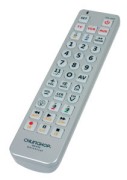 Looking to help a friend, relative or neighbour who needs a remote control without small fiddly buttons? There are some universal remotes that can help. Here’s two worthy of note:
- OK – It’s huge, but it does the job – the Big Button Remote from Maplin – This is a 6-in-1 universal remote control for controlling TV, VCR, satellite, DVD, cable and audio
- For a remote control without too many unneeded buttons that’s easy to read, there’s the Medium Size 3-in-1 Remote from Maplin (pictured here) which has large backlit buttons and can control many makes of TV, DVD, video recorders, Freeview boxes and hi-fi systems.
Kameleon Remote Control
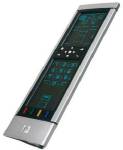 Our top choice for a universal remote control is the One for All Kameleon the ultimate remote control. These can control multiple devices up to five devices. The Kameleon has a weird glowing blue electro-luminous controller. It’s easy, and fun, to use, the motion-activated touchscreen has subtle animation, brightness control, a huge range of macros, and can be updated with new codes as new appliances come onto the market, via the Internet or over the phone.
Depending on the device you’ve got selected, only the key icons appear (i.e. No ‘Rewind’ in TV mode, and no ‘Teletext’ in DVD mode, etc).
Kameleon Questions:
- Is Kameleon compatible with your setup? Most things that you’ll want to control are from a major manufacturer. The manual contains a long list of the four-digit codes needed to set up most appliances. For those not covered, there’s a Search mode. The Kameleon also has a ‘learn’ mode, so with your existing remote control, you can assign keys to transmit signals not supported as standard.
- Other features: Macros (a series of keystrokes), screen brightness, sleep-timer.
- Manufacturers support page: Click here
- Internet download (upgrade your codes): Click here
- Find setup codes: Click here

Can I use a Wireless AV Sender and a Marmitek remote extender at the saem time on the same Sky (HD)box -I am not bothered about the HD bit
If so what do they both plug into – the AV sender into SCART connectors but the Remote Extender?
I lost my remote control for my sony cmt cp500
How can I get one??
Thanks
i have a terrestrial receiver a samsung model SIR-U200iM now i have tried to connect it to my aleady existing satellite dish but it is saying no signal and i have also used an antenna stil saying the same thing i dont what to do with it i think i have to throw it maybe it is very old and it cant show i have tried all posible means what can i do now
Hi, I have just installed a BT tv youview box, all works fine, however, the BT tv controller is changing the volume on my sharp home cinema system .
Is there perhaps something I have not done correct, or is there any solution to stop this happening ?
Many thanks
Phil.
Helpful post, thank you. I ended up finding a generic remote control from http://www.remotes4u.co.uk. Didn’t need any programming, but worked fine and saved me a fair few quid!