
SCART Switchers, Adapters and Splitters Explained
Not enough SCART sockets? A SCART switcher might be the answer. Here are the options
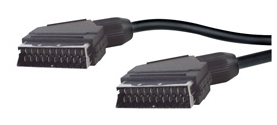
Too many SCART plugs?
What is a SCART Switch?
If you own a DVD recorder, Video recorder, Satellite TV box, PVR, Freeview box or games console, chances are, your TV set doesn’t have enough spare inputs to handle all of your kit. For that reason, you may need a box that allows you to switch between inputs.
Typically, a SCART switch box allows you to plug in multiple SCART sockets, and connect them to a single SCART socket on a TV.
There are three main types of SCART Switch Boxes available:
- Manual: Plug in your SCART leads, then press a button to decide which source you watch
- Automatic: When you switch on a piece of equipment, such as a DVD player, the player sends a signal down the SCART lead to the switch box, which will automatically connect the DVD player to the TV
- Remote control: Some switch boxes come with a remote control, so you can select what you watch
Manual SCART Switches
Manual switches don’t require any extra power supply and will allow you to connect either 2, 3 or 4 SCART sources to one TV. You press a button to decide which SCART is routed to your TV.
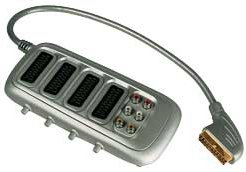
Bush 4 way switchable SCART from Argos
You can get a manual SCART switch for around £10. Get a 2, 3 or 5 source switch from Maplin. Alternatively, look at the Bush 3 or 4 switch with gold-plated connectors from Argos (search SCART Switch)
Automatic SCART Switches
SCART leads have 21 pins, and are quite clever. Pin number 8 is called the ‘switching pin’, and when you turn on a piece of equipment, a change is made to the pin 8 signal. The upshot of this, is that some SCART switches can detect when a piece of equipment is turned on, and switch to that piece of equipment.
For example – let’s say you are watching a DVD via SCART. If you now turn on a satellite receiver box, the satellite box will send a signal on pin 8, and the SCART switch box will switch from DVD to satellite automatically.
If you have an automatic SCART switch, you’ll find that if you are watching a DVD via SCART, you can switch to satellite by turning on the satellite box using the satellite remote. Much easier than getting up to press a button.
Automatic SCART switchers are available from Maplin.co.uk and at Tvcables.co.uk.
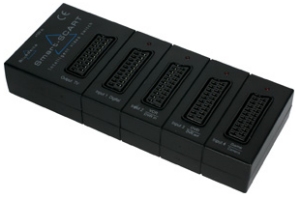
We recommend: The Bluedelta Smart-SCART. This allows you to connect four SCART leads to one TV… Unlike many of the SCART switchers on the market, this one is fully automatic – it detects which piece of equipment was just switched on, and makes the SCART socket live – a little red light indicates which SCART is active.
The Smart-SCART works on a priority basis, so SCART 2 overrides SCART 1, and SCART 3 overrides SCART 2. SCART 4 can be used for equipment
There’s also a record loop – so you can get your video or DVD recorder to record from one source, whilst you watch another source. If you happen to have a Sky box, or a suitable Freeview box, you may be happy to know that this box works well with the PhantomPLUS (well, it’s made by the same people).
The Smart-SCARTThe Smart-SCART comes with a mains adapter, and is available from Maplin (Cat number L08BJ)
Remote Control SCART Switches
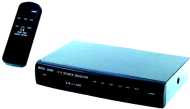 Typically, these are boxes that sit with your other AV equipment and have a small remote control that allows you to select what source gets switched to your TV. These are generally the more expensive option, and mean you have yet another remote control to clutter up your lounge.
Remote control SCART switchers are available from Maplin.co.uk.
Pictured here is a 6-Channel AV Switcher from Maplin. This will allow 6 sources to be connected to one TV, and comes with a remote control to allow remote switching. You can also switch using buttons on the front panel. The unit also has a built-in amplifier to compensate for insertion loss. Note that this unit only has two SCART sockets. The other four sources are connected using S-Video and video phono sockets. Here is a picture of the rear of the unit
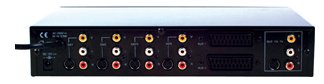
The 6-Channel remote control switcher box is available from Maplin.co.uk.

I have bought a dvd player & scart extension lead as my tv only has one scart socket which is currently hooked up to a virgin box. Do I plug the scart extension in to the back of the tv & then run virgin & dvd out from the extension lead. Or something else.
To connect two devices to a TV that only has one SCART socket, you’ll need either a switch box or a splitter, as described above. The box or splitter would be plugged into the back of the TV, giving you two sockets instead of one – The Virgin box goes into one, and the DVD into the other. Hope that helps.
Hi, my tv only has one scart outlet which my record freeview box is using. Ive just got a home cinema system (sony dav dz100) and want to play sound via freeview. The system only has one scart. What do i need to play the surround sound through normal tv? Thanks
Sorry i meant to play home cinema surround sound while im watching freeview. Thanks
Your page title is misleading you only explain switchers and don’t even mention adapters or splitters let alone explain them. I was hoping to read about splitters (1 output to 2 inputs).
I have in the past bought and used two different Scart splitters. Each was used on completely different equipment. In each case one side of the splitter worked well but the second dropped the signal to an unusuable level. (It was the sound side which suffered – very little volume.
I now have a third set of completely different equipment and find that a Scart Splitter would help to avoid unplugging and replugging. What should I be looking for to ensure quality is not compromised? I like your description of the automatic splitter. This may work but would quality of signal suffer?.
Thanks Bernard Calver
hi i have had a problem with 3 automatic scart splitters. If i insert more than one scart lead into splitter i lose
volume on all of them Is there a solution without having to return to a manuel splitter ? i would appreciate any feed back asap Kind Regards phil lawrence
do i put sky dvd and vcr into bush scrat selector when i did that s0000ky box did not work
please can u tell me how to use bush 4way scrat seletor
Hi, I have purchased a scart splitter, which should allow me to switch between my satellite box and dvd player. But when these are plugged in all I can get is sound from both inputs, bit no picture. Any suggestions greatly appreciated
Steph
I have a security AV system with the female scart output & I need to run the security system to two seperate monitors continually, So signal input with a dual adaptor with both female outputs running at the same time. I have searched the internet but have not yet found one, So is there such a splitter on the market ?.
Hi, I was hoping your expertise may help me with a problem I am having.
I am running a two gaming consoles, both via RGB scart through a manual RGB scart switcher. However I have an issue with one of the consoles.
One console works fine through the scart switcher, however if I plug my other console through the scart switcher I get very bad checker-boarding on the image. If I plug the same console directly into my TV it works perfectly.
The only thing I can think of is the console I am having an issue with uses sync over composite, while my other console that works fine though the switcher is sync over luma. Could the sync on composite be the issue, maybe interfering with the scart switcher? If so would a sync stripper on scart cable making it pure sync be the answer?
Many thanks for your help.
Please+can+you+help+me,+our+TV+is+old+and+I+am+thinking+about+getting+a+new+set+,+My+problem+is+that+the+new+TV+’s+only+have+one+scart.+-+At+present+I+can+run+my+Hi+fi+-+Video/DVD+-+and+Sky+box+through+the+TV.
Can+you+get+a+scart+to+play+everything+through+a+new+TV+set.
Look+forward+to+your+reply+-+Thank+you+for+your+help+in+this+matter