
Your Own Radio Station – How to Get Started
Looking to start your own radio station in the UK? Information advice on how to get started with an FM or Internet radio station
Your own radio station?
We’re occasionally asked what’s involved in setting up a radio station here in the UK, so we’ve created this page of information.
The page is split into two sections:
- FM / DAB / Satellite Radio stations, and
- Internet Radio / Podcasts
Setting up an FM, Satellite or DAB Station
Some information for those considering starting up an FM, DAB or satellite radio station in the UK:
- Licensing – UK commercial radio stations are regulated by OfCom. If you want to run a radio station, you need to get a broadcasting licence from OfCom. This includes FM, AM, community, restricted-service and DAB digital stations. For more on licensing, see http://www.ofcom.org.uk/radio/ifi/
- Studios – You’ll need to look at equipping a broadcast studio. This involves getting at least one or two soundproofed rooms with equipment including a mixing desk, computer playout systems, music servers, CD players, mics, headphones, recording equipment, telephone lines, etc. Then there’s news, travel and sports equipment if required, production facilities, an office computer network, and a link from the studio complex to the transmitter site or satellite uplink. In the UK, talk to Veale Associates.
- Transmission – You have to have a technical plan in place to get your signal broadcast. For FM and AM stations, you need a transmitter – Try: Arqiva (formerly NTL Broadcast / NGW). Those looking to broadcast on DAB will need to reach an agreement with a Multiplex operator covering the required area. If you want to broadcast on Sky satellite, you’ll need to negotiate for space on their satellite transponder. OfCom offers some guidance on this on their website.
- Business plan – To run a radio station, you need a sound business plan to make sure that you can pay the bills, recoup the setup costs, and generate revenue.
- Music – To broadcast music, you’ll need to reach agreement with the UK copyright bodies PRS, PPL and MCPS – see boxout
- Costs – Vary depending on the type of station and the length of the licence period. Costs include transmitter rental, music copyright licence, broadcast licence, premises, studio equipment, broadcast circuits, promotion budgets, news/travel services, production equipment and staff salaries, as well as the standard costs of running a business.
The above gives a general idea of what’s involved in setting up a UK station. There are a couple of books on the subject, which may be worth considering. The OfCom site also carries information on the licensing process and what’s involved. For non-UK stations, contact the appropriate regulator in your country for guidance.
| Music Royalties in the UK
If you’re planning to run a radio station or podcast broadcasting to the UK, and you’re planning to play music, you’ll need to talk to three bodies that look after music copyright and royalties to obtain a music licence:
Most UK music radio stations own a ‘blanket’ licence, that allows them to play whatever music they wish, in return for an annual licence fee (based on audience size and revenue). Stations are required to undertake “sample days” to help apportion the licence fees out to the artists and composers. |
Setting up an Internet Radio Station
If the idea of running your own radio station appeals, but you don’t want to go through the processes involved in setting up an FM station, consider broadcasting over the Internet. Here’s some information on how to start an Internet radio station:
There are three main categories:
- Live streaming service: This would typically involve having a studio (mixing desk, CD, mic, computer system, headphones), connected to an Internet Streaming Server. The Streaming Server converts the output of your studio into an Internet stream that’s then made available over the Internet. If this is the option for you, take a look at www.shoutcast.com for information on the software needed, and how to get your station streaming online. There’s also icecast, free streaming software for the more technically-minded. You will also need a streaming radio server – you can host this yourself, or use a third party streaming radio server.
- Part-live or Pre-recorded: Rather than running a 24 a day live service, you could run a part-live, or fully recorded radio station streamed over the Internet.Here are Radio and Telly, we run a 24 hour station using Shoutcast and a streaming server provided by Wavestreaming. The station is automated using clips from recent editions of our podcast scheduled using a podcast and streamed to listeners around the world. You can listen to us here: FrequencyCast Streaming Station
- Podcasting: Record a series of radio shows and distribute them as podcasts. Listeners around the world can download shows automatically and listen to them at a time of their choosing. Growing in popularity, and a great way to get your voice out there. Check out our podcast, FrequencyCast. For details of how to make your own podcast, see the Podcast Advice.
Internet Radio Stations – Things to consider
- Hardware: If you’re running a streaming radio station, you will need a streaming server, plus a decent Internet connection. Think about the number of simultaneous connections coming into your streaming server. Also think about a backup server and your ongoing Internet costs
- Podcast Bandwidth: You need to host your podcasts somewhere. We’re in the UK and our podcasts are hosted at Simply.com. If you’re getting lots of downloads, watch your download bandwidth, as hosting providers charge extra for lots of downloads.
- Music Royalties: Looking to run a streaming station or a podcast in the UK or for a UK audience? If your station or show uses music that you don’t own the copyright to, or that you don’t have permission from the artist to play, you’ll probably need a music licence. Go to the Online and Mobile section at PRS For Music.
For more, see our Guide to starting an Internet Radio Station
Setting up a station with Live365.com
This is probably the easiest way of setting up an Internet radio station, to get you started.
- Create a free account at www.live365.com
,
and enter a name and description for your station. - Download their Studio 365 application, which will let you upload MP3 files to Live365
- Record your show on your PC as MP3 files (Detail on how to do this our Voice Recording page)
- Upload the MP3 files
that will be used on your station, then set up your playlist by dragging your clips into an order you’re happy with - Once you’re
happy, select “Start broadcast”, and your station should be live.
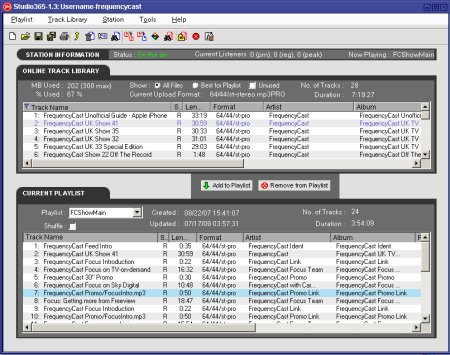
Live 365 Studio Software
Is Live 365 Legal? Broadcasting material that you don’t own the copyright
for (including over the Internet) is not legal, but Live365 do send a percentage of their fees to the music industry, and provided
you follow the rules laid out clearly on their site, you may be in the
clear. Worldwide copyright laws differ, so you should check the legality
of broadcasting over the Internet carefully. See our Music Royalties boxout
Starting your own podcastTo create your own podcast, all you need is software to create an MP3 file and some webspace to host your podcast. Some useful links:
|
Links
- Internet radio forum – Want to talk about streaming radio? Try here
- Record your voice – How to record your voice at home
- Setting Up An Online Radio Station – Details on how to get your streaming radio service live
- Community Radio Station Costs – Our guidance on planning the budget for a community station
- Adobe Audition – Information on the audio editing package
- Olympus LS-5 Recorder Review – Top quality handheld audio recorder
- Amateur Radio – Become a licensed radio ham and broadcast to others around the world
- Internet radio – Information on listening to Internet radio stations
- UK Radio FAQ – Got a question on radio? Try here

hi i am looking for engineer to set up my internet radio station please get back to me call me on 07956574656
Dear
I have a very low budget for internet radio.
I was wondering if you know any company or technician who can help me set up up one or sell me a turn key .
Regards
Hello I can set you up – text me on 07747873668
Within 1 hour you will be on Air and Live broadcasting
Hi
Whats total cost to start online radio?
Hi,
Is there any way I can connect my internet radio station to a customized transmitter which is connected to a satellite? So the listeners can buy that device and listen to my internet radio without any data usage?
No sadly not that i know of yet.
Hi im very interested In setting up my own radio station im from Northern Ireland not sure if this is the right site for me could someone contact me on the above email address and i will send my contact number to you thanks
Hi
I want to start a radio station that would help community but I don’t want to open an community radio station I want to open a commercial radio station what must I do
Licences for commercial stations are advertised by Ofcom, by area. When a licence is available, these are advertised and groups can apply by submitting an application. Details can be found on the Ofcom website.
Hi, i would like to start a station playing movie scores and musicals etc as a hobby but also for a form of supplementary income? Can money be made ? Any further advice? I think it would be mainly pre-recorded. Thanks!
We would like to establish our own radio station to broadcast our home match commentary , hiow doi we go about this?
Garry Plant
Harrogate Town AFC Ltd
I was thinking of starting my own FM station. Can anyone advise on a ball park figure this would cost to set up and then run per year? Was thinking of starting a kick starter campaign to help fund it.
I have been researching a fair bit to start a radio station the last 12 months. We started a radio station using a company called citrus3. They made it easy and included all the software and licensing required. http://www.citrus3.com is the link.
HI I HOPE THIS WILL TAKE YOU WELL AS I WANT TO START A RADIO PREACHING IN CAMPUS MINISTRIES FOR OUR YOUNG PEOPLE TO RAISE A BIBLE ACTIVITIES IN OUR COMMUNITY.
ALSO WE BUSSY WITH MORE MINISTRIES IN THIS AREA OF MAFIKENG CITY IN LICHTENBURG WE PLANT CHURCHES, CONNECT GROUPS, CAMPUS MINISTRIES IN EVERY NATION OUR TAGERT WE LOOK FOR STUDENTS ,HOME VISITATION AND HOSPITALITY,
I want to open fm radio station for de community but i dont know de procedures.pls help me
Hello,
We are looking for a 1KW or 2KW FM Radio station complete solution.
Can you please let me know if you can supply the complete system.
Thanks
Nadeem
I would like t set up an FM Urban Gospel Radio Station in London. But I have no idea how to begin each step, to achieve it. Or what is really required to make it truly happen.
Can you please advise? Any advice you may have to give, will be appreciated and welcomed.
Hi,
I wish to start a FM / AM Radio. would like to know the pre-requisites. Please email me all the details. If you could also help me with the setup cost.
Thanks,
Hello, myself an 2 other friends are planning on starting a radio station, after doing some research i understand that it is going to be quite a task, but were prepared to put in the work. We are after advice and help to point us in the right direction.
Any help is much appreciated, Thankyou.
Hi Daniel,
I have an idea. Did you get your station up and running. My number is 07845 176600
Peter Lindsay
I am Dhanush , i am studying engineering in karwar in this place people are good but they need a entertainment programs like radio where they can be happy and get better informations so please I am requesting u that please open a radio station of entertainment and good music with all content even I have wish that if u give me chance I will be the RJ
I need to start a radio station but need to know the equipments needed and how much they cost. thanks
I have noticed tune in radio excepts steams free of charge.
If I started a Internet Radio Station ‘UK GOLDEN OLDIES’ is it possible to send our internet stream direct to the ‘Tune In’ people for our proposed internet only radio station.
Also I understand we need the UK PPL licences and that we have to give total number of listeners and number of songs played an hour would TUNE In give me this information too.
Need an internet radio to educate my community in Africa and therefore i need your support.
Thanks
Setting up an Internet radio station is really easy. I have been broadcasting for almost three years now and moved into a studio beginning of April 2016. Respect covers everything mental health. If you want any advice then message me here.I also have 3 volunteers helping run 5he station.
Link is fullycharged.listen2myradio.com
Is it correct that to actually record the podcast I plug one or more microphones into an audio recorder (like this one: https://www.amazon.com/Zoom-H4N-Digital-Multitrack-Recorder/dp/B00UK7G3UO/ref=pd_rhf_eeolp_s_cp_3?ie=UTF8&dpID=41Grh7gaevL&dpSrc=sims&preST=_SL500_SR77%2C135_&psc=1&refRID=HQV81QQ36KPMVC9713HG
and then when the whole podcast is complete I take the memory card out of the sound recorder and transfer onto my computer?
How would I edit the completed audio? Is there special software?
Once I have a polished (edited) audio file where do I go next? How do I go ahead and publish the podcast on iTunes? What is the process?
You mention web-hosting where you say you’ll need to publish your Podcast somewhere on the Internet. You may also want to buy a web domain too, to give your podcast an easy-to-find web address. … Is this needed? Or can you just publish straight onto iTunes? What exactly does this do?
Media hosting, I believe is hosting or mp3 files, and lets others download them, however If its on iTunes is this needed? Or can I just keep them on my computer, because people can access on iTunes?
Okay, I think that’s all for the podcast. Now for the internet radio station.
The plan would be for a talk style station, however it can’t be manned 24hours a day so how would I get around this? .
LIVE365 looked good, as recommended on the website but it has now closed down, is there any others like it? that can instead of uploading music, upload pre-recorded talk shows.
How would live content be transmitted what is the total equipment I would need?
To fill gaps would it be possible to loop a pre-recorded audio file to repeat for a long period for when there is no other content to fill? Could I only be live at specific days and times not 24/7?
It would be Part-live or Pre-recorded like yours, How would the station work? Where would it be hosted? Are there any licenses needed?
It would be Part-live or Pre-recorded like yours, How would the station work? Where would it be hosted? Are there any licenses needed?
unrelated..
Also do you know any camcorders that would have an insert for a broadcast mic like this one?
http://www.ebay.co.uk/itm/131557601441?_trksid=p2055119.m1438.l2649&ssPageName=STRK%3AMEBIDX%3AIT
Or is compatible for this type of cable ?
http://www.cabling4less.co.uk/category.php?terms=350LU2BK&source=googleproducts&gclid=CjwKEAjwyPW5BRCC3JaM7qfW_FwSJACM3jz9LtUIpCsa8j64HrmR6NbjmzXC32tkc9vLllPiU4IP6RoCHJ_w_wcB
Timely analysis ! I learned a lot from the details . Does someone know where I could possibly access a template MD MCPS SR-6 copy to fill out ?
Hi,+I+want+to+set+up+my+own+internet+radio+station,+doing+a+once+a+week+live+broadcast+as+part+of+an+website.+My+problem+is+what+hardware+I+need+and+how+it+all+fits+together.+It+seems+very+daunting.+I’m+looking+for+someone+who+can+let+me+see+how+its+done+and+show+me+how+its+all+put+together.++Can+you+help+me.
Many+thanks
Regards
Mark
Hi there. Can I make money from an online radio?
Hi+Cheryl,+my+name+is+Helcias,+Brazilian+guy,+I+saw+your+message,+it’s+almost+two+years+already,+but+I+got+the+same+plan/dream+to+open+set+up+gospel+radio+station+in+London+for+my+community+(Portuguese+language),+I’d+like+to+know+did+you+get+to+open+yours?
How+it+was?+
Please+let+me+know
Mr+H+Barros
What is the cost of setting up a DAB stat ion on a London multiplex?
If you want help setting up a internet radio station contact 07930820578
Hi Ed, i rang on your mobile and left a message, i want to start a radio on Sky if you can help.
Hi+Thomas+I+was+thinking+the+same+and+in+northern+Ireland+too.
Need Audio Productions for Radio or any othet use, call 077617 99985
Set up internet or Live Radio
Hi , i want to open radio station , to serve community in Leicester . I am new with this , and need help to open this . Please if any of you can offer full guide and support send me price and details on email .
that means price of equipment and for you service ,again i need full support to open .
Hi all,
i am setting up a small radio studio at home and asking for help.
I need someone to set up and wire the studio as i have not got a clue.
If anyone can help or knows someone who can then please get in touch.