
It’s getting harder to call an MP3 player an MP3 player these days – considering they now do so much more than play a handful of MP3 files. The iAudio D2 is the latest little device to drop onto our desk for review, and we love it. Don’t be fooled by it’s titchiness, this is a powerful micro media machine.
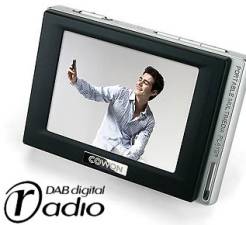 What does the iAudio D2 offer?
Well, it’s an MP3 player with either 4, 8 or 16 gig of onboard memory. It accepts SD and MMC cards for expansion. As well as playing music in a number of different formats, it also does the following:
- Plays video
- Displays pictures and text
- Has both FM and DAB digital radio
- Is a voice recorder
- Is a notepad
- Has a calculator
- Is a USB storage device
- Supports Flash applications.
Amazingly, it also has a crystal clear QVGA touch screen. Oh, and did we mention that it’s tiny?…
Cowon iAudio D2 Specs:
This little media player has the following impressive specs:
- Features: Supports music, videos, photos, texts, games or flash animations
- Radio: Built-in FM and DAB radio receivers, capable of recording
- Display: 16 million colours, QVGA (320×240) touchscreen
- Formats: MP3, WMA, OGG, WAV, FLAC, APE, JPG
- Power: Built-in rechargeable (52 hours MP3 playback on one charge)
- Memory: 4gig, 8gig and 16gig models. Has a card slot for SD / MMC cards
- Connectivity: 3.5mm headphone, USB, TV-out cable (for connecting to a telly)
- Dimensions: 78 x 55.5 x 16.6 mm
iAudio D2 Review
First off… this is one tiny little device. Slightly bigger than a matchbox, but smaller than a cassette tape, this is a comfy hold, and it’s packed with a stack of features not even found on the iPods and Creatives of this world.
We looked at the 4 gig version of this back in 2007, and have since got our hands on the 16gig version. We’re still impressed by the features and size of this device. It remains one of the best handheld DAB radios we’ve used.
We reviewed this player for FrequencyCast, this site’s regular online radio show – Take a listen to Show 19 as a podcast. We also reviewed the iAudio D2 16 Gig version in our October 2008 show – Listen online to Show 31.
iAudio D2 Screen
The big seller on this small device, is the touch screen. It’s not something you’re used to finding on such a small device, and to be honest, you really do need a touchscreen these days. No other navigation is as easy to use or gives you more flexibility.
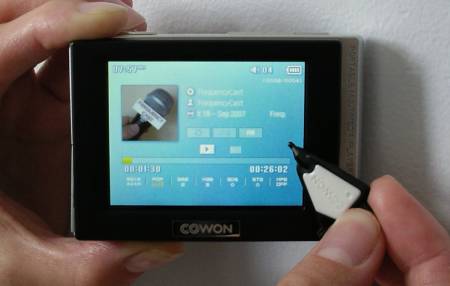
The touch screen is well implemented. It’s now always quite as responsive as we’d expect, but that doesn’t hinder use. The iAudio D2 has a handy Lock slide switch on top, which you can slide to prevent accidental presses of the touchscreen when the player’s in your pocket.
The iAudio is so small, that there’s no room for a standard stylus – you’re supplied with probably the smallest pointer we’ve ever seen… a little like a guitar plectrum, and almost bound to get lost, despite the bit of string you can tie to your keyring, or the iAudio itself.
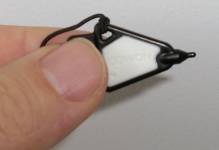
The iAudio Stylus
iAudio D2 Navigation
Navigating around the user interface is fairly intuitive – there’s a main menu, pictured below, then a screen for each of the applications. The text size is, perhaps, a little small, and applications like the MP3 player cram in so much information (album cover, duration, levels, EQ settings), that the display can be a little crowded, but it’s perfectly usable, and in many cases, nice to have access to all the display options you need without having to drill down through menus.
We were particularly impressed with the DAB radio screen layout, and the fact that each radio station’s Radio Text was displayed clearly by default.
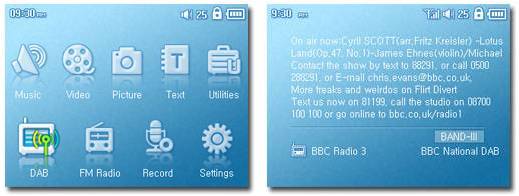
Screenshots of the iAudio D2
iAudio D2 Audio quality
Pretty impressive. We were a little worried at first when we saw the headphones – as you expect with most MP3 players, the headphones are standard and nothing special, but the iAudio’s had four contacts, not the standard three, so we expected our more pricey Shure E3Cs not to work – but they did.
The player has probably the most comprehensive range of onboard audio processing we’ve seen – a very impressive graphic equaliser, BBE, Mach3Bass, 3D surround, Stereo enhance, MP enhance, pan, and even a variable play speed (50%-150%). Far more than anyone wants (or probably understands), but as there are some half decent presets, plus the ability to customise loads, this should keep the audiophiles in their element.
FM radio is pretty good – and seems to get a decent enough signal using the headphone wire as it’s aerial. The DAB radio is ok in areas of decent DAB reception, but as with most devices that use the headphones as an aerial – it’s a little more flaky where the signal isn’t so strong, or where you’re on the move lots. Click here for a few seconds of DAB recorded on the iAudio (386kb, mp2 format)
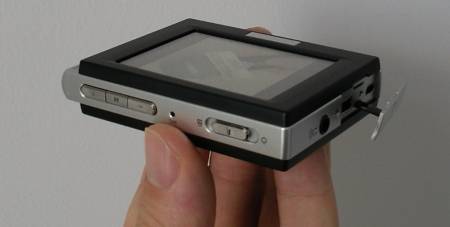
Top and side view of the iAudio D2
Podcasts on an iAudio D2
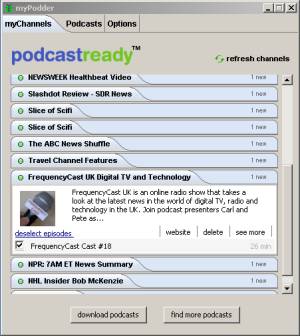
The Box proclaims “Podcastready” – which we assumed meant that it was capable of playing MP3 podcasts (what mp3 player isn’t?). What it actually refers to, is a little application installed onto the memory of the device that enables you to select and download podcasts. The application doesn’t need to be installed on your desktop computer, so is nice and portable.
To get new podcasts, it’s a simple case of connecting to any PC or Mac via USB, then running the application from the iAudio’s drive. It then uses your computer’s connection to download new episodes of your podcasts. We’re glad to say that our podcast, FrequencyCast, appeared in PodcastReady’s list. Thanks guys!
 .
.
The PodcastReady Application
Recording on an iAudio D2
You can record DAB radio, FM radio or voice. There’s also an option in one of the menus to record “Line in” or via an external mic, but that requires a lead that’s not supplied as standard. For recording voice and FM, there are options to select quality (from 32 to 256k).
Voice recording’s not bad – click here for a ten second audio recording (Windows WMA at 256k – filesize 380kb).
iAudio D2: Supported formats
| Audio formats: | MP3 , WMA , OGG, FLAC, WAV |
| Video formats: | AVI (MPEG4) , WMV (WMV v9) |
| Image formats: | JPG |
Other stuff
Tucked away in a covered panel on the left of the iAudio, you’ll find the power connector and the mini-USB connector. The unit’s supplied with a mains adapter, or for extra convenience, you can recharge from a computer’s USB socket (7 hours to charge from USB or 3.5 hours from mains)
A quick rattle through some of the other features we’ve not covered so far – there’s an alarm clock (wake up to music, FM or DAB – although you’ll presumably need to connect to external speaks for this to be useful). You can browse text files, there’s a notepad for scribbling on and doodling, an onboard Adobe Flash player (for games and small apps), and two calculators (one standard, and one scientific)
Under the ‘Settings’ option, you’ll find controls to allow you to change display brightness, set backlight timeout, alter font colour (but not size), add a wallpaper, and change the scroll speed. There’s also the usual Shuffle settings for your MP3’s, plus the option to build a “dynamic Playlist” of tracks.
Supplied with?
Below is a picture of what we found inside the iAudio D2’s box: Headphones, the tiny stylus thing, USB 2.0 cable, power supply, Quick Start Guide, and a CD.
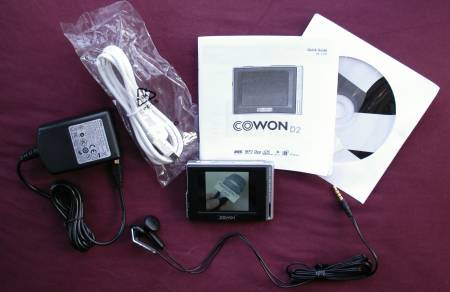
iAudio D2 Box Contents
Cowon iAudio D2 UK availability:
For more on the Cowon iAudio D2 range, including reviews and photos, go to AdvancedMP3players.co.uk
|
Summary
The Swiss Army Knife of pocket multimedia players – if you’re into travelling light, then this could well be for you. There’s enough space to put a decent selection of music, video, games, text and photos onto, and with DAB and FM radio, you’ll be shouldn’t be stuck for something to listen to.
DAB did it for us – we like our DAB radio, and this is the smallest device we’ve seen that allows playback and recording of DAB – although the DAB radio does rely on getting a decent DAB signal via the headphone wire. The construction of the unit is solid, the device is nicely styled, and it’s hard to fault. The screen is perhaps a little too reflective and not always as responsive as we expected, but the sheer fact that it’s a touchscreen makes up for it – it’s really the only way to browse and select content, plus steer around a device.
The touchscreen, size and (for us) the addition of DAB radio, makes this a top choice for those that like their gadgets, and want to cram as much media in as small a space as possible.
Enjoy!
|
The Cowon iAudio D2 is available from AdvancedMP3players.co.uk |
Cowon iAudio D2 FAQ
This section includes the answers
to frequently-asked questions we’ve received…
| Software | Firmware updates for the Cowon iAudio D2 can be downloaded from the Download section of www.cowonglobal.com |
| User Manual | At the time of writing, a PDF manual for the iAudio D2 can be found in the Download section of www.cowonglobal.com |
| Playlists | We’ve been asked if the iAudio D2 supports Playlists: You can build and play your favourite list of videos and music files easily using Dynamic Playlist function. |
| Operating system | The Cowon iAudio D2 can be used with Windows 98, 2000, XP and Vista.According to Cowon’s site, it is also Mac and Linux compatible (MAC OS, Data transfer only, Linux v 2.2 or higher, Data transfer only)
|
| Accessories | A range of accessories are available for the iAudio D2, including memory cards, a power adapter, case, special film to protect the screen and a TV out cable. The range is available from AdvancedMP3players. |
| Timed recordings | Question from site visitor: “Can you program the DAB radio for Scheduled/timed recording on the Cowan d2?”Sorry, but it seems the answer is no. |
| Line out? | Question from site visitor: “Does the iAudio have a Line Out to connect to separate hi-fi? ( I don’t mean the headphone socket , a proper line out)There is an optional “TV out” lead, that uses three phono leads, including line level audio outputs. |
| MP2 Support? | A question from a site visitor: “I am decidedly interested in the iAudio D2 device, however, although it has a DAB tuner, I see no mention of compatibility with the mp2 codec. Can you please advise, is it able to play back mp2 files saved to an SD card?”.The good news is – “Yes”. We record a lot of FM radio in MP2 format, and these files can be played back, without conversion, on our Cowon iAudio D2. For the technically-minded, the shows we record are in the following format: MP2, 192kbps, encoder FhG, and they work!
Also, DAB recordings made on the Cowon are recorded in MP2. Click here to download an 18 second clip recorded from DAB on a Cowon iAudio D2. |
| DAB Aerial | The iAudio uses connected headphones as the aerial lead for DAB reception, as with most portable DAB and FM radios. Note that the headphones supplied with the Cowon have four connectors, not the standard three. We’re not sure if the fourth is used for the DAB aerial.The wire that’s in other headphones or speaker leads can be used as an aerial, but this aerial is unlikely to be as efficient as using the headphones supplied by Cowon, which were designed for the job. |
| Home hi-fi? | If you’re looking to connect your MP3 player to your hi-fi to play back audio from your home hi-fi system, then note that the only audio output, is the headphone socket.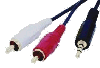 You’ll need to connect from the 3.5mm headphone socket to two male phono plugs. This will let you to connect to your stereo’s line level AUX input, although note that you will need to turn the headphone volume down to a low setting to avoid overloading the line-in.You can find a suitable lead at AdvancedMP3players or Maplin (Part: L32BA) You’ll need to connect from the 3.5mm headphone socket to two male phono plugs. This will let you to connect to your stereo’s line level AUX input, although note that you will need to turn the headphone volume down to a low setting to avoid overloading the line-in.You can find a suitable lead at AdvancedMP3players or Maplin (Part: L32BA) |
| In car? | 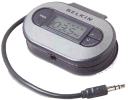 If you want to listen to your MP3s in your car, there are a couple of options here. Probably the most elegant is to make use of a little gadget called an FM re-transmitter. These plug into your MP3 player, and transmit the audio from your player a frequency that you can tune your car radio into. Until December 2006, use of these was illegal in the UK, but Ofcom has now overturned this law, making the use of CE-approved short-range FM transmitters legal. Take a look at the range on offer from AdvancedMP3players or Play.com. If you want to listen to your MP3s in your car, there are a couple of options here. Probably the most elegant is to make use of a little gadget called an FM re-transmitter. These plug into your MP3 player, and transmit the audio from your player a frequency that you can tune your car radio into. Until December 2006, use of these was illegal in the UK, but Ofcom has now overturned this law, making the use of CE-approved short-range FM transmitters legal. Take a look at the range on offer from AdvancedMP3players or Play.com. The other option is an audio car adapter – these plug into the headphone socket of an MP3, walkman or portable CD player, and the ‘dummy’ cassette gets inserted into your car stereo’s cassette deck – the sound will be played through your car’s system.There are several of these around. For under £10, there’s the Ross Car Cassette Adaptor from Argos, with a ‘bass boost’ feature. |
| Something different to listen to? | If you fancy listening to audiobooks, classic comedy or drama , try an audio book, comedy file or one of the other 18,000 audio files available from Audible.co.uk |
| Podcasts | Expand your listening pleasure on your MP3 player by downloading podcasts onto your player. A podcast is an audio (and now video) file available for download and transfer to your device. They’re often updated regularly and are a new type of broadcasting set to change what we listen to. You can subscribe to channels of interest and get updated recordings synced to your iAudio D2 on a range of subjects.
|
| What about my old records and tapes? | 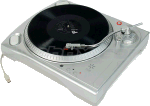 Got a huge vinyl collection tucked away in the loft? Get yourself an ION USB turntable that connects to your PC – You can use this to transfer your old singles, albums and even 78s to MP3, WAV or WMV format – ideal for your iPod or MP3 player. Bundled software allows to you copy music at double speed, and can automatically remove crackles and noise from your records. Got a huge vinyl collection tucked away in the loft? Get yourself an ION USB turntable that connects to your PC – You can use this to transfer your old singles, albums and even 78s to MP3, WAV or WMV format – ideal for your iPod or MP3 player. Bundled software allows to you copy music at double speed, and can automatically remove crackles and noise from your records.Available from Maplin , Firebox and I want one of thoseUpdate: There’s also a USB audio cassette converter available. Check out the USB Cassette converter from Firebox, Argos and Maplin. |
Useful links:
- Audible.co.uk – Wide collection of comedy and audio books available for download
- Denon AH NC732 Headphones – Top quality noise-cancelling headphones
