
This page takes a closer look at one of the various handheld DAB radio receivers on the market, the Perstel Bluenote.
We’ve picked this model, as it’s the first handheld radio below the £100 mark, and is one of the smallest receivers around.
 DAB offers a greater listening choice and represents the new way of listening to radio – digitally. For more on DAB, see our DAB radio information section, or you can discuss digital
radio in our DAB Radio Forum.
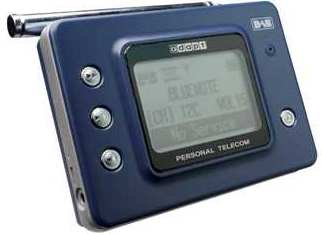
The Perstel Bluenote Digital Radio was released in July 2003, and was originally available for under £100 from Dixons. From the picture, you’ll see that this is a stylish blue radio, with a three-line display. It has a telescopic aerial, that shouldn’t be needed unless you’re in a lowish signal strength area. The radio is a comfortable hold, easy to use, and can easily be stashed into a pocket.
The three-line scrolling display is backlit, and shows station name, text transmitted by the radio station you’re listening to, the type of station, and its frequency. It also has signal strength and battery indicators.
Perstel DAB Bluenote Review
We’ve been using our BlueNote since July 2003, and have been very impressed with the results. The unit is very small and pocketable, and appears to be a little more sensitive than earlier
handheld model’s we’ve tried out. When first switched on, the unit goes to the last multiplex (referred to as an ensemble in the manual). You can use the forward and backward buttons to scroll through stations on that multiplex, or press the Confirm button, then the forward/backward buttons to scroll for another multiplex. These buttons are located to the left of the screen.
At the top of the radio, there are volume up/down buttons, a “hold” to stop you changing channels by accident, and an on/off switch. To the right of the screen, there’s a Menu button that lets you access preset and manual tuning, backlight (“always on”, “always off” or “on for 5 seconds”), plus a contrast setting.
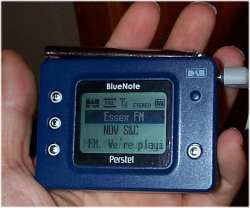
The BlueNote is a great listen – the supplied headphones are well-made and very usable, but for the tests, we used our own Sennheiser headphones, and the sound was great. The only small down-side to the BlueNote is that you can’t alter the treble/bass on the unit (some of the more expensive come with pre-defined EQ settings, e.g. “Speech”, “Rock”, “Flat”). Reception-wise, the BlueNote performed fairly well indoors with the aerial retracted, but didn’t like being too near our PC. With the aerial extended (7 segments, 31cm), the Perstel performed very well indeed, and wasn’t phased by the PC at all. Out and about, the Perstel performed well too, although as with most portable DAB receivers, being on the move in built-up areas or on a train isn’t wonderful unless the aerial is fully extended. This isn’t a fault of the BlueNote – just one of those things with handheld DAB receivers – without a good signal, reception is patchy.
Until the powers that be increase power to the DAB transmitters, walkabout DAB in a city isn’t fun. The BlueNote only receives DAB stations (i.e. doesn’t have an AM or FM tuner)
The display has a comfortable blue backlight, and in normal listening, the screen shows the station name, multiplex name and the scrolling text supplied by the radio station. By pressing the
Confirm button, you can scroll down to this last line and get at a few more bits of information, such as the version number of the software, DAB Mode, time, data rate in kbps, program type (e.g ‘Speech’, ‘Music’, ‘News’).
The back of the packaging intriguingly refers to a “connection for powered speakers or hi-fi system”. There is an unexpected socket on the side of the unit, but it’s not referred to in the manual. On the right-hand side of the unit, is a small plastic cover, labeled “adapt” that can be prized off to reveal a mysterious hole. I can only assume that an adapter will be released to make use of this in due course. For now, it’s a mystery!
Update Nov 2003. Thanks to Steven Brice for the following comment re. this connector: “That adapt cover and little hole is there because of the 201 model from the same company. It looks the same as the BlueNote but also includes an MP3 player. The Adapt cover on this model would hide the USB connector for the MP3 side. Its probably been done like this so they don’t have to re-tool to produce the new model”. In that case, all I can assume is that the packaging is referring to the headphone jack as the connector for powered speakers or hi-fi.
The BlueNote comes with a set of silver earphones, two Duracell AA batteries, and a small 16-page manual.
Perstel Bluenote Specification:
- DAB Band III stereo receiver (174-240MHz)
- Power: 2 x AA batteries, or mains adapter (not supplied)
- Connectors: Stereo headphone socket, DC mains adapter socket and
an “adapt” socket - Dimensions: 84 x 60 x 24 mm
- Weight: Approx 80 grams
- Buttons: Volume up/down, Hold, Forward, Backward, Confirm, Menu
| Availability:
The Bluenote is now discontinued. Here
If you can’t track it down, try a price search at Pricerunner, or check out the alternatives |
Useful information:
- Power Adapter info: Voltage = 3V / 500mA. Polarity – Ring is positive, pin is negative. Maplin Electronics supply power supplies capable of generating the required power (See under “Power supplies”). If you need more information, best to ask in our DAB forum.
Links:
- DAB radio models – View comments on the range of DAB receivers
- DAB forum – Get talking and ask for advice in our Digital Radio forum
- Perstel.co.uk – Manufacturer’s UK homepage with FAQ and contact information
