
iRiver U10 Information
This little beauty caught us by surprise – not only is it tiny, it’s also packed with a stack of features
A look at the iRiver U10
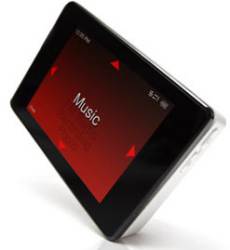 This has the following impressive specs:
- Supports music, videos, photos, texts, games or flash animations
- Revolutionary direct click concept directly on the display and without knobs or buttons
- High-resolution display with 320×240 (QVGA)
- Outstanding features: supports MP3, WMA, ASF, OGG Q10, MPEG4 SP videos, JPG photos, texts, flash games
- Built-in FM-tuner including recording and alarm function
- Available in 1 GB and 2 GB versions
- Cool docking station with infrared remote control available optionally
Mini Review
This is a nice piece of kit that supports music, videos, photos, games, FM radio and text on the move. It’s a tiny and lightweight little box of tricks.
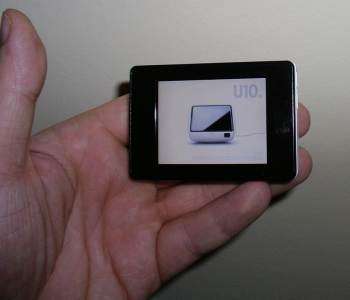
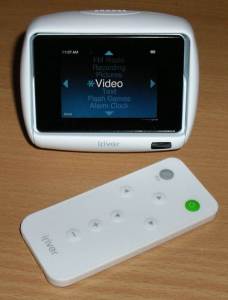
As well as playing back a range of different formats, the iRiver has a built-in mic for voice recording, and can play and record FM radio. Optionally, a docking station, pictured below, is available. The docking station adds stereo speakers, mini-USBand a line-in / line-out
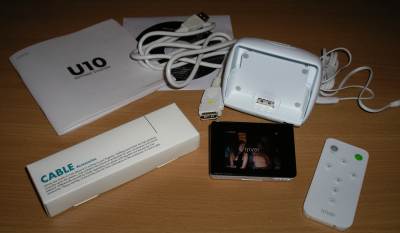
Below is a picture of what you get if you order the iRiver U10, plus the docking station. The U10 box includes: manuals, earphones, CD, USB cable and pouch. The cradle kit comes with a docking station (with speakers) and a tiny remote control.
In summary, this is a pretty powerful box that’s ideal for keeping you entertained while on the move. With only 1Gig on board, you don’t get as much music or video as you would with an iPod or our favourite, the Creative Vision M, but then it’s a lot cheaper, and importantly, a lot smaller. Sound and video is pretty impressive, and it’s a well constructed unit.
If you’re looking for something smaller, and cheaper than the big boys, this is an impressive unit with extras not found elsewhere, such as a collection of Flash games. Also recommended for it’s PC connectivity.
| Availability: The iRiver U10 became available in early 2006 in the UK. Here are the main online stores where you can get your hands on one:
Found a lower price online? Let us know. |
iRiver U10 FAQ
This section includes the answers
to frequently-asked questions we’ve received…
| How do I copy music & video to the iRiver? | The U10 is supplied with a USB cable that connects to a USB port on your computer. It uses Windows Media Player version 10 for copying of music and video over to the U10. Here are the options open to you:
|
| Something different to listen to? | Tired of listening to music on your player? Give your ears a treat and listen to something other than music on the move.Perhaps try a podcast… think of these as downloadable radio shows. You could do worse than give our podcast a try – FrequencyCast is a regular podcast that you can download to your device as an MP3 file. Each show looks at UK technology and information on digital TV and radio services. Check out the latest show at www.frequencycast.co.uk If you fancy listening to audiobooks, classic comedy or drama , try an audio book, comedy file or one of the other 18,000 audio files available from Audible.co.uk |
| Headphones | So, what are the headphones like? They’re OK – nothing special, but pretty well-made. After using ours for a few days, we swapped back to our Sennheiser MX500 earbuds (the inline volume control makes the difference).The freebies with the U10 are perfectly fine, and a good comfy wear, but our darker headphones with the volume control have meant that the standard earbuds are back in the box. |
| Home hi-fi? | If you’re looking to connect your U10 to your hi-fi to play back audio from your home hi-fi system, then note that the only audio output, is the headphone socket.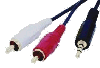 You’ll need to connect from the 3.5mm headphone socket to two male phono plugs. This will let you to connect to your stereo’s line level AUX input, although note that you will need to turn the headphone volume down to a low setting to avoid overloading the line-in. You can find a suitable lead at AdvancedMP3players or Maplin (Part: L32BA) You’ll need to connect from the 3.5mm headphone socket to two male phono plugs. This will let you to connect to your stereo’s line level AUX input, although note that you will need to turn the headphone volume down to a low setting to avoid overloading the line-in. You can find a suitable lead at AdvancedMP3players or Maplin (Part: L32BA) |
| In car? | 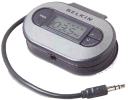 If you want to listen to your MP3s in your car, there are a couple of options here. Probably the most elegant is to make use of a little gadget called an FM re-transmitter. These plug into your MP3 player, and transmit the audio from your player a frequency that you can tune your car radio into.Take a look at the range on offer from AdvancedMP3players or Play. If you want to listen to your MP3s in your car, there are a couple of options here. Probably the most elegant is to make use of a little gadget called an FM re-transmitter. These plug into your MP3 player, and transmit the audio from your player a frequency that you can tune your car radio into.Take a look at the range on offer from AdvancedMP3players or Play. |
| What about my old records? | 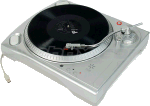 Got a huge vinyl collection tucked away in the loft? Get yourself an ION USB turntable that connects to your PC – You can use this to transfer your old singles, albums and even 78s to MP3, WAV or WMV format – ideal for your iPod or MP3 player. Available from Maplin , Firebox and I want one of those Got a huge vinyl collection tucked away in the loft? Get yourself an ION USB turntable that connects to your PC – You can use this to transfer your old singles, albums and even 78s to MP3, WAV or WMV format – ideal for your iPod or MP3 player. Available from Maplin , Firebox and I want one of those |
| Accessories? | If you’re looking for accessories for your iRiver, such as spare headphones, the Cradle Kit or a case, try AdvancedMP3players.co.uk and Amazon. There are also some excellent bargains to be had on ebay, including new clear cases – try a search on ebay.co.uk. |
Useful links:
- iRiver – The official homepage
- Audible.co.uk – Wide collection of comedy and audio books available for download
