
Top Links
Get BT Vision
BT Vision Basics
BT Vision Channels
BT Vision Options
BT Vision Content
Vision Questions
BT Vision Box
BT Vision Forum
BT Broadband
Money off BT bill
Freeview Info
Save money with

a BT Credit Card
BT Vision Explored
A closer look at BT's home TV-over-Broadband service, BT Vision
What is BT Vision?
BT Vision combines digital TV via a TV aerial, a digital video recorder, plus a large collection of TV shows and movies available "on demand" over BT Broadband.
The BT Vision service includes the BT Vision V+ box, which stores up to 80 hours of TV and lets you access thousands of hours of online TV and films.
What does BT Vision offer?
- Over 40 TV channels and 20 radio channels (See BT Vision channels).
- Watch a selection of TV shows from the last seven days, from the BBC, ITV, Channel 4 and Five - sometimes referred to as "catch-up TV".
- The BT Vision+ box - a high-spec hard-disk recorder capable of storing up to 80 hours of TV shows
- A 14 day electronic programme guide, as well as an on-screen guide to allow selection of on-demand content. You can also search for TV shows and films by name or actor.

- On-demand content includes hundreds of films, TV shows, music videos, sports from ESPN and kids shows.
Getting BT Vision
BT Vision is available across the UK. If you want get BT Vision, you need to get your broadband from BT.
- Cost: You have two choices with BT Vision - you can take out a BT Vision subscription (from £7.50 a month for the first 3 months), or get the service without a subscription, and pay for the content that you watch. Full price breakdown at btvision.bt.com.
- Requirements: BT Vision requires a BT Total Broadband connection and a BT Home Hub (available free with BT Total Broadband). For the video-on-demand content, you need a line speed of 2Mb or over. To check your line speed, go to www.bt.com/btbroadband
|

BT Vision Review
On this page, we take a look at the BT Vision set-top box, the service, and what's on offer with the BT Vision On Demand content. You can also listen to our audio review in Show 12 of FrequencyCast, our podcast.

BT Vision's Movies-on-Demand screen
BT Vision Installation:
The BT Home Hub has to be physically connected to both a phone line (for Broadband) and the BT Vision+ box. If your Home Hub isn't near the TV and a phone line, you can make use of special HomePlugs to send data over your home's mains wiring.
The BT Vision set-top box is connected to the TV via a SCART lead or HDMI lead, and to the BT Home Hub via a standard Ethernet RJ45 cable.
For more on installation, go to get.btvision.bt.com
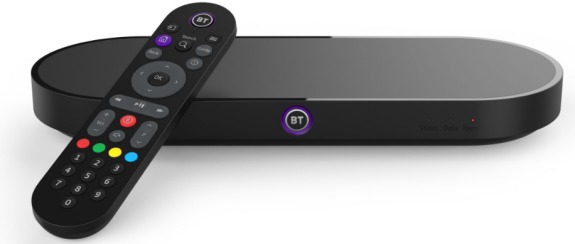
The BT Vision+ Box
The original BT Vision V+ set-top box is manufactured by Philips, and seems very well constructed. It sits well with other AV equipment, and there don't seem to be any obvious hardware problems. The original box was in silver, with a revised black model released in December 2009.

The revised BT Vision V+ Box, released in December 2009
We have a special page dedicated to the BT Vision+ Box, so if you're interested in delving more deeply into the box, its connectors and the technical specs, go to our BT Vision Set-top Box page.
Using BT Vision:
There are three main buttons you'll need to use on the remote: the 'BT Vision' button to get to the main menu and your recorded shows, the 'TV Guide' button to get to 14 days of programme listings that are available over the Internet, and the 'On Demand' button that opens the door to the online content available for watching via the BT servers.
Accessing the On Demand content was very easy - and BT has gone out of its way to make browsing and searching for content as easy as possible. There are a number of ways of searching for everything - searching films by genre, TV shows by TV channel, A-Z listings, and a free-form text search.
This search feature is our favourite - there's one search engine for everything, on demand content, shows in the EPG, even actors and directors. A great way to find what you're looking for and some thought has clearly gone into how to get to the wealth of content available.

Searching with BT Vision
Features and functions
The BT Vision service has got a lot going for it - the built-in hard disk recorder is great for recording off-air telly - the 14 day programme guide, features like Series Link and Programme Search make finding and recording TV programmes a dream - superior even to our favourite, the Sky+ box.

The BT Vision Electronic Programme Guide
Watching On Demand content is great too. Later on this page, we summarise some of the TV shows available to watch "on demand". The selection in the first few months perhaps a little small, but we've seen the collection grow month-on-month.
Our most-used service at the moment, is Catch-up TV - the ability to watch a TV show that's been on in the last 7 days, and watch it at a time to suit you. Vision Replay currently offers on demand content from the BBC, ITV, Channel 4 and Five.

Downloading TV programmes from BBC On Demand, on a BT Vision box
Review Summary
We're pretty impressed with BT Vision - the service is easy to use, with the option to sign up to get all you can watch on subscription, or to choose pay-as-you-view, it's flexible and good value for money.
If you have a question, first check out our BT Vision FAQ, then if your question's not answered, please ask in our forum and we'll try to help.
We also have a BT Vision forum and a dedicated BT Vision mailing list, so please feel free to sign up.
BT Vision: On Demand Content
The top question we're asked, is "what on demand content is available on BT Vision?". We've created a page covering BT Vision Content, but here's a quick summary:
On Demand MoviesHundreds of films priced from £1.99 for a 24 hour rental. See our BT Vision content page for some sample films. High Definition: A smallish number of HD films are available for download over Broadband with BT Vision. |
On Demand TV ProgrammesLive TV is supplied using Freeview. Extra 'on-demand' content is available for download. This isn't like a traditional TV channel, there's a huge store of TV shows from a range of channels and content providers that you watch via BT Vision over the 'net. When we last counted, over 1,500 TV shows were available. You can access TV content by category, channel, 'TV Replay' and 'Premium TV' categories. Prices between £0.79 or £0.99 per episode, or for £6 a month for the TV Package. Catch up TV (last 7 days) content is available from the BBC, ITV, Channel 4 as well as Five. There's also content from the likes of Warner, Sony Entertainment, National Geographic, Discovery On Demand, HBO, Comedy Central, Adult Swim, CBS and MTV.
|
KidsContent from BBC Hits, Cartoon Network, Disney, Disney Playhouse, Baby TV and Nickelodeon. Last time we counted, around 850 kids shows. Prices for most items are 49p.
|
MusicMusic videos, concerts and Music Extras.
|
Sport on BT VisionBT Vision Sport offers content provided by sports channel ESPN. For the 2009/2010 football season, ESPN on BT Vision will show 46 live FA Premier League games, live Scottish Premier League games, as well as non-UK sports such as Live Italian Serie A, Live German Bundesliga, MMA, French Rugby, UFC, Major League Baseball, NHL Hockey, NCAA Basketball and more. ESPN is FREE with any Value Pack |
Interactive games
|
Full details at btvision.bt.com
![]() PODCAST FEATURE: We featured BT Vision in Show 12 of our radio show, FrequencyCast Listen to the show online, or download it to your MP3 player. Listen to Show 12 | What is FrequencyCast? | Add us to iTunes |
BT Vision Questions
- Please see our BT Vision FAQ for answers to frequently-asked questions.
More details...
- Discuss BT Vision in our BT Vision forum
- BT Vision Help and Advice
- BT Vision Basics - Just the basics
- BT Vision Set-top Box information
- BT Vision Content - A summary of what's on offer
- Online review of BT Vision in Show 12 of our Podcast
- More on alternative Internet TV services on our dedicated IPTV page.
- For more on Freeview and free-to-air set-top boxes, see our Freeview page.

Is this page correct? Something out-of-date or broken? Report a page error If you're looking for help, please don't use this option - instead ask in our forum |