
Information about Freeview,what the services offers, how to get Freeview, and answers to common questions about the free-to-view TV service.
What is Freeview?
 Freeview is a Digital TV service that allows you to watch over 40 TV channels via your TV aerial. No dish required, no subscription, no ties, no contracts, and no installation costs. Just buy a set-top box for free access to the Freeview channel lineup…
What channels do I get on Freeview?
Below is a summary of the channels on offer to Freeview users:
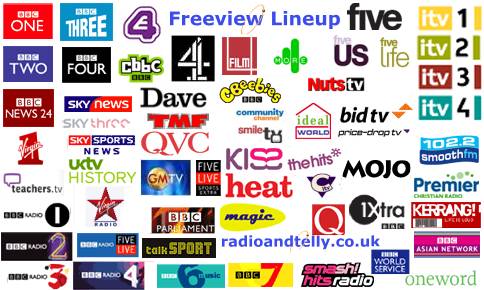
| Entertainment | BBC One, BBC Two, ITV 1, Channel 4 and Channel 5, ITV 2, ITV 3, ITV 4, BBC Three, Pick TV, BBC Four, E4, More4, Film4, Yesterday, Dave, 5*, 5 USA, CNN, Challenge, Community Channel |
| News / Sport |
BBC News, Sky News,, BBC Parliament. |
| Kids | CBBC, CBeebies, CiTV |
| Shopping | QVC, Bid TV , Price-drop TV , Ideal World |
| Music | 4 music, The Music Factory |
| Radio | BBC Radio 1, BBC Radio 2, BBC Radio 3, BBC Radio 4, BBC Radio 5 Live, BBC Radio 5 Live Sports Extra, BBC Radio 6, BBC 1Xtra, BBC Radio 4 Extra, talkSPORT, BBC Asian Network, BBC World Service, Smash Hits, KISS, Kerrang, Smooth Radio (formerly Jazz FM), Heart, Absolute (formerly Virgin), The Hits, Q, Magic, Heat & Premier Christian |
| Interactive / Info |
BBCi, Teletext, FourText, Sky Text, NHS Direct |
| For more on the Freeview channels, see our Freeview Channel List |
How do I get Freeview?
Here’s what to do if you’re looking to get the Freeview channels:
- Check Coverage – To receive Freeview, you must be in range of a Freeview transmitter. To check this, enter your postcode on the Digital UK Postcode checker. More: Freeview Reception help
 Box – If you are in a coverage area, you’ll need to get a free-to-air set-top box. Boxes cost from around £20 and can be bought from high-street stores such as Currys. Shopping online for a set-top box is often cheaper. For help choosing, see further down this page.
- Connect – Plug your existing TV aerial lead into your Freeview set-top box, then connect a SCART lead from the box to your TV’s SCART socket, and you should be ready to go. Follow the instructions supplied with the set-top box, and scan for available Freeview channels.
The cost? There’s no subscription costs or rental agreements, so the one-off cost for the set-top box is all you’ll pay for the extra channels.
| For help with getting started, see our ‘New to Freeview’ page. |
Freeview set-top boxes
There’s quite a range of set-top boxes, with differing features and styling. Here are a few things to consider when buying a Freeview box:
- Price: From around £20 – no subscription or ongoing costs.
- Connectivity: All boxes have a single SCART socket for connection either to a TV or recorder. You may want to consider improving your options by getting a box with a second SCART socket, so you can connect to both a TV set and a video / DVD recorder.If connecting to a TV that doesn’t have a SCART socket, you need to look for a Freeview box that has a modulated output (e.g. the Icecrypt T5000).
- Features: Basic boxes tend to support Freeview’s interactive services and subtitles. More expensive boxes come with two-week electronic programme guides, built-in games and programme timers. At the top-end, boxes have a built-in a hard-disk recorder – These hard-disk recorders, known as PVRs, support live pause, and many allow you to record one digital channel whilst watching another.
If you’re looking to buy a Freeview receiver, take a look at our list of Freeview boxes for the full range of UK boxes. Below, you’ll find our ‘Quick Picks’ – three different types of box, to suit differing budgets:
Radio and Telly’s Freeview Quick Picks |
||
 GOODMANS GDB18FVZS2: Basic box with 2 SCART sockets. Amazon / Currys £25 GOODMANS GDB18FVZS2: Basic box with 2 SCART sockets. Amazon / Currys £25 |
 BT YouView: Freeview HD recorder plus on-demand content. BT YouView: Freeview HD recorder plus on-demand content.More info: get.youview.bt.com |
 Humax PVR-9300: Includes a hard-disk recorder that holds 160 hours of TV. Currys £164 Humax PVR-9300: Includes a hard-disk recorder that holds 160 hours of TV. Currys £164 |
For info on set-top boxes, see our Freeview Boxes section |
Freeview Interactive Services
Freeview offers digital services, such as programme listings, digital teletext and games. Check out BBCi on channel 105 for an example of the text services available.
Below are some screenshots of Freeview’s text and interactive services (click the image to get a larger version):
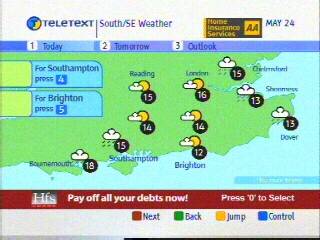 Teletext Weather |
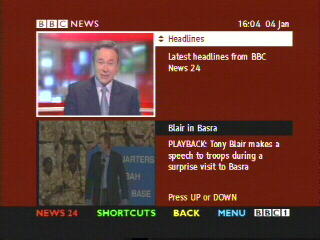 BBCi News Multiscreen |
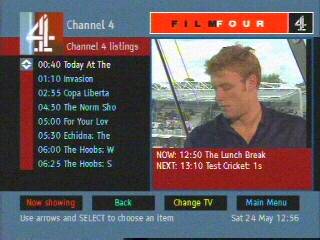 Channel 4 Listings |
Freeview problems?
- Problems receiving Freeview? See our Freeview reception page
- Problems connecting your Freeview box? See our Freeview connection page
- Other Freeview problems or questions? See our Freeview
Help and Advice section
- If your question isn’t answered,
please ask in our Freeview forum

Freeview Links
- Freeview set-top boxes – More on the available boxes
- Freeview forum – Discuss Freeview and set-top boxes with others
- New to Freeview? – Considering Freeview? Read on…
- Freeview podcast – Regular updates on Freeview in our mp3 podcast, FrequencyCast
- Freeview FAQ – Our page containing answers to common Freeview questions and problems
- Topping Up Freeview – How can I get extra channels?
- BT Vision – Freeview receiver, hard disk recorder and on-demand content…free box!
- Splitters and boosters – Help on using an amplifier to improve your Freeview signal
- Digital TV – The Digital TV options explained
- On Your PC – How to watch Freeview on your desktop
- Channel comparison – See which TV service carries your favourite channel
- TV Listings – Information on Freeview listings / guides to help schedule your Freeview viewing
- Freeview Channels – List of the Freeview channel numbers plus multiplex lineup
- Digital UK postcode checker – See if Freeview is available in your area
- Wolfbane’s TX info – Transmitter coverage maps for UK digital TV
- BBC Transmitter work – Check for problems with your local digital transmitter
- DTG Software Download Schedule – Information on over-the-air software upgrades
- News Archive: 2004 News ; 2005 News ; 2006 News ; 2007 News ; 2008 News ; Latest News

I HAVE A BOXSET BY NAME MATSUI. CAN I GET FREEVIEW WITH A 20DB OR
45DB INDOOR (NOT OUTDOOR) ARIEL, AND WHAT IS MY DISTANCE FROM THE
TRANSMITTER WHICH IS SITUATED AT SUTTON-COLDFIELD, IS IT 15 OR 30
MILES.
THANK YOU.
Give me your postcode and that of the transmitter and I will tell you
OK. I have the transmitter’s postcode
I noticed yesterday, without any prior warning of any kind, 2 channels (CBS Action & Dave JaVu – channels 25 & 64) were removed from my Freeview service. Please explain why this has happened, I watch both these channels a lot, as they show a number of programmes which are among my favourites and it is highly annoying to go to watch them only to find they have been unceremoniously removed without trace or prior warning. I trust you will be restoring these services immediately as these actions have caused great annoyance. I live in West Kent so maybe it is just a localised error on your part but either way I look forward to (1) your explanation and (2) restoration of these channels. Thank you in frustration & annoyance.
I really snapped when someone told me the other day that god isn’t real!!
I would like to know why such an important program like Daystar channel 73 has been taken off air.It was the new light of jesus coming to us in our homes just like TBN IS ON Channel 65 Together they gave an awesome delivery of gods message. Now it is like one arm being cut off. please reinstate it for the complete and varied delivery of these pastors of god who bring the answers to the problems of the world through the bible that we may receive everlasting life through jesus christ amen.
God works in mysterious ways Paul
Do you like tapas Paul?
Gutted I missed the delivery of gods message.
This has made me sad too.
Do you know if I can find reruns online? My friends are in need of gods message, I could pass it on?
The Lord bringeth and the Lord taketh away Paul. He just happens to be in the taketh part of the week
Well I’m glad it’s gone. It was awful. Gave me migraines listening to it.
Our apologies Paul. We reviewed the viewing figures and unfortunately 1 person per show was not enough to keep the channel active
I for one will miss it. I now how to fill my time with knocking on people’s doors with leaflets on a Sunday morning
I have now found everlasting life through Christ by watching love island. It’s similar to when you order your shopping with Tesco bit the item you want is prosecco but thry replace it with beans
Have you tried SNM on channel 69? I have found it fills a hole
I read on the internet the other day that I can absolve my sins and gain everlasting life by purchasing some juice plus. Do you know if this is true?
I miss the light of Jesus. I think I may need a trip to Ikea to replace it. I can’t find a bulb that fits anywhere else
I’m glad nobody is bleating gods message anymore. Now we can all get on with our lives. I’ve missed the debauchery.
Please refrain from spamming this comments section. It is making Jesus sad
It will come back in a different form don’t worry
Since this stopped airing things in my life have deteriorated. I’m pretty sure my daughter is even possessed. She urinated all over my floor this evening. I have father Karras coming over later. I hope he can help. I’m sick of listening to her talk in tongues.
No way Chris MacNeil. I knew Father Karras in the 70’s through my sister Regan.
Thanks Paul, sons crying
I think my favourite pasta of god is tuna bake
I was singing oh happy days til I saw this. Now I am sad.
Have you considered converting? We have some dynamite opportunities for anyone who wants to come on over.
Man. I did not clap when I saw this was removed
I have been considering making a new channel. It looks like there would be some interest here. Would have to channel share with babe station though is that ok?
I came across this channel when visiting friends with a new baby with my 2 brothers
Have you considered setting up your own channel. I’m a make up artist and soul d be happy to support your stars
**** half price stable rooms ****
**** Reply for prices ****
Don’t bother I’ve stayed here and my son had to sleep in a grimy manger!
I think this Jesus just coming into people’s homes is entirely inappropriate
Was he invited? What if a child was on their own in their house?
Maybe those weren’t burglars!!!! Awks!
Here’s a joke for you Paul to cheer you up.
Ten puns were asked if they believed in god.
No pun in ten did
I really snapped the other day when someone told me that god isn’t real!!
My husband Adam was very upset when this was cancelled. That channel is a bunch of snakes. He used to watch it on his apple devices
I love the bible. It was an amazing sci fi story for back then.
I have deep sadness that you mock the great lord himself. I hope you are plaqued by headlice and the clap
Dear Paul. Plaque is for teeth. Plagues are for Egypt.
Blessed be
I did write plague although it must have corrected after. This must be the work of the devil. All your blasphemy let him in. God save our souls. Amen
Pride is a deadly sin Paul. Say 7 Hail Mary’s and 2 Our Father’s and God may consider your soul
having tried to do a retune yesterday I now find that some channels are no longer available, like yesterday. how do I get them back so they can be accessed.
regards
chris hollow
Hello
I have a Freeview television , I m not going to pay for virgin or sky , but I notice that all of the Freeview channels are available on sky and virgin , there are two many selling and jewellery channels why cannot Freeview show more sky or virgin
shows . I only watch five or six channels , I have heard that sky
have over two hundred channels a friend has sky has sky and he only watches six channels a lot to pay for just that .
What a windup motorstv gone since the move from 71 to 240 cant watch channel 60 tv’s only 4 yo freeview tv cant be outdated whats going on ?
Freeview christmas channel 74 is it available in la1 4rg as ive retuned and cant get it?
i have built in freeview on tv and hardly getting any channels .iwas getting all channels when i stayed at eh25 9lu i am now at eh20 9fa,didnot need freeview box at first postcode.Surley if freeview built in on tv shouldnt need box can anyone help.
I+have+deep+sadness+that+you+mock+the+great+lord+himself.+I+hope+you+are+plaqued+by+headlice+and+the+clap
We have just brought a free view box and I was hoping I would get the drama channel which is channel 20. If does say it is a free view channel so why don’t we get it.
All your funny clever names made me laugh! So many i would never think of! Nice one everyone! Oh, and god sucks. Yeah, i said it. Fight the power! Hey, whats that big hand coming out of the clouds towards me… uh-oh…
Hi there I have a Humax FVP-5000T Freeview PVR in my living room. In my bedroom upstairs I have a Humax FVP 4000T Freeview Play PVR. I haven’t connected the upstairs top box to an arial yet. Using wifi can I play/screen my recordings only from the downstairs top box to the upstairs top box. I don’t want to by an ariel as I always watch catch up on the bedroom top box. It’s would be easier to just set the downstairs top box to record, then if I can watch it upstairs should I decide to THANKS.