
One of our most frequently asked questions, so we’ve given it its own page… how do I use the USB sockets on a Sky+ or Sky+HD set-top box. Read on!
Sky Box USB Sockets?
Yes – sure enough – look on the back of your Sky+ or Sky+HD box, and you should see a free USB slot. These also one hidden under the flap on the front panel.
Here’s a photo of one, on the back of a Thomson-made Sky+HD box:
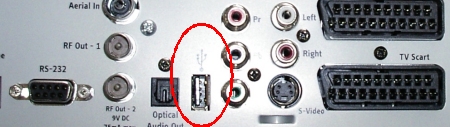
Here’s the USB socket on the back of a Amstrad DRX890 Sky+HD box:

Q. Can I use these USB slots to copy files from my Sky+ box?
A. No. no supported. For the alternatives, see our Copying from Sky+ page
Q. Can I use the USB slots to play back files from a USB stick or connected drive?
A. No. Not supported
Q. Can I connect a webcam or printer to my Sky+ box via USB?
A. No. Not supported
Q. So what can I do with the USB sockets?
A. At this time, nothing. The Sky boxes have two USB sockets, and Sky tell us that the USB sockets are “Reserved for Future Use”. Sky may have plans for the USB socket, but as yet, there appears to be nothing that can be done with the USB sockets.
There is one exception – Apparently, as the sockets are powered, you could possibly use the socket to charge up a device that’s charged via a USB socket. Not supported by Sky, and nothing we’d like to recommend, but it may possible! You do so at your own risk, and we can’t see the point.
Need to copy programmes from your Sky+ Box?
Your options are as follows:
- Connect a DVD recorder to a SCART socket and copy over the recordings to DVD, or
- Get a video capture card for your PC or Mac, then connect your Sky+HD box to the computer and record the box output with suitable capture software. You could consider using a Dazzle USB device on your PC to record from a connected Sky box. Dazzle device are available from Maplin.co.uk or Dabs.com.
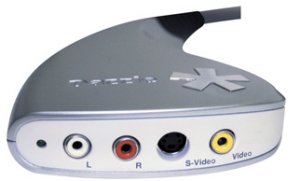
A Dazzle Video Capture Device
Need to play video clips from USB on your TV?
As we outline above, this can’t be done with the Sky USB sockets. Instead, consider a device like the WD Live HD Media Player. Plug in a USB stick or external drive, and this little black box will play back HD video on your TV
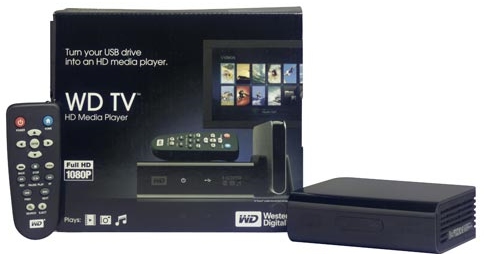
WD TV HD Media Player is available from:A network-enabled version, the WD HD TV Live (with Ethernet and support for a Wi-fi USB stick) is available from Play.com, and Amazon.co.uk
|
On our other pages:
- Satellite TV in the UK – General information on services in the UK
- Copy recordings from a Sky+ box – How to copy recordings to DVD or a PC
- Free Satellite TV – A summary of what’s available for free
- Subscription-free TV – What can you get for free
- UK Satellite TV forum – Talk about satellite TV in the UK

Fu*king sky+, i bought this shit only for this function, and now i read that it wouldnt work out, nice :) Fuuuuuu
Re: “Apparently, as the sockets are powered, you could possibly use the socket to charge up a device that’s charged via a USB socket. Not supported by Sky, and nothing we’d like to recommend, but it may possible! You do so at your own risk, and we can’t see the point.”
A Chromecast dongle needs to be powered via USB but also needs to be plugged into a USB socket itself. Many TV’s do not have a space USB socket so use the spare one on the Sky+ HD box. Simples!!
I’d like to see the power switched on – there IS a point for some users.
For example, my Google Chromecast. If I could power the Chromecast from my Skybox, I could do away with a plug socket for it (I currently have to use a 230v USB plug).
Also, USB is 5v. If I have to use a transformer for the Chromecast, I’m stepping 230v down to 5v which means a lot of electricity is lost as heat.
Finally – I use my Samsung phone for Play Music. If I could plug the phone into the USB I could keep it charging whilst playing music through my entertainment system (my TV doesn’t have a USB port).
The Sky USB does have a use and it’s to plug a sky wifi dongle in to connect the sky box to your sky wifi router.
Can I plug Amazon firestick into sky USB port as my TV dont have USB connection ?
Pity Sky cannot use the USB ports to at least transfer to a new sky box when received as otherwise needs everything stored to be copied in real time to DVD disks. If you could connect two boxes using USB would be brilliant.
I would like to see the USB ports used to transfer from one sky box to another saving time to copy in real time to DVD’s
How can you record anything on dvd if the skybox has only one start connection?
You can daisy chain them
Sky Box -> DVD -> TV
Sky Box Scart out into DVD AV2 Scart Socket (VCR) then
DVD AV1 Scart Socket (TV) into TV Scart socket (any for example AV1).
Then you turn the TV onto the AV channel you plugged the DVD into (in the example AV1), if you turn the DVD on you see the DVD, if you turn the DVD off you see the Sky Box if it’s switched on, if you turn the DVD on and want to see the Sky box then you turn the DVD to AV2 and you see the sky box coming through the DVD – then you use DVD on, on AV2 for recording and DVD switched off, Sky on for watching (don’t watch through AV2 as the picture quality isn’t as good, and also anything that activates the Sky box macrovision chip will have strange colour patterns)
or alternatively you use the Scart socket to go to the DVD and the HDMI to go to the TV (best quality).
or if you really wanted to you could go RF from Sky to TV, and Scart to DVD although this would be absolutely dreadful! (bear in mind that if you went through RF to the TV you’d need to use the analogue tuner to find the Sky box as the Sky box doesn’t have a DVB modulator!)
I have found a few uses for the socket on the sky+ hd box – charging a phone (run a micro-usb cable round the back of the sky box then you can charge your phone and other things), charging wii controllers (you turn the wii off to watch tv, and then find the controllers aren’t charged – not to worry with the sky usb you watch tv when the wii’s not on so when you come to play on the wii you have fully charged controllers!), powering the chrome cast.
Although I do wish Sky would just do something with them sockets other than just as a spare usb charger. When the box fills up you have to go through the entire contents and back it up onto dvd which is a lengthy process. Most other TV devices out there now have usb ports to take recordings off the box simply, but Sky users have to go through a complex process just to transfer digital data, to analogue and then back to digital again – Rupert Murdoch’s Sky is still living in the dark ages. I know obviously they don’t want you copying things like movies in full HD or Game of Thrones which is totally understandable but in this day and age they can put digital locks on certain items to prevent that and only allow people to copy things to USB that aren’t protected or transfer things that are protected only in SD mode.
It’s also annoying that most PVR’s only record input from Freeview or Freesat – surely if there are analogue to digital PC boxes out there that convert videos and stuff to mpeg it can’t take that much or cost that much to add that to a PVR – although I guess the real reasoning behind it is the MPAA ensuring they have full control over what people can watch/record even if they don’t own or control the original recording – I wonder why Microsoft’s Xbox One DVR feature has been delayed for so long??
WHAT+A+WASTE+OF+SPACE
Question from a non techie.
Am moving to a ‘virgin ‘ house for 5 months but would like to watch loads of stuff on my sky box that I can take with me, while I am laid up,after a leg op.
Can a sky box be connected directly to a tv and play the recorded programmes on it. It seems logical? If so …how please?j
Gonna use sky USB to power a bluetooth box and also plug phone plugs to the out points so I can use my wireless head phones yey..
Sky is ok to watch .But when the satellite dishes go in the bad weather. They knock the signal off the sky box.like mind has gone.so I am using free view you need a satellite dish for freeview
Sky is ok to watch .But when the satellite dishes go in the bad weather. They knock the signal off the sky box.like mine with no picture. has gone.so I am using free view you need a satellite dish for freeview
Can I use my USB stick to look at my pictures through my sky box ????