
When you watch digital TV, or listen to DAB radio, you may notice a time lag. Why is this? And how can you set your clock or watch accurately with the digital delay? We explain the reasons and some workarounds.
The problem
Since the 1920’s, in the UK, we’ve been getting our over-the-air entertainment using “analogue”, but now we’re living in a digital world.
On the plus side, Digital TV and radio gives us loads more channels of TV and radio, and loads more choice.
On the down side, with digital TV and radio, we lose a few things too – Ceefax, VideoPlus, and the ability to set our clocks from the BBC.
Why is there a digital delay?
If you sit an analogue FM radio and a DAB digital radio next to each other, both tuned to the same radio station, you’ll notice a one or two second time difference. Similarly, watch the news on Sky satellite in one room, with analogue TV on in another room, and you’ll notice the delay.
Why is this? The main cause of the delay is down to the way that TV and radio channels are combined together (multiplexed) and compressed. The digital technology is used to squeeze loads of channels onto a single frequency. Your digital TV or radio receiver is receiving the encoded and compressed signals, and using an onboard microprocessor to decode the incoming data and convert to video & audio. This encoding and decoding process takes a little processing time, hence the delay.
Satellite TV? If you get your TV via Satellite, there’s also another type of delay. The round-trip to the orbiting satellite and back to the ground. For the technically-timed, the typical delay is 900ms and 2200ms, depending on the data encoding/decoding used, and allowing for the 72,000 kilometre journey.
DAB Radio? DAB is encoded using a system called MUSICAM before it is transmitted, and your radio decodes this for playback. If you’re technically-minded, the detailed explanation is that the time interleaver introduces a 384 microsecond delay and the audio coder/decoder introduces a delay of several tens of milliseconds. You can read more on this subject in a PDF we found here
So, how can I set my watch if there’s a delay?
There are several ways to get to an accurate time:
- Use an FM radio. Radio 4 broadcast a set of “pips” at the top of most hours, which can be used to set your clock or watch. The FM GMT pips aren’t delayed, and are accurate. You may have heard that there are plans to phase out FM radio, but BBC Radio 4 will still be on FM until at least the end of 2015.
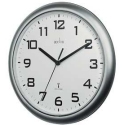 Get yourself a radio-controlled clock. These are available from around £10. They work by getting the time from a built-in radio that’s tuned to an analogue transmitter that broadcasts a time code. These radio controlled clocks are amazingly accurate, and commonly available.
Pictured to the right is the Acctim Radio Controlled Wall Clock, available for under £10 from Argos online
More on Radio controlled clocks, including availability on our Radio Controlled time page.- Phone BT’s speaking clock – Dial 123 from a BT landline phone, and set your watch at the third stroke
- Time over Internet – You can set up some computer equipment to pick up the time accurately by setting the kit to update the time from something called an NTP server, and getting time over the Internet
Useful Links:

I have two DAB radios. A Roberts and a murphys. They are ten meters apart but there is a time lag of about a half second. This is very annoying. Is there a cure for this ?
The difference in delay is down to the different circuits in the radio itself. You need two radios with the same circuit and the easiest way to ensure this is to have two identical radios.
Which is the correct time signal? I have an analogue radio, a digital radio through my TV and an internet radio. All several seconds different.
Thanks
The analogue radio will have the most accurate time. The DAB radio has has variable signal-processing delays as discussed in this article, and the internet radio also has transmission and buffering delays. An analogue radio signal is only delayed by the speed-of-light as radio waves propagate from the transmitter to your radio, and the speed of sound, as the sound waves propagate from the speaker to your ears.
Your Analogue radio will give you the correct time.
The EBU DAB technical article you link to above talks about a 384 millisecond delay (a third of a second, and thus something you’d notice) rather than a 384 microsecond delay (which is an imperceptible three thousandth of a second).
Have noticed this with several stations – but for the one I listen to most: –
[N.B.: Reference comparisons made against time received with a radio-controlled digital clock (I have two – both made in Germany but one takes its signal from Cumbria (MSF, previously at Rugby) and is just slightly ahead of the other which gets its signal from Frankfurt!- would be interesting to know whether anyone else has noticed this difference – would the extra distance travelled be sufficient to account for this? -are there any other clocks out there which get their time-synch. signals from elsewhere? )]
FM -approx. +1 sec difference (is relayed to, and re-radiated from my local transmitter – if I tune to the main mast – seems to be slightly less delay))
Freesat digital radio: +2 sec
DAB: +7sec (again could be re-relayed from a main transmitter)
– I have 3 DAB radios made by different manufacturers – and there is a noticeable difference between them – even though all the radios receive their signal simultaneously the audio output depends on how quickly the gubbins inside each radio processes the digital signal.
Internet radio (copper wire Broadband – apparently “14.5 Mbs max” – but always much less than this) – Varies! from +23sec right up to +1m35s !! – possibly dependent on the amount of internet traffic (might give a different value on a hi-speed fibre broadband connection?)
Couldn’t check AM or LW or SW wavebands – the station I listen to isn’t broadcast on them. Nor have I checked any mobile devices (Wi-Fi, 3G/4G etc.) – but I would imagine that the time displayed on these would also be somewhat delayed due to the extra steps involved in getting the signal to the device and before any on-board processing.
– so, to the poster who enquired about which time signal is the correct one: – use a freshly-synchronised radio-controlled clock – ALL the other sources described above are delayed to some extent and therefore not accurate,
I have two DAB radios. A Roberts and a Sony. They are ten meters apart but there is a time lag of about a half second. This is very annoying. Is there a cure for this ?
Thanks
I was looking for the difference between radio controlled clock and the Internet, about two minutes. The difference with the TV is the same. The radio controlled clock is two minutes ahead of other signals it seems. I prefer reading the Internet but perhaps it is delayed?
Which”pip” on Radio 4 is accurate – the first or the last?
They’re all accurate, but it’s the start of the last pip that marks the top of the hour. However, you’re listening on DAB or online there’s a lag of a few seconds, so none of them are accurate.
Pete,+if+BBC+Radio+4,+on+FM,+it+is+the+last+one,+if+on+DAB,+because+of+2s+lag+it+is+third+here+in+UK.+For+my+Radio+watch,+PC+and+TomTom+GO5200+are+the+same.+The+PC+time+is+from+NPT+server.+The+laptop+is+not,+but+appears+to+be+on+same+time.++I+found+similar+when+in+Germany.+my+clock+is+just+the+Cumbria+signal,+whilst+my+watch+can+use+all+6+transmitters.+The+clock+was+out+by+about+½s.+My+watch+tuned+to+the+German+transmitter,+the+TomTom+time+stayed+the+correct+time.+Cannot+say+what+would+have+happened+with+my+PC,+but+the+laptop+from+the+hotel+link+was+fine
This morning I had Radio 4 on FM downstairs and streaming from the internet on my desktop computer upstairs. At 9.00am the pips on my computer were at least 25 seconds behind the FM transmission. Why?
When you stream over the internet the data is buffered before being decoded because the data packets may be delayed and may even arrive out of sequence and require reassembling in the correct order. This buffering tends to get larger over time, so the delay is not only inconsistent but generally gets larger the longer the connection has been made. If you refresh the connection, the delay will be minimised again. However, for a given DAB radio the delay is consistent. Note that the time sync data via the internet uses a different protocol that usually reduces the delay to a few milliseconds making it possible to set clocks reasonably accurately over the internet.
Apparenty+not+I+am+told,+I+have+the+same+problem+with+a+Roberts+and+and+a+Bush+Dabs.++And+I+have+3+radio+controlled+clocks,++the+Emerson+is+3+minutes+fast+of+the+Oregon+Scientific+and+the+Precision+clocks.+Digital+inaccuracy+I+guess.+Please+tell+me+if+I+am+wrong+as+I+would+love+to+fix+it+:))
I watch the BBC News on Freebies showing the time in lower right corner, yet my tablets time differs not by a few seconds but by 7 minutes!!!!
Can anyone explain this difference?
Freebies -> Freeview.
There+is+no+cure+for+this.+Even+purposely+delaying+the+FM+signal+isnât+a+solution+because+the+delay+caused+by+the+digital+compression+and+encoding+isnât+consistent+and+so+could+not+be+timed+precisely.
How can expect people to take you seriously when you put an annoying + sign between every word.
VERY ANNOYING!!!
HD TV lag: If the delay is due to encode/decode time why is it a constant delay instead of a gradually increasing one?
Because the TV is consistently decoding ‘on the fly’. Unlike internet radio which waits for missing packets of data to be resent, Digital TV has no option to carry on regardless, sometimes causing an obvious glitch.
there is a time delay of 43 seconds between Radio 4 pips on radio and Radio 4 on my PC