
| No Freeview Channels? Missing Freeview Channels TV Interference Freeview Coverage Indoor TV Aerials |
Advice on Retuning Freeview Signal Boosters Recording Freeview Freeview Reception Help TV Connectors |
On this page we offer some practical help on how to deal with TV picture breakup, image freezes, pixelation and other Freeview interference problems…
What is Interference?
There’s nothing more annoying than interference, picture drop-out, pixelation, or the Freeview red dot when watching your favourite TV show.
When you see these kinds of problem, this is normally because your Freeview receiver isn’t getting a strong clean signal.
 |
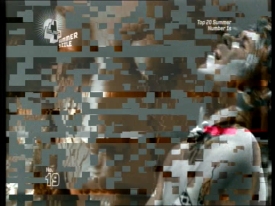 |
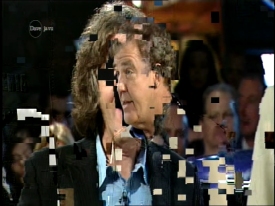
Examples of Freeview pixelation
What causes interference?
If you’re seeing interference on your Freeview picture, that indicates that your Freeview receiver is not getting a good enough signal, for one of a number of possible reason.
If you’re suffering from interference there are some things to try…
Freeview Interference – Things to check:
Here are some things to do to improve your picture quality.
| 1. Check your signal |
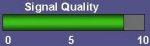
Weak signal strength is the most common cause of TV picture break-up. Your Freeview receiver just can’t get enough signal to hold a decent picture. Most Freeview set-top boxes and TV sets have an on-screen signal strength meter. This can be useful in working out how good your incoming TV signal is. You may have measurements for both Quality and Strength – the measurement for ‘Quality’ is very important – if this is high, then you’re likely to get good pictures even if the ‘Strength’ is much lower.
If your signal is weak, check your Freeview coverage. If you’re in a good Freeview coverage area, then a weak signal could point to an aerial issue. You should find the on-screen signal strength meter somewhere in one of the menus. Check your receiver’s manual for details. It’s also worth re-scanning your Freeview channel list a couple of times too. |
| 2. Check your Neighbours |
Are your neighbours affected by interference?
|
| 3. Check your cabling |
Use a high-quality screened co-ax aerial cable with gold-plated co-ax connectors (such as those from Maplin), don’t run your aerial cable anywhere near your mains cables, and don’t use longer cables than you actually need. Another option to try (although it didn’t work for us), is to wind your aerial flylead through a ‘ferrite ring‘. These are designed to reduce electromagnetic and RF ‘pickup’ and reduce the interference before it gets into your receiver. These are available for a few pounds from Maplin Electronics. For more help on tips for improving your TV aerial cabling, see our TV cabling advice. |
| 4. Check your aerial |
Make sure your aerial isn’t damaged, misaligned, or not up to the job. For best results, you need a good quality rooftop aerial, pointing directly at the appropriate digital transmitter. For aerial advice, see our TV aerial advice section. |
| 5. Too little signal? |
Note that in cases of low signal, boosters are less effective as they amplify noise as well as signal. See our boosters and splitters page for more. |
| 6. Too much signal? | In some cases, if you’re fairly close to your TV transmitter, you may be getting too much signal, and could be overloading your Freeview receiver. If this is the case, you need an aerial attenuator from Maplin. This plugs into the aerial socket and reduces the signal. |
| 7. Feeding other equipment? |
If you’re splitting aerial cables so that you can get TV in other rooms, consider a mains-powered booster with multiple outputs. This can help to overcome signal loss in the cables. It’s also worth trying a basic connection (i.e. removing feeds to other room or other equipment) to see if it is the extra cabling or connectors that are causing interference. |
| 8. Electrical interference |
This is another major annoyance – a common example being picture breakup when a light is switched on, the washing machine is running, the heating thermostat clicks on, a car or bus drives past or there’s other electrical activity in the area. Freeview can be prone to electrical interference, and here are a few hints to help you cure this:
The advice in the "Radio Interference" section may also be of help. |
| 9. Radio interference |
If your TV picture is breaking up at random, it could be that the TV is getting interference from a neighbouring transmitter.
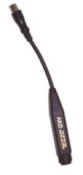
In many cases, filtering of the unwanted RF signals will solve the problem, and this can be done using an RF filter (pictured here). If possible, look for what’s called a "UHF Band Pass Filter" or a "High Pass Filter", which will let TV signals through, but restrict signals from other frequencies. Maplin stock a TVI ‘High Pass’ RF filter designed for the job. Some of the other tips in this section can help to screen out RF as well as electrical interference. |
| 10. Weather |
Bad weather can have an effect on your reception – strong winds blowing your aerial will affect your signal, as will heavy rain (specially in weak signal areas). Good, sunny weather can have an effect on your reception if you’re in a weak signal area, due to high pressure atmospherics. |
| 11. Channel interference |
Equipment such as video recorders and some set-top boxes ‘re-broadcast’ their signal via a TV aerial cable. This is known as ‘modulating’, and it allows TV sets that don’t have a SCART socket to view the output of video recorders and set-top boxes. If you’re seeing interference to channels, this could be being caused by something in your setup clashing with other channels. See our advice on "RF channels". |
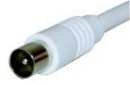 Sorting out your aerial cabling can make a serious difference to your reception. Just replacing your flylead from the aerial socket on your wall to the Freeview receiver could make a significant difference.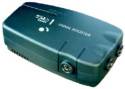
 If you live close to a taxi firm,
Need more help?
Ask in our Freeview Problems forum – Please include your postcode, plus the make and model of your Freeview receiver, as this helps the forum regulars provide relevant advice.
