
Need a connector or lead for your TV setup? We explain what the connectors do, and aim to point you in the right direction
Aerial Flylead
An Aerial Flylead is used to connect from a TV aerial socket on the wall to an aerial input socket on a TV or set-top box. They are also used to connect set-top boxes and recorders to TV sets. These will have a male aerial plug at each end. TV Aerial Flylead at Maplin.
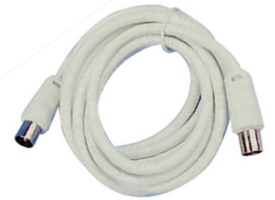
Co-ax aerial flylead
Aerial cable extender
Aerial lead with a male socket at one end and a female connector at the other end. TV Aerial Lead at Maplin.
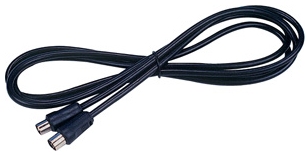
Co-ax aerial extension lead
Aerial connector
Got a damaged aerial connector? Replace the male connector plug with a co-ax plug. Basic co-ax plug at Maplin – see also all aerial connectors at Maplin.
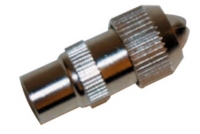 Co-ax aerial plug |
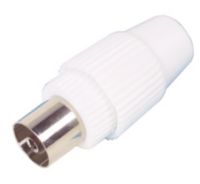
Co-ax aerial Socket (female) |
Aerial Splitters
See our dedicated Aerial Splitter and boosters page.
Need a connector, adapter, lead or splitter? We recommend Maplin Electronics and TV Cables |
SCART Lead
If you need to connect a set-top box or a DVD player to a TV set, you’ll probably need a male-to-male SCART lead. You can buy a basic SCART connection lead at Maplin, or you may want to invest in a higher-quality SCART lead, which you can get from TV Cables.
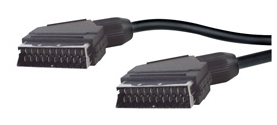
SCART plugs
F-Plug connector
F-Plugs are most commonly associated with satellite TV or cable TV systems. They have a screw thread. Pictured below is a male plug on the left, and a female on the right. For cables and connectors, go to a maplin.co.uk or tvcables.co.uk.
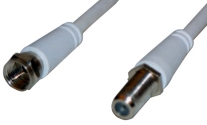 Male and Female ‘F’ connectors |
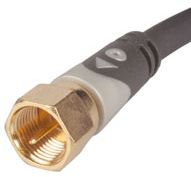 An F-Plug (Male) Satellite connector) |
HDMI connector
Typically used to connect a High Definition set-top box or DVD player to an HD-Ready TV set. We have a page dedicated to HDMI cables, connectors and converters. See our HDMI advice page.
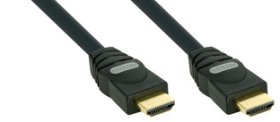
HDMI plugs
Component Connectors
Can be used to connect some types of set-top box to a TV set. Red, Green and Blue for Y,Pb,Pr component connectivity. Note that these carry video only, not audio. For Component connectors and adapters, go to a maplin.co.uk or tvcables.co.uk.
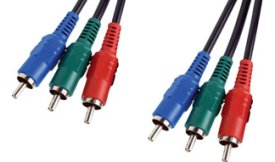
Two sets of Component Plugs
Composite Connectors
Three leads – red and white for stereo audio, and yellow for video. For connectors and adapters, go to a maplin.co.uk or tvcables.co.uk.
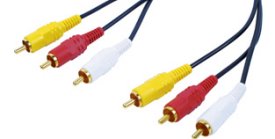
Two sets of composite leads
Connectors Explained
| Co-ax Explained | 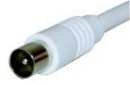 A co-ax plug is the kind you’d expect to find on the end of the wire that comes from your TV aerial. A co-ax plug is the kind you’d expect to find on the end of the wire that comes from your TV aerial.
For a selection of co-ax leads, converters and extensions, go to the Maplin website. |
| SCART Explained | 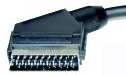 You’ll typically find a SCART socket on most modern TVs, DVD recorders, DVD players and many video recorders. It’s a 21 PIN rectangular connector that carries video and audio signals, as well as switching commands You’ll typically find a SCART socket on most modern TVs, DVD recorders, DVD players and many video recorders. It’s a 21 PIN rectangular connector that carries video and audio signals, as well as switching commands
For a selection of SCART leads and switch boxes, go to the Maplin website. |
| HDMI explained | 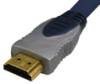 HDMI stands for “High Definition Media Interface”. This is the connector used to connect most high-definition equipment (such as the Sky+HD , Virgin V+ or BT Vision box) to a hi-def TV set. HDMI cables carry both video and audio. See our HDMI advice page for more. HDMI stands for “High Definition Media Interface”. This is the connector used to connect most high-definition equipment (such as the Sky+HD , Virgin V+ or BT Vision box) to a hi-def TV set. HDMI cables carry both video and audio. See our HDMI advice page for more.
If you’re looking for an HDMI cable, try TV Cables or Maplin Electronics |
Your questions answered
How can I connect my Freeview box to a PC monitor?
- If your Freeview box can output RGB via SCART, then get a SCART to VGA lead like the SCART to VGA SyncBlaster cable from Maplin , or the Video to VGA converter from TV Cables.
Related pages
- Not enough SCART sockets? Get a SCART Switch Box

Hi!
I’d like to use remote earphones with my TV but it doesn’t have an earphone socket.
Can you help please?
Warm regards,
Andy Dyson.
What other outputs does your TV have?
I just picked up (in fact,it took 2 of us) a SONY KDE P37XS1 Plasma TV as a second set,and THOUGHT it would be a simple matter to connect up my Desktop Computer,BUT no,as it doesn’t have a VGA socket.
Some say it can be connected,others say it can’t…got any Aspirin?
It doesn’t help that I don’t have the manual,and the one I’ve seen on-line doesn’t seem to explain the connections,but just gives “Letters” in the picture,such as
W/G/W/G
L/G/S/I
R/D/D/D
Y
PbCb
PrCr
With what LOOKS like 3 different Ariel connections.
So,my question to you is…can you please direct me to a site that will explain these cables (unless you can)? and do you think I can get a cable to connect this TV to a computer,such as a VGA to?.
If you can help,many thanks,if not,NO problem…I’ll work it out :-)
All the best
Sincerely
Gaz
Hi We had Scart leads put into the walls so that when we hung the flat screen tv there would be no wires until much lower down where we would place the tv hub and recorder etc. I now have a new tv provider which only gives an HDMI lead. Is there a converter that allows a male scart to plug in and then have an HDMI lead which will plug into the TV provider?
SCART and HDMI are not compatible and there’s no adapter – you need to add HDMI cable(s)
Hi
I lost the TV cable when we moved for my daughter’s room. The problem is the whole for the cable is not like a kettle lead. It is round with wholes for pins in it and I don’t know how to find one of these. Could you help please :-)
I have the sameness problem please help
Hi, do you mean the mains cable is missing? If so, just search on ebay for a PC mains cable and you should easily find what you need.
How do i covert TV ariel for use on my uniden ubc 355clt
can I run x3 tv sets from one outside ariel?
the wall plug is a F connector. How do one connect to a HDMI port?
My problem is that the building manage supply TV programs to my apartment thro’ this F plug, thinking of buying a darblet day 5000 to improve the picture.
Hello I just moved to UK from Italy and need advice on how to plug my TV. there’s a Co-ax aerial Socket in the wall, I connected it with a co-ax cable to my TV but there is no signal.
on the wall there is also a F plug connector. does this mean the co-ax cable does not work anymore and I need to try and plug on the F plug?
so what should I do in order to see the standard channels of british TV?
thanks
G
I forgot to mention, it is an italian TV with only co-ax plugh and SCART plug.
If it’s a TV that is older than two years then u need to get a free view box. Otherwise u just tune u r TV into the area. Being bought in Italy would have nothing to do with it given most tvs and electronic good come from Asian countries like China or tyain or Tokyo.
@Mary Trainor
Where they’re made is irrelevant, but different countries have different TV standards. There are uncountable variations on PAL (B/G/I), and then there’s SECAM (France).
Wondered if you could help please?
I have bought a 2nd hand technika 19″ tv/dvd combo. I would like to use it with headphones but it has no headphone jack. I am not bothered about using the tv, just dvd.
I have read about various converters etc and tried a few things but all without success.
The set has scart, y/pb/pr, hdmi, vga and s-video sockets and also two audio in sockets but no output.
Would a scart block with 3 phono sockets do the trick as I am not using the scart lead?
Any help most appreciated!
Hi
I have a dish on the side of my house and would like to know
If we’re the lead comes in and is two wires can an adapter be bought
so I can have one lead into the back of the set .
I have changed from a sky box back to freebies.
Can I buy an adapter to change my two lead aerial lead for sky box to a one lead for free view.
No. But you can buy Freesat box instead of Sky and receive free to air sat channels.
Hi
I have a dish on the side of my house and would like to know
If we’re the lead comes in and is two wires can an adapter be bought
so I can have one lead into the back of the set .
I have changed from a sky box back to free view.
Hi! I have a question. Is it possible to solder two wires in one. If I have abb (http://hardware.eu/abb) and inside it there are 4 wires more? How to know which wires should be connected to each other?
Hello, is there anyway possible of converting a sega megadrive/genesis (coax) to an HDMI output?
Trying to solve a friends problem. Taking a coax cable out of any of the 3 televisions means the other 2 stop receiving a signal…
hi I have an old tv i want to use in my den so my wife doesn’t have to watch all the . [her words] crap sport.the skybox only has a hdmi socket and the tv doesn’t can I do what I want to do and how.Hope you can help or no sport for me. thanks Bernard Frankland
All skyboxes have an RF throughput which means if you plug the aerial into the tv then into the sky then plug another lead from the other rf socket into the aerial socket you will get an output on channel 36 of the TV its then a simple case of tuning the telly in. Your box is capable of HD and your using it with an SD TV then you are not getting the most out of your Sky Box get a 32′ TV their about 150 and have HDMI
Hi I have broke off aerial connection to rear of tv,can I convert aerial lead to hdmi regards Charles
No you can not. The signal needs to decoded by the TV tuner.
My TV aerial lead is male one end and female the other. However, the TV and the socket on the wall are both the same, male or female, not sure which, how can I connect my TV?
you need an RF coupler to change the gender of the socket the tv will probably be using the male end so youve got the old type female socket just get a male to male RF coupler and this will allow you to plug your female end in. you could also get a male to male fly lead but that would be more expensive
What is the knob you can twist on a both
Ends of the lead?
I need wireless headphones that I can use from my tv my wife listenes to the tv in the same room but I am hard of hearing and need the sound higher than she does . is this possible and what do I require and how do I connect these tnanks juke
Both my Digital antenna and my HDTV (Vizio) have male connectors. I purchased an “F” connector to pair them, but it is too large to screw into either the TV or the Antenna cable. Is there a special connector for this purpose? Thanks.
What is the name of the cord that plugs the TV into the wall? I lost mine and can’t find one.
I+have+1+co-ax+cable+connected+between+my+main+Sony+TV+system+in+sitting+room+and+TV+in+kitchen.+I+can+watch+digital+on+this+TV+and+also+Sky+via+the+same+cable+I+purchased+a+new+Tv+and+decided+to+move+the+old+one+to+the+bedroom.+I+put+a+3+way+splitter+on+cable+feeding+the+kitchen+TV+and+ran+a+cable+to+the+bedroom,+but++I+find+that+I+can+only+get+the+Sky+channel+which+is+showing+on+main+Tv,+but+cannot+access+Digital+/Freeview+,+when+I+try+the+Auto+Set+Up+it+shows+no+channels+and+to+connect+the+aerial.
Any+suggestions+greatly+appreciated.
I have a dish outside the house and the cable I can see in is a set of 3 cables with the socket and a needle in them, can someone help me as to what type of coaxial cable I need to buy to watch the freeview channels, the TV has built in speciality so don’t need a freeview box, etc.
You need a TV aerial to receive freeview. Sat dish won’t work.
Just bought an Atlas 200-se satellite receiver here in Spain,only instructions are in French & Arabic.Any idea how to connect cables to TV? old box had cart to scart but new box has no scart possibility.
Is+there+a+symbol+for+Ariel+socket
Can you tel me please what I need to connect a now tv box I only have scart on the back of telly
Can’t+find+where+to+connect+electricity+to+my+toshiba+flat+screen+tv
Hi all I have just moved to a new property that has a digital tv aerial and a built in connection point. The point has 2 x coaxial lead and 2 x digital see in lead connecters. My tv has 1 x coaxial and 1 x digital connection socket. I have tried to get a signal through a single coaxial lead and tune the tv but to effect. Can anyone help as to the way to get a signal to my tv through this set up.
Thanks in advance
Hi we are only getting black and white through the ariel connection to my freeview box anyone have an idea how to fix please.
Thank you for the such good post! I will use this info
I+have+a+smart+TV+connected+to+my+WiFi,+with+built+in+Freesat+which+I+have+connected+to+my+existing+satellite+cable.++I+want+to+use+this+system+via+my+WiFi+only+and+also+record+progs+onto+my+Tv+box.++Do+I+need+to+connect+the+box+to+the+satellite+or+just+record/playback+using+the+HDMI+connection.
I have a dvd with place for a scart lead and a tv that does not how do I connect the two.
You have a great content! Thanks for sharing
Hi,
I have a Humax TV which I use as a computer monitor. It was working perfectly last night, then today I replaced my desk, so disconnected it. The 4 pin power cable/adaptor won’t reconnect – it now goes halfway into the socket on the TV and makes an intermittent noise. I thought even I was capable of moving a TV from point A to point B, but seemingly not. I have ordered a new cable, but thought I’d check if there is anything else that I should do.
Thanks for any suggestions,
Verity