
Watch TV In Other Rooms – Help and Advice
Useful information on how to get digital TV onto other TV sets in your home



Digital TV services available in the UK
How can I get TV in a second room?
Let’s assume you have digital TV on the main telly in your house. This could be with a set-top box, or from a TV set that has Freeview built-in. If you don’t yet have digital TV on your main TV set, see our Digital TV Options page.
To get digital TV into other rooms of your home, such as a bedroom or a kitchen, you have two options:
- Connect from your existing set-top box to your second TV
- Get a separate set-top box to connect to your second TV
Next, we’ll explain both options:
Option 1: Connect your set-top box to a second TV set
This option will save you the expense of having to buy a second set-top box.
Normally, this will mean running an aerial cable from the output of your main set-top box, to the aerial input of your second TV set.
NOTE: There is one big drawback with this option – and that is that your second TV set will only be able to watch the output of the TV receiver in the main room. As an example, let’s say you have a Sky Digital box in your lounge, and it’s set to Sky One. If you connect an aerial cable to a second TV set, the second TV set will only be able to watch Sky One via that connection. Change channel on the main box, and the second TV changes channel too.
Connecting via aerial cable to a TV in a different room:
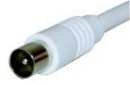 For this option to work, your set-top box must have an RF aerial output socket (to accept a plug like the one pictured). Also, the set-top box must have something called a modulated output (which means it can re-transmit a signal to a second TV set). Boxes from Sky Digital, Virgin Media and BT Vision (grey models) have these, as do some Freeview boxes.
Box not got an RF Output? You can buy an add-on “modulator” for under £30 that will convert a SCART socket into an RF out, or you can connect via an old video recorder – as many of these have modulated outputs. RF modulator advice. Otherwise, consider a wireless sender , or the second box option
Aerial Extension kits: To connect, you need to run a co-ax aerial cable from the back of your set-top box to the aerial input on your second TV set – you can get cables, connectors and extension kits from Maplin and Argos. See below for an example of an extension kit.
If you don’t want to use a kit, you’ll need a suitable length of co-ax cable, cleats to nail the cable to the skirting board and one co-ax aerial plug for each end, plus a way of splitting or boosting your existing aerial.
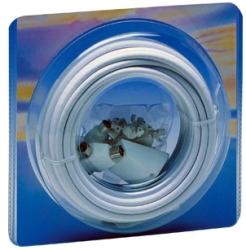
Pictured: TV aerial extension kits (15 or 25 metres) under £20 from Maplin.co.uk
Tuning in: Once you’ve made a connection, you need to tune the TV set into the output of the set-top box. You need to make sure that the set-top box modulator is turned on (Got Sky? See Sky FAQ).
Multiple TV sets? If you’re feeding to lots of TV sets, or have a very long cable run, you may need either a splitter or booster (from Maplin) to allow you to split and amplify the aerial co-ax output without too much quality loss.
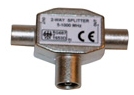 Aerial Splitter. Handy for splitting a single aerial to feed two TV sets, or a TV and recorder. Available from www.maplin.co.uk |
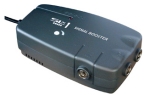 Aerial Booster with multiple outputs. Amplified for low signal strength areas, or if you get signal loss over a long cable run. Available from www.maplin.co.uk |
Got Sky Digital? Consider getting a Sky TV Link/Eye to allow you to change channels from the second room. They’re available from Maplin or Argos. More on our Sky TV Link FAQ
Don’t want to run cables?
Wireless AV senders are available from Maplin.co.uk. See our Video Senders page for more on AV senders. |
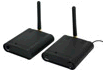 If you’d rather not run cables, consider a wireless video sender – these connect to a spare SCART socket on your digital TV set-top box. Again, these can only transmit whatever channel your set-top box is tuned in to.
Option 2: Get a second box
Purchasing a second set-top box for the other room is normally the more expensive option, but it does give you the flexibility to watch a different digital TV channel in each room.
- Freeview: Just buy a second Freeview box (from £20), connect it to your telly, then connect the box to a TV aerial feed. Freeview information
- Sky Digital: If you want a second Sky box, you’ll be wanting Sky Multiroom. This gives you a box in each room, each one cabled to your satellite dish. You will need a Multiroom subscription for each additional box. Details and prices at sky.com/shop/boxes/sky-multiroom
- Virgin Media: Virgin will be happy to sell you a second V Box – Order at www.virginmedia.com.
- BT Vision: You can’t have two BT Vision boxes connected to broadband at the same time, so getting a second BT Vision box won’t do you many favours. As BT Vision gets its live TV from Freeview, a second Freeview box may be all you need.
More on Digital TV:
- For more on Freeview and free-to-air set-top boxes, see our Freeview page.
- For more on Sky, see our Satellite page.
- For help with connecting, reception problems and other TV issues, see our Freeview FAQ page
- Discuss digital TV in our TV forum
- For details of hard-disk recording solutions, see our Personal Video Recorder PVR page
- Help and Advice: BT Vision , Freesat, Freeview, Sky TV, TalkTalk TV, Top Up TV, Virgin Media

Really useful info as I need to install a separate TV in my kitchen and have no wired aerial point, so will try the wireless option
Looks like a simply option to get a decent TV signal into my bedroom. Will give this a try,
Hi there,could you please post a diagram of the cable set up to have sky multiroom with two separate boxes Lounge and bedroom 1 and bedroom 2 a sky link to tv in bedroom 2 by coax cable and video sender from the sky box in the lounge to bedroom 2.
Thanks
Hi
Quick question.I have just bought a TV with satellite build in with no RF out. I still have my old satellite receiver so I have decided to connect it to my second TV upstairs. The only problem is that I can’t run any cables (apart from the one that I have already)through the wall. Can I can connect my receiver (I will leave it downstairs) and my TV (upstairs) just with the RF loop?
Thanks
veronica
Hi Veronica.
If you have decided to take your sky digi box upstairs to use in ur bed room. You will need one digital coaxial cable with a f connector to go from the lnb on ur sky digital dish down to the back of your sky digital box then a scart cable going from TV out on the back of sky digital box to scart in on the back of your TV. Then switch on bedroom TV an tune it into what channel your sky digital box is broadcasting showing IE 401 Sky Sports one.
I have Virgin media in main room and it’s connected to a booster box which is also connected to the bed room TV. Can I watch Virgin in the living room and also have the same channel on in the bed room? If so how can I do this help please. :) email me if poss :)
I ahve just replaced a first generation digiatl tv ina bedroom witha new Sansung smart Tv. Problem is I cannot get the old Sky arrnagment to work, This was not Sky multiroom just a feed from the lounge Sky bbox which connected toa combiner (Freeview TV being the other input and the outlet from the combiner went into the coax socket on the TV . O the old system there was channel which you selected to see Sky but the new set up doesnt seem to allow this
Any ideas please
john
Hi,
I want to install a 6-way aerial signal booster, to feed signal to TV’s in different parts of the house (and leave spare sockets for future additional TVs). One of them will be around a 30m run away from the booster, located in the loft.
I have seen a box to buy, and the spec quotes Output gain of 12-15dB, with Noise of <=3.5dB. Will this spec be strong enough to push a strong enough signal to the farthest TV, for viewing Freeview?
I already have 2 TVs connect to a smaller signal booster and the picture quality is perfect.
Thanks,
Tony
Hi tony what is ur last name as I think u might be part of my family
How do i install a tv plug in amplifier?
(Aerial cable is in the loft?)
Thanks
can I get more freeview channels on my freeview tv if I connect a freeview box.
I have a M8 TT tv box with kodi etc, all connected via HDMI cables. I have purchased a oneforall SV 1730, and I can’t seem to get it to work on my second TV in the kitchen. The oneforall is connected to my smart TV in lounge and the receiver is connected to kitchen TV all by scarts. The chap in Currys assured me that whatever was on lounge TV would show on kitchen TV but I don’t have anything…please help.
gd day.pls i hav dstv satterlite dish nd box likewise startimes and want to be whahing dsame challels inside my other tv i hav in my inner room. dat means where i can get av chnners to connect my cable tv inside d sitting room to my tv in d sitting room.is it possible to buy on line or where i can buy in nigeria shop.
pls can i watch in one decoder or receiver more than 1 television?
Not sure if you can help, i am after a device which can enable me to listen to British radio channels on my builders radio while working in the barn. I can get radio channels on my sky box, but it is around 45m away from the barn. I am looking for a gadget to boost it to my radio.
Thanks.
I+have+a+seperate+free+sat+box+with+my+bedroom+tv+.+both+my+freesat+boxes+take+their+feed+from+the+same+dish+yet+there+are+many+freesat+stations+missing+from+the+tv+in+my+bedroom+compared+to+what+I+can+receive+from+my+other+tv+.+
My+Freesat+boxes+are+via+diff’+makes+but+should+that+make+a+difference+etc+?
I+have+tried+re+tuning+but+I+still+can’t+pick+up+the+missing+channels+!
I’ve decided after many years of trying to extend TV circuits myself, its worth it in the long to get a professional in and do this for me. Now that many programs in broadcast in HD it is well worth getting a good signal in order to appreciate the benefits of HD. No point buying a good quality HD TV if you are not going to get a signal to match.
according to https://www.radioandtelly.co.uk/freeviewhelp/splittersandboosters.html
It says, if you have a Y or T splitter the TV aerial has to be connected to the ‘foot’ of the ‘T’ or ‘Y’ for the correct result)
If the aerial has a male connector and the foot of the T or Y also has a male connector how is this possible.
Also not sure what aerial leads to use. I have two and both have a male and female end
I know it’s kinda old thread, but I really could use some help. Can’t get it by googling everything I thought about.
I have cable tv provider to my house. 2 TVs are connected to main SetTop Box via cable splitter. So, one coaxial cable goes to splitter, and two cables go from the splitter, each to its own TV. Now, my problem is, whenever I turn off LG tv, my Samsung tv in the other room loses signal for all the channels. If both are turned on, signal is great on both of them. If I turn off Samsung, LG does NOT lose signal. I tried switching the cables on the output of the splitter, but nothing changes. What can I do? Also, when i plug off the cable from LG tv, my Samsung is able to search for channels and has great signal. As soon as I plug the coaxial cable back into LG and its is turned off, Samsung loses signal. Please, anyone, help me.
Personally I’d run separate feeds to both TVs ( use 2 cables not a splitter) eliminates that problem.
how do I stop my sky remote switching on the t v down stairs, when we switch t v on upstairs when we go to bed, using a t v link
how do I stop my sky remote switching on the t v downstairs, when we switch t v on upstairs when we go to bed, using a t v link
My+Sky+HD+Box+doesn’t+have+a+port+labelled+RF+although+it+has+a+port+reading+”Coaxial+Digital+Audio+out”.++++Is+this+an+RF?
Hi+I’m+watching+normal+tv+through+my+old+sky+box+how+do+i+connect+my+telly+in+the+bedroom+is+it+just+a+cable+from+sky+box+to+bedroom+tv+I+have+no+aerial+in+my+bedroom+but+I+do+have+a+freeview+box+to+connect+to+bedroom+telly!
With the help of this article, You can easily watch TV in the room. it is a very important post to me. And in this, you provide the technic which is very helpful to me. so, I am using the Apple TV which is working very good. if I have any problem when I go to the website https://applesupportnumber.net/apple-tv-support/ which provides the best support. This post is really good.
Ladders are required for your Freeview mod, get an exterior splitter some self amalgamating tape , and climb the ladder snip the mount cable fit a connector and fit it into the’out’ of the the splitter, then run your cables into a room or rooms from the ‘in’ connectors to your TVs.
We do have a television on our bedroom a few months ago but it seems like my son is getting more spoiled as he wants to watch shows all the time. So we have to remove it and just use the ones from the living room. I love it as it has become a family time bonding for us.
durasash.com
I am happy that we do not go through the same thing nowadays. Kids now do not realize how hard to set this up.
http://www.svgtoyota.com/