Radio and Telly
Home
Digital TV
Freeview
Satellite TV
Cable TV
Top Up TV
BT Vision
Digital Switchover
Divider
Glossary
Email alerts
Forum
RSS FeedLatest news
RSS FeedPodcast


TV and Radio Guides

UK TV Guides and Listings

With so many TV and radio channels available to us, especially via Sky TV, Freeview and cable, it's getting harder to find something to watch, keep track of your favourite shows, and plan your week's viewing.

We give you some ideas on keeping track of your telly...

TV Listings Magazine

The traditional way of keeping track of your TV viewing, is the weekly TV listings magazine.

TV & Satellite Week

There are a number of TV listings magazines on the market - at the office, our favourite is TV & Satellite Week, billed as "The UK's No.1 Digital TV guide". This covers over 100 digital channels. It's available from newsagents, but it's a lot cheaper to subscribe. Check out their site for Subscription info. For a discounted subscription, go to www.magazine-group.co.uk

Digital TV On-screen Guides

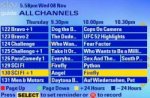
Below is a screenshot of the Electronic Programme Guide (EPG) from Freeview - this was taken from the BT iPlayer, which has a built-in 7 day electronic programme guide updated over-the-air.

Freeview EPG

Most Freeview boxes carry the EPG, but some of the early or more basic models only support "now and next". Sky customers are also treated to an excellent EPG, especially useful for their hard disk recording product, Sky+.

Electronic Listing Services

Good as the above guides are, electronic on-screen programme guides just aren't to the job, daily newspapers don't let you plan ahead, and weekly listings magazines can be expensive or don't carry all the channels.

The answer? An electronic listings service. This section looks at the main services available in the UK, and the ways to get hold of them:

  • PC Software - Download an application to your PC. It checks for TV listings, downloading them if you don't have them
  • Internet - There are several listing services online, and each TV channel has listings on it's site. We look at two services that cover most or all of the channels in one service. You have to create a profile, and each time you log in, you can view your channels and preferences.
  • PDA / Palmtop - Got a Pocket PC or Palm OS PDA? Then you can download listings when you dock your PDA, and carry searchable listings around with you.
  • Mobile phone - Using WAP (the 'Mobile Internet'), you can log on to a TV listings service and see what's coming up


DigiGuide for your PC

If you're into your telly, then the best tool at your disposal for keeping track of the many channels and programmes out there, is the PC version of a product called DigiGuide. Once installed, this PC application downloads programme listings from your selected TV channels for up to a month in advance, and lets you search for your favourite shows. You can customise TV listings to your preferences, keep an eye out for appearances by your favourite actors and actresses. DigiGuide supports over 250 channels, has multiple views, and has superb search facilities.

DigiGuide for your PC is free to download on trial. If you like it, the cost is £8.99 a year. Click here to download the free trial . As of September 2006, there's a "lite" version available that offers free listings to your desktop. More at www.digiguide.com

Digiguide's application
The main Grid view
Summary view A show's listing
The channel overview and programme details

Get DigiGuide

Digiguide on the Web

As an alternative to the DigiGuide PC application, they also offer a web-based subscription service. This can be accessed from any browser, and also allows for PDA and WAP access to your preferred channels, favourite shows and programme listings. Take a look at www.mydigiguide.com

DigiGuide on the Move

Access to programme listings are available on your PDA, smartphone, or a WAP-enabled mobile phone with DigiGuide. Here's a summary of DigiGuide in action on Pocket PC, Palm and Symbian OS.

DigiGuide on AvantGo Nokia 7650 Wap Browser.PDA - If you have a Palm OS, Pocket PC Palmtop, or a smartphone, you may be able to get access to TV listings offline via AvantGo, the synchronisation service. To set this up, you'll need to create an AvantGo account via www.avantgo.com. Once this is done, add the account name and password to AvantGo on your PDA. Next, you'll need to create a subscription to DigiGuide online. Then, subscribe to the AvantGo DigiGuide channel, and add the DigiGuide username and password. Next time you sync, the programme listings get copied across. You can use a basic version of DigiGuide for free, but to open up all of the channels and facilities, then you'll need to register for just £6.99.
Even if you don't use AvantGo, DigiGuide can be used with Pocket PC Mobile Favorites, iSiloX, AvantGo, MobiPocket or Mazingo.

WAP
- Digiguide can also be accessed from a WAP-enabled mobile phone. To get there, enter the WAP address of http://wap.mydigiguide.com/ (including the slash) into your WAP browser. Pictured on the right is the Nokia 6600 browser. Click here for more on WAP.

DigiGuide Questions?

  • Q. When I register, can I use my copy on more than one machine?
    A. Yes. Provided it's for your own use, you can use one licence on more than one machine, such as a home PC and a laptop. The licence is a per-user licence, so if it's just you using it, you should be fine. You can't use two versions with the same registration code at the same time, and the DigiGuide servers keep a track of your Internet connections, so can monitor licence infringements and prevent access to the service. The file uprof in your DigiGuide directory holds licence information and personal settings. Transporting this to your second PC should be all that's needed. Info from DigiGuide forum

Radio Times PDA

The second option available to you, is from the BBC - The Radio Times PDA version can be downloaded and administered from radiotimes.tvcompass.com. Here's what it has to offer...

DigiGuide on a Pocket PC Radio Times is available for a free trial period of 14 days, on Pocket PC and Palm devices. If you like the service, the Radio Times PDA application will cost £14.95 per year. This price includes full TV listings, radio listings, upgrades and support. It can be downloaded from radiotimes.tvcompass.com. As well as listings for the major TV channels, the application acts as a remote control, and has a List view and a Grid view.

DigiGuide on a Palm IIITo get up and running, you select which package you have at home: the five standard TV channels, Sky Digital, Freeview or Virgin Media. You then select your make of TV or set-top box (for the Remote Control feature), then download the application. When you perform a hotsync or ActiveSync

Once up-and-running, you can change your synchronisation settings, channels, timebands, favourites all from the website, and they'll take effect next time you synchronise.

If you get a "Sync failed" message, it's probable that you've not verified your account (check for an email from the BBC), the password you've entered is wrong (for a Palm, see 'Custom' in HotSync Manager), or the service from TVCompass is down.

FreeGuide

There's a free electronic listings program under development. It's an open source Java application, with a Linux or Windows build. For details and the installation files, see freeguide-tv.sourceforge.net. Here are a few notes:

  • Installation. If you're running Windows, you'll need to have Sun's Java Runtime Environment installed (a 15 Meg download) for FreeGuide to run. When we first reviewed this in 2003, installation was a little fiddly, but when we tried again in August 2004, this had been made easier through a Windows installer application. From our experience, it's best to install Java before installing FreeGuide - doing this the other way around resulted in us seeing "Configuring: Execution Error." A re-installation solved this for us (Note that FreeGuide doesn't appear in Add/remove, so you'll need to uninstall from the c:\program files\freeguide folder). Also, make sure you add a timezone variable (see the installation instructions)
  • Interface. Compared with DigiGuide, some may consider the interface to be a little bland - it's not as colourful, doesn't support as much customisation, and lacks a few of DigiGuide's nice little touches and more advanced features, but then, it's free!
  • Features. Comes with basic listings, favourites and a recent addition, notifications. Doesn't support as many TV channels as DigiGuide, and lacks features such as the ability to search listings, a programme lookout, and a page-per-channel view.

FreeGuide screenshot
FreeGuide on a PC (under Java). Not quite as impressive or feature-packed as DigiGuide, but, hey, it's free!

XMLGuide

This TV Guide program started life as XMLGuide (part of an A Level Computing project). Since then, it's updated, now supports XMLTV (so can be used with international TV listings formats), and runs on the Windows Java engine. Find out more, and download the current version from www.spheretv.com


Sky Special offer

Links

Is this page correct? Something wrong or missing on this page? Report a site problem
Please help us correct the problem and to keep the site up-to-date
.

If you're looking for help, please don't use this option - instead ask in our forum

Copyright © 2002-2008 Radio & Telly. Terms