
How to get satellite TV in the UK, and a look at what Sky and Freesat have to offer. We provide help and advice on using the Sky and Freesat digital satellite services, to help you make the right choice.

| New to Satellite TV? |
|
| Existing Sky User? |
|

Latest Sky Offer…If you order Sky online, you can take advantage of the following offers.
|

Sky TV: The Basics
Sky offers the highest number of digital TV channels. Sky’s service can be received by 98% of homes in the UK, so it offers far better coverage than rival services Freeview or Virgin Media.
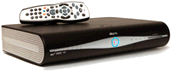 To get Sky, you’ll need to have a satellite dish installed on the outside of your house and Sky will provide you with a special digital set-top box.
Sky’s famous for their Sky+ hard disk recorder boxes, which makes watching and recording TV amazingly easy. In most cases, Sky will let you have one of these high-spec recorders for free.
The Sky Channels
Once Sky has been installed, you’ll get access to hundreds of digital TV and radio channels. You’ll get some top channels, such as Sky 1, Sky Living, Sky Atlantic, Comedy Central, the SyFy Channel, G.O.L.D, ITV2, BBC Three, E4, Fox, Dave, Watch and Alibi. There’s also lots of junk too, including loads of shopping and gaming channels.

For a little extra, you can also add premium channels such as the ten Sky Movies channels. Sports fans are well-served with the 4 Sky Sports channels, Eurosport and ESPN. The Disney channels, Music Choice and Sky Arts are available, as well as adult content, and you can get new films on-demand with Sky Box Office.
How do I get Sky Digital?
To get Sky TV, you’ll need to have a satellite dish and a special Sky digibox installed at your home, and you’ll need to pick one or more channel packages to subscribe to. In many cases, Sky will supply and install for free.
You can order Sky TV online at www.sky.com. When you book, you arrange an installation appointment (including Saturday and Sunday). One of Sky’s installers will turn up and install the Sky dish and digibox, connect it all to your telly, and set everything up for you.
Want to know more about Sky Digital?
Millions of homes in the UK have Sky. If you’re considering signing up, here’s what you need to know:
- Hundreds of digital TV and radio channels – Far more channels than you’ll find on cable TV or Freeview – including Sky 1, Sky 2, Sky Living, Sky Atlantic, GOLD, Comedy Central, Dave, E4, BBC3, Film 4, SyFy (the sci-fi channel) and loads more.
- HD: Over 50 channels of stunning High Definition TV. Even if you don’t yet own an HD TV, getting a Sky+HD box will mean you’re ready to hi-def.
- Recording – The hype is true – the award-winning Sky+ box will change the way you watch telly. Watch TV on your terms, when you want, and don’t miss an episode of your favourite series.
- Sport – Unrivalled sports coverage with 4 Sky Sports channels, ESPN, Sky Sports News, plus Eurosport , Racing UK and attheraces. Sky’s a must for football, rugby, golf and cricket fans.
- Movies – Sky has 10 main movie channels, and two Sky Cinema channels, as well as a whole range of Sky Box Office pay-per-view films. Sky also offers 10 HD movie channels
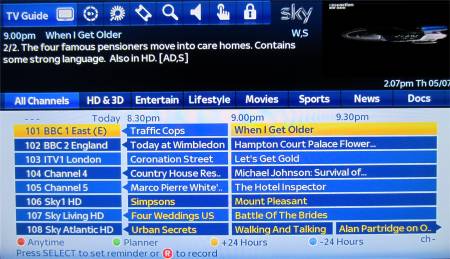
Sky’s on-screen Electronic Programme Guide
What is Sky+?
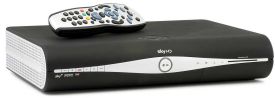 The hype is actually true… Sky+ will change the way you watch TV.
The Sky+ box combines a satellite receiver with a hard-disk recorder that lets you record 180 hours of programmes and movies without tape or DVD.
Sky+ lets you watch one satellite channel while recording another TV channel, record two different channels at the same time, and pause/rewind live TV. Sky+ supports Series Link, so you don’t miss an episode of a series you’re following. You can even use your mobile phone to set programmes to record.
Sky+ is available direct from www.sky.com. For more on this recorder, see our dedicated Sky+ section.
Free-to-view satellite TV
To watch many of the channels on offer with Sky Digital, you have to subscribe to a Sky package. If you don’t fancy paying to watch satellite television, there are ways to watch without a subscription – although the channel choice is limited.
Here’s a summary:
 Freesat – This service from the BBC and ITV launched in 2008 and provides subscription-free satellite TV.You need a satellite dish (£80 typical installation), and to pay a one-off cost for the box (from £50). Once installed, you’ll be able to receive over 100 TV and 30 radio channels without a subscription. To find out more, see Freesat Explored
- Subscription-free Sky – Sky offers something called Freesat from Sky. 240 digital TV channels for a one-off cost of £175. Sky will install the satellite dish and digibox – and there’s no ongoing subscription.
 Freeview – This is nothing to do with the Sky satellite system. Freeview is received on suitable set-top boxes or TV sets using a TV aerial, and not via a Sky box or satellite dish.Freeview offers around 60 channels of TV and radio, with no subscription. The channel lineup is quite small compared to Sky Digital. See our Freeview information section for more on Freeview via a TV aerial.
- Free to air – A number of digital TV and radio channels can be viewed on a satellite receiver without a subscription or a card, as the signal is not encrypted. For a list of the free TV and radio channels that can be viewed with a Sky dish and decoder without subscription, see the Sky Free-to-air channel list.To get these channels, you can use a Sky decoder and dish, or go for a DIY Free to Air Digital Satellite Kit, which is available from Maplin.
Details of free-to-air TV in the UK can be found on our Free to view satellite TV page.
|
 Paying too much for your TV channels?
Satellite TV Questions Answered
Need help and advice about Sky Digital or Freesat? Visit our special Sky Digital FAQ or our Freesat FAQ. Below are a few extracts from our main FAQ:
| Satellite TV coverage | The satellites used for Sky and Freesat covers approximately 98% of the UK, meaning that Sky and Freesat are available to more homes than Freeview, BT Vision and Virgin Media.
Getting satellite TV is only a problem if you aren’t able to get a clear line-of-sight to the orbiting satellite (concrete, trees or hills in the way), or if for some reason you’re not allowed a satellite dish where you live. More on this on our Sky Coverage FAQ |
| Sky packages | When you sign up to Sky’s satellite TV service, you need to select either the Entertainment, or the Entertainment Extra Package:
With Sky, you also get a number of free-to-view channels as well. There are also optional “Premium Packs” (which let you get the various Sky Movies and Sky Sports channels). Sky doesn’t allow you to pick individual channels to subscribe to – you select from their preset “packages”. To view these options and to see how much your monthly subscription is likely to be, go to sky.com/shop/tv. |
| Sky in other rooms | If you’re looking to watch Sky in other rooms of your house, there are a few options:
For more on these options, see our Sky in other rooms section. |
| Multiroom | If you’re interested in having Sky in multiple rooms, you can look at Sky Multiroom. This gives you a box in each room, so you can watch different Sky channels in different rooms. You will need a Multiroom subscription for each additional box. Details and prices at sky.com/shop/boxes/sky-multiroom
Note the following limitation: One Sky dish can’t have more than eight ‘feeds’ running from it (and for that, you’ll need to have an Octo LNB fitted), and that assumes that so each dish can only provide a feed for up to four Sky+ boxes, or eight standard Sky boxes. |
| Sky HD |  Hi-definition (HDTV) offers a higher quality picture with more vibrant colours, greater detail, crisp clarity and amazing sound quality. Hi-definition (HDTV) offers a higher quality picture with more vibrant colours, greater detail, crisp clarity and amazing sound quality.
Sky is the leading HD provider in the UK – For more details on Sky’s HD service, take a look at our dedicated Sky+HD Information page. |
| Where is the satellite? | Sky Digital broadcasts from a group of satellites positioned at 28.2ºE and 28.5ºE above the Equator. These orbit the earth at an altitude of around 22,000 miles.
Need help finding the satellite? See our Installing a Dish FAQ. |
| Outside the UK | 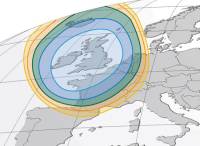 The Sky Digital TV service is only officially on offer to those living in the UK (including the Isle of Man and Channel Islands). There’s also the Sky for Republic of Ireland service. The Sky Digital TV service is only officially on offer to those living in the UK (including the Isle of Man and Channel Islands). There’s also the Sky for Republic of Ireland service.
That having been said, the “footprint” of the Astra satellites used by Sky allows signals to be received in other parts of Europe. The picture on the right shows an approximate “footprint” of the Astra 2D satellite, which transmits the BBC channels. For more help on digital TV outside the UK, see: |
| Can’t get satellite TV? | 98% of the UK can get satellite TV, but if you can’t get a satellite dish where you live, or don’t want to pay for Sky, see our page of digital TV alternatives. |
| Sky Broadband | Sky offers free Broadband to its digital TV customers who get their Talk package. The basic Sky Broadband free service offers limited bandwidth, but you can pay extra to get service up to 16 Meg, if supported in your area.
Sky’s Broadband is provided by Internet provider Easynet. You can check if your area is covered at sky.com/shop/broadband-talk |
Got a question on Sky Digital or Freesat? Try our Sky FAQ, or ask in our Satellite forum |

Received sky hd box to change from sky+ ,what do I connect my 3 arial connections to?
In my living room I have a socket which has sat,return,tv, radio. I have no socket in the bedroom. I have an old sky + HD box that I want to put in the bedroom for freesat from sky. I also have a freesat recorder that I want to put in the living room. Is this possible with the sockets I have and if so how do I do this. Do I need splitters etc.
can you get the history channels on freeview or do i need to shell out for sky please answer
had no problems with local news etc until wednesday30 december 2015. that evening we had no signal then after switching off box at mains , removing card for over 5 mins i finally got reception but local news is central when it should be north east as we live in north yorkshire [yo22 5en postcode].can you advise please
if you changed to fta and cancelled sky subscription, would you lose catch up and recording facilities
does anyone know of a company or person who can set up all my phone, tv and broadband services on my new house which is a new build property in Bedfordshire?
BT or sky….
happy to pay for someone to ensure all this is done on moving in day(april/may)
many thanks
please how can i set up my tv on sky tv channel or uk freeview channels ? SOURCESTV in Tottenham.
http://breakingnewsgh.com/tv/sources-tv
I+have+followed++instructions+for+adding+channels+to+my+Sky++planner+and+get+a+message+that+the+channel+has+been+successfully+added-+so+far+so+good.
But+when+I+go+Into+the+added+channels+box,+the+channel+appears+with+a+tick+against+it+and+below+the+screen+instead+of+yellow+button+save+it+says+remove+channel+but+for+all+the+other+channels++in+the+box+it+says+save+channel.
Why+is+this?
when is retro movies coming back please was on 327
I have an auto-track sat system on my boat (road pro minidome) satellite receiver is an old Ross HD box system, in use is freesat Obviously this box will need to be changed for a sky digi-box If i change to a sky system set up, will my tracking system accept sky signal output? looking at one of the the sky offers, i noticed one that came without contract where i could purchase a sky digibox that came with a card on a one off payment, does this card cover movies and some sport channels? Costings for any of the system set ups would be greatly appreciated.