
We take a closer look at Sky Digital’s High Definition TV service, and the Sky+HD satellite TV recorder.
What is Sky+HD?
Sky Digital offers over 50 high definition TV channels – far more than rivals Virgin Media and BT Vision.
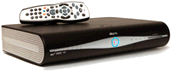 High Definition TV pictures are lot sharper and clearer than standard TV pictures – with four times more detail than standard TV broadcasts.
Sky HD comes with a special Sky satellite receiver, the Sky+HD Box, which is basically the popular Sky+ box with an output for connection to a high definition TV.
There’s more information the Sky HD box over on Sky’s HD site at sky.com/shop/boxes/sky-hd-box
Why choose Sky+HD?
Here are some of the benefits of the Sky+HD service and the Sky HD digibox:
 Over 50 channels of HD – more than any other provider
- Amazing HD picture quality – 720p and 1080i formats supported
- Record up to 180 hours of TV, or 60 hours of HD TV onto the built-in disk
- Watch one digital channel while recording another
- Use ‘Series link’ to keep track of your favourite shows
- Browse through a week’s worth of TV with the on-screen programme guide, selecting which shows to record
- Pause and rewind live TV.
- Get access to a collection of “on demand” content with Sky Anytime, as well as Sky Box Office
- Control of your Sky HD set-top box over the Internet or from your mobile phone. More
|
Marks & Spencer voucher for new customers signing up to Sky online.
|


Sky HD Channel List:
Below, you’ll find our list of the Sky HD channels on offer here in the UK:
Num |
Channel | Details | Channel type |
106 |
Sky One HD | UK and US shows from Sky One | Subscription channel |
107 |
Sky Living HD | Formerly Living TV | Subscription channel |
108 |
Sky Atlantic HD | US TV Shows from HBO | Subscription channel |
109 |
Watch HD | Entertainment | Subscription channel |
111 |
Dave HD | Entertainment | Subscription channel |
112 |
Comedy Central HD | Comedy from Paramount | Subscription channel |
113 |
Universal Channel HD | Entertainment channel from NBC | Subscription channel |
114 |
SyFy HD | Sci-Fi channel | Subscription channel |
118 |
ITV2 HD | Entertainment channel from ITV | Subscription channel |
119 |
ITV3 HD | Entertainment channel from ITV | Subscription channel |
120 |
ITV4 HD | Entertainment channel from ITV | Subscription channel |
124 |
Fox HD | US Imports in HD | Subscription channel |
126 |
MTV HD | Music | Subscription channel |
136 |
E4 HD | Entertainment from Channel 4 | Subscription channel |
140 |
Channel 4 HD | Channel 4 shows and US series | No subscription. Sky card needed |
143 |
BBC One HD | Simulcast of BBC One | No subscription. No card needed |
162 |
RTE Two HD | Ireland | Northern Ireland only |
169 |
BBC Two HD | Selection of BBC content | No subscription. No card needed |
171 |
Five HD | Selection of ITV content in HD | No subscription. Sky card needed |
178 |
ITV 1 HD | Selection of ITV content in HD | No subscription (England/Wales only) |
211 |
Bio HD | Biography channel | Subscription channel |
217 |
Sky 3D | The UK’s first 3D TV channel | Subscription channel |
243 |
Sky Arts 1 HD | Arts channel | Subscription channel |
245 |
Sky Arts 2 HD | Arts channel | Subscription channel |
249 |
Good Food HD | Food / Cookery | Subscription channel |
301 |
Sky Movies Premier HD | One of Sky’s Movies channels | Subscription channel (‘Movies’) |
303 |
Sky Movies Showcase HD | One of Sky’s Movies channels | Subscription channel (‘Movies’) |
304 |
Sky Movies Comedy HD | One of Sky’s Movies channels | Subscription channel (‘Movies’) |
305 |
Sky Movies Action HD | One of Sky’s Movies channels | Subscription channel (‘Movies’) |
306 |
Sky Movies Family HD | One of Sky’s Movies channels | Subscription channel (‘Movies’) |
307 |
Sky Movies Crime & Thriller HD | One of Sky’s Movies channels | Subscription channel (‘Movies’) |
308 |
Sky Drama and Romance HD | One of Sky’s Movies channels | Subscription channel (‘Movies’) |
309 |
Sky Movies Sci-Fi & Horror HD | One of Sky’s Movies channels | Subscription channel (‘Movies’) |
310 |
Sky Modern Greats HD | One of Sky’s Movies channels | Subscription channel (‘Movies’) |
311 |
Sky Movies Classics HD | One of Sky’s Movies channels | Subscription channel (‘Movies’) |
312 |
Sky Movies Indie HD | One of Sky’s Movies channels | Subscription channel (‘Movies’) |
345 |
MGM HD | Re-mastered MGM Films | Subscription channel (‘Movies’) |
358 |
MTV Live HD | Music | Subscription channel |
401 |
Sky Sports HD 1 | Part of Sky Sports package | Subscription channel (‘Sports’) |
402 |
Sky Sports HD 2 | Part of Sky Sports package | Subscription channel (‘Sports’) |
403 |
Sky Sports HD 3 | Part of Sky Sports package | Subscription channel (‘Sports’) |
404 |
Sky Sports HD 4 | Part of Sky Sports package | Subscription channel (‘Sports’) |
405 |
Sky Sports News HD | Sports channel | Subscription channel |
408 |
Sky Sports F1 HD | Sports channel | Subscription channel |
412 |
Eurosport HD | Sports channel | Subscription channel |
417 |
ESPN HD | Requires subscription to ESPN | Subscription channel |
430 |
ESPN America HD | Requires subscription to ESPN | Subscription channel |
501 |
Sky News HD | The first UK HD News channel | Subscription channel |
507 |
NHK World HD | English news service from Japan | No Subscription |
523 |
Eurosport 3D | Sporting Events | Subscription channel |
525 |
Animal Planet HD | Natural history and wildlife | Subscription channel |
526 |
National Geographic HD | Documentaries | Subscription channel |
528 |
Nat Geo Wild HD | Natural history and wildlife | Subscription channel |
529 |
History HD | History | Subscription channel |
532 |
Eden HD | Documentaries | Subscription channel |
536 |
Discovery HD | Science, technology and lifestyle | Subscription channel |
555 |
Crime HD | Crime | Subscription channel |
601 |
Cartoon Network HD | Kids channel | Subscription channel |
604 |
Nickelodeon HD | Kids channel | Subscription channel |
607 |
Disney XD HD | Kids channel | Subscription channel |
609 |
Disney Channel HD | Kids channel | Subscription channel |
622 |
Disney Cine HD | Disney Movie Channel | Subscription channel |
752 |
Sky Box Office HD1 | Box Office Movies | Pay per view |
753 |
Sky Box Office HD2 | Box Office Movies | Pay per view |
889 |
Sky Insider | Sky employees | Free (Sky employees) |
List out-of-date? Please let us know
Alternatives to Sky HD?Sky offers 50 HD channels, but it comes at a price. Subscription to Sky’s HD service costs £10.25 a month over and above your existing Sky TV subscription. There are alternatives:
|
 Virgin Media: Now offering 29 HD channels including BBC, ITV, Channel 4, E4, Sky 1, Sky Sports HD, Film 4 HD and ESPN. Subscription to the HD service is just £5 a month. More:
Sky+HD Review
This is a very easy review to write – if you’re in the UK, and you’re looking to make the most of your HD-ready TV, then Sky+HD is the way to go. The Sky+HD box builds on the success of the Sky + box, with all those great recording features, and adds high definition to the mix. Picture quality is amazing – so sharp and natural, that you’ll want more. Try a flip between National Geographic and GOLD, and you’ll really notice the difference.
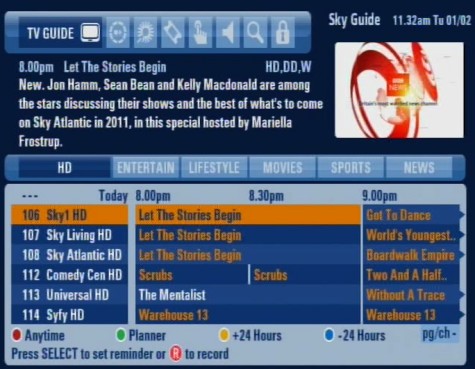
Sky’s On-screen Electronic Programme Guide
The set-top box is great (more below), and there’s promise of some new goodies. The box has an Ethernet connector (for the Sky Anytime+ service), as well as two USB sockets (for future use).
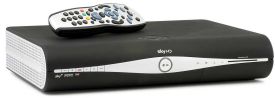
The Sky+HD Box
Another feature worthy of mention is ‘Sky Anytime‘ – This started rolling out in 2007 on Sky+HD boxes. The Anytime service uses space on the hard disk, and captures some top Sky TV programmes and movies overnight. This means that there’s always a selection of programmes ready to watch on-demand.
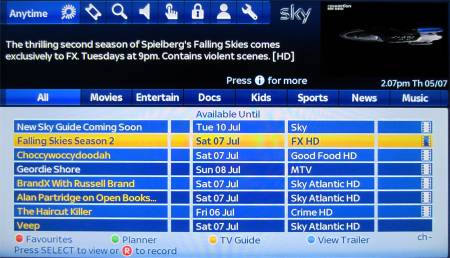
Sky Anytime on a Sky+HD box
Our views on Sky HD? We’re sold… stunning picture, a powerful box, and the promise of more good stuff to come. Put your HD-ready telly through its paces, and enjoy!
There’s more information on Sky’s HD site at sky.com/shop/boxes/sky-hd-box
The Sky+HD Box
Below is a photo of the rear of the Amstrad Sky+HD set-top box:
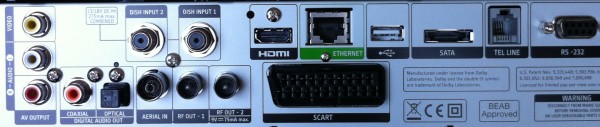
Rear of Amstrad Sky+HD box
Sky+HD Box Specifications
Specifications of the Thomson Sky+HD box:
- Dimensions: 380 x 245 x 80 mm (leave plenty of room for ventilation)
- Hard disk capacity: 300GB (160GB personal space storage)
- Aerial: RF aerial in , 2 x RF aerial
outputs (modulated) - Video output: HDMI socket, 2 x SCART (Composite, RGB), S-Video, component HD Analogue (Y, Pr, Pb). Note that component video support has been dropped on newer Sky+HD boxes
- Audio output: Optical digital audio, 2 x stereo phono
- Other connectors: Telephone line (RJ11) socket, RS-232 female socket, 2 x USB sockets (reserved for future use), Ethernet (RJ45), SATA (external HDD socket reserved for future use)
Sky+HD FAQ
Note that the Sky+HD box has the functionality of the Sky+ box. You may want to check out our Sky+ FAQ.
| HD Installation | Sky HD requires a special Sky+HD digibox. You can get one of these direct from Sky Digital – it requires installation by a Sky installer.
The Sky satellite dish will need to have a multi-LNB fitted and two cable feeds from the dish to the Sky set-top box. This is so that the Sky+ box can record two channels at the same time. Like standard Sky boxes, the Sky HD box must also be connected to a UK phone line. More details on Sky+HD installation at Sky.com. |
| Subscription | To get Sky’s HD channels, you have to pay an additional monthly HD fee. Details at sky.com/shop/boxes/sky-hd-box
If you don’t want to pay a subscription, the channels BBC One HD, BBC Two HD and Channel 4 HD are available subscription-free. |
| Do it yourself | We’ve been asked if it’s possible to buy your own Sky+HD box, and fit it yourself.
Yes – if you wish, you can buy your own Sky+HD box, rather than having to go through Sky. A Sky+HD box requires two separate feeds from the satellite dish, and your dish will need an LNB with multiple outputs – this is to support recording one channel while watching another. Once connected, you’ll need to call Sky Customer Services to get them to “marry” the serial number of your new Sky+HD box to your Sky viewing card, and then to activate the Sky+HD subscription, so you can view the HD channels. Sky won’t activate a box unless they’re happy that it’s legitimate, and you’re not misusing your account by swapping cards between boxes on a regular basis. If you’re brave, you can pick up a Sky+ box cheaply on Ebay |
| HDMI sockets |  The Sky+HD box is designed to connect to a TV set using an HDMI lead. Here are some links related to HDMI connectivity The Sky+HD box is designed to connect to a TV set using an HDMI lead. Here are some links related to HDMI connectivity
|
| New-look EPG | 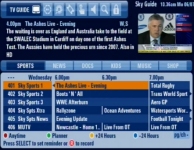 Sky started rolling out their new-look EPG in March 2009. They phased the release of the EPG to boxes with different version numbers and different manufacturers. Sky started rolling out their new-look EPG in March 2009. They phased the release of the EPG to boxes with different version numbers and different manufacturers.
Some users got the new look EPG version quickly, while others had a longer wait. Boxes made by Thomson and Pace should have received the upgrade by August 2009. Boxes made by Samsung got the upgrade in November 2009, and Amstrad users got the update in December 2009. |
| Satellite Dish | “Do I need to change my satellite dish to get Sky HD?” – No. If you’re able to get Sky at the moment, your existing dish is fine for Sky HD.
Note though that Sky+HD needs two feeds from the satellite dish, but standard Sky only needs one. If you only have one feed at the moment, Sky will have to run a second lead from the LNB on the dish to the Sky+HD box. |
| HD Quality | “I’ve never been that impressed with the quality. Certainly nothing like the demos in stores. Am I doing something wrong?”
When you switch been a standard definition channel and an HD channel, you should notice a crisper picture with more detail. If not, there are a few things to check:
If you’re still not getting the most from HD, you may want to play with your TV’s picture settings (brightness, contrast, colour, etc), and check that your TV is not in a non-HD mode. As all TVs are different, you’ll need to check the manual for information on how to get the best picture from your TV. |
| No HD TV? | If you don’t have an HD-ready TV set yet, you can still get a Sky+HD box and watch in standard definition. You will be able to connect to a non-HD TV set using either a SCART lead or standard TV aerial cable. You can then upgrade to an HD-ready set later if required. |
| More HD channels | One of our podcast listeners asked whether we can expect to see Sky Digital phase out non-HD programming over time, to make way for more high-definition programming. Our take is that we’re some way away from that, as there just isn’t the volume of TV programming available in the HD format. Doubtless this will increase, but as with Sky Digital, change is slow, and tends to be driven by user demand. Hi-def UK Gold, anyone? |
| Sky HD in others rooms | We’ve been asked if you can get Sky HD in more than one room. Here are some notes:
To watch Sky programmes in HD, you need to connect to your TV using an HDMI lead to a suitably equipped HD-ready TV. If you have two HD TV sets you want to connect to, you may be able to use the HDMI connector for one TV, and the Component connectors for the other TV, although over a long distance, this may not be practical. If you need long cables or extra connectors, try TV Cables or Maplin Electronics
You can use a “Magic Eye” TV Link (pictured) with a Sky+HD box to allow you to use a remote control in the second room to remotely change channel. More on Sky Magic Eyes. See our Sky in other rooms section for more on Sky in extra rooms. |
| Latest version | To check which version of software your Sky HD box is using, press the Services button, choose Settings, then select ‘System Details’.
You can force your Sky box to update to the latest software. The procedure can be found on the Satcure FAQ Please visit our Sky forum to discuss version numbers and updates |
| Manual | Looking for the Sky+HD user manual? We have found a Sky+HD User Guide for the Thomson and Pace Sky+HD set-top boxes at www1.sky.com/HDGuide, under the “Further information” option. |
| Ethernet port | The Sky HD box has an Ethernet (RJ45) port on the back. This is to support connection to the Internet for Sky’s Sky Anytime+ service, which launched in 2010.
For more details, see our Sky Anytime+ page |
| Video senders | Our podcast team had a call from a listener asking whether his existing AV sender used to send TV pictures to a receiver elsewhere in his house, would work with his Sky HD box.
Well, the video sender can’t be used to transmit high definition around the home. Firstly, most AV senders use SCART connectors, and High Definition doesn’t work over SCART. Secondly, the bandwidth needed for sending HD wirelessly, isn’t there. Although you can’t send HD using a video sender, as the Sky+HD box has SCART sockets, so you’ll still be able to send standard definition pictures to another TV wirelessly. |
| DVD / CDs | We’ve been asked if the Sky HD boxes will play back DVDs or CDs. The answer is a firm “no” – the Sky HD box doesn’t have a slot for a disk to be inserted – you’ll need a separate DVD player connected to your telly to play DVDs and CDs. |
| Installer menu | The technically-minded out there may be interested in the hidden “installer” menu on the Sky+HD box, that can be accessed by pressing the ‘Services’ button, then 0 0 1 followed by ‘Select’
|
 If you have non-HD TV sets elsewhere in the house, you can still connect these to the output of the Sky+HD box – if you’re connecting to a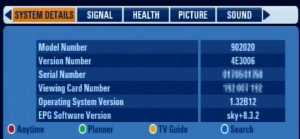
|
Got a general question on Sky’s HD service? Ask in our Sky forum , or contact us More on Sky+HD at sky.com/shop/boxes/sky-hd-box
|
Sky Links
- Order Sky+HD – Details of the Sky TV packages and the special installation offers
- Sky FAQ – Help and advice with Sky Digital
- Sky information – Our page of information on Sky
- Sky forum – The area of our forum dedicated to Sky
- PVR explained – Details of Personal Video Recorder (hard-disk systems), including Sky+
