
We explain the advantages of the Sky+ service – Sky’s digital TV set-top box that changes the way you watch and record your favourite TV shows.
What is Sky+?
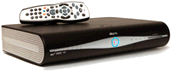
Sky’s hype about their Sky+ box is that it will ‘change the way you watch TV‘… and for once, the hype isn’t wrong.
Sky+ is a combined satellite TV receiver and a Personal Video Recorder (PVR), which records up to 180 hours of telly onto a built-in hard-disk.
Sky+ gives you a huge amount of control over how you watch and record TV. As standard, Sky is now providing the Sky+HD box to new customers. This new Sky+ box is intended for use with Sky’s HD TV service, but that’s optional (you can upgrade your Sky+ to HD later should you wish).
How to get Sky+
For more details about Sky+, and to order, go to the Sky+ site (or Sky Ireland). |
Marks & Spencer voucher for new customers signing up to Sky online
|


With a Sky+ box, you can:
 |
Watch one TV channel while recording another |
|
Record two different channels at the same time, while watching a recorded show |
|
Browse through a week’s worth of TV with the on-screen programme guide, selecting which shows to record |
|
Select recordings from your Sky Planner, and copy them off to a video or DVD recorder. |
 |
Follow a series – The excellent ‘Series link’ can be used to record episodes of your favourite series automatically, keeping track of schedule changes, and avoiding repeats. |
 |
Pause live TV – handy for when the phone rings. |
 |
Rewind live TV, if you missed a piece of the action |
The Sky+ box really is a top offering – you’ll find you change your TV watching behaviour – no need to worry about setting the video recorder to keep up-to-date with a series, and with the drive holding around 180 hours of shows, no more running out of tape.
You also find you can stagger your watching – less more programme clashes, and using Live Pause means you can fast-forward through adverts. You can read more about how Sky+ works on the Sky+ Site.
Sky+ was recently awarded top of the PVRs in a PVR survey conducted by a leading UK consumer organisation.
The Sky+HD box gets our top recommendation… go get one!
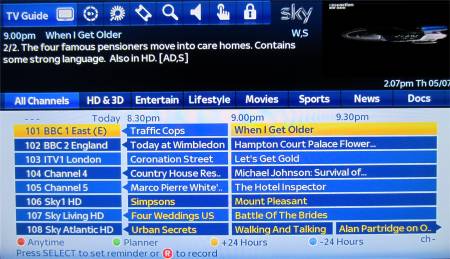
The Sky+ onscreen Planner
|

Sky On-Demand “Anytime”
Sky Anytime is available on newer Sky+ and Sky+HD boxes. This service makes use of extra disk space on the newer Sky’s hard drive, and downloads a selection of Sky’s content and movies to the box while the box is idle. These shows can be viewed on demand.
There’s also a service called Sky Anytime+, available to Sky Broadband customers with a Sky+HD box. This service offers movies and TV using an Internet connection
More details on this service on our Sky Anytime page.
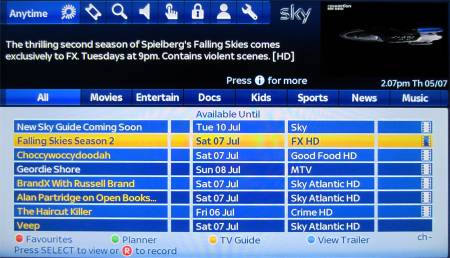
Sky Anytime on a Sky+ digibox
Sky+ FAQ
| Got a question?
Thinking of getting Sky+, and have a question? Contact us |
| Installation | Sky+ is available directly from Sky Digital and requires installation by a Sky installer. Your Sky dish will need to have two cable feeds run from the Sky dish to the Sky+ Digibox. Normal Sky installations only require one cable feed from the satellite dish LNB, but as the Sky+ box has two tuners (to allow simultaneous viewing and recording of different channels), then two feeds from the dish are required.
Like standard Sky boxes, the Sky+ box must also be connected to a UK phone line. It is possible to buy a Sky+ box from sources other than Sky, and fit them yourself. This is not recommended by Sky – it means fitting an LNB to your dish (if the LNB doesn’t have multiple outputs), then running satellite cabling from dish to box. Sky has to enable Sky+ on your set-top box (not always easy if you didn’t get the box from them). We also understand that Sky Technical Support won’t support systems that they didn’t install. For most people, it’s a lot easier to get Sky‘s professional installers to do the work. More details on Sky+ installation at sky.com. |
| Upgrading to Sky+ | If you’re already got a standard Sky digibox, you can upgrade to Sky+. Here’s a few things you should know:
For more, or to arrange Sky to visit and upgrade you to Sky+, go to sky.com/shop/boxes/sky-plus-box. |
| Latest version | To check which version of software your Sky+ box is using, press the Services button, System Setup menu, option 5, ‘System Details’.
You can force your Sky box to update to the latest software. The procedure can be found on the Satcure FAQ. Please visit our Sky forum to discuss version numbers and updates. |
| Copying recording to DVD | You can connect a video or DVD recorder to your Sky+ box, to allow you to copy shows recorded on your Sky+ box… great for archiving series recorded using Sky’s Series Link. Note that there is a restriction on copying Sky Box Office movies.
Connection to a recorder can be made in one of the following ways:
For help with connecting to a recorder, see our Connection page. Also, see our How to record Sky TV page. |
| Exporting recordings | Exporting of recordings as data files from your Sky+ box is not supported. The USB sockets on Sky boxes are non-functional and you can’t copy off recorded programmes from Sky+ onto a USB stick, or stream off content as data to a PC. If you want to get your recordings transferred from your Sky+ box, here are your options:
|
| Sky in a second room |
If you’re looking to get Sky+ in other rooms of your house, the options are as follows:
For more on these options, see our Sky in other rooms page. |
| Programming Sky+ remotely | There are a couple of ways to set your Sky+ box remotely, including control by SMS text message from your mobile phone, or from your PC web browser. See FrequencyCast’s TV Control page for more on this.
|
| Sky+ Manual | If you’re after a user manual for Sky+, you can download a PDF of the manual from Sky’s website. Right-click on the following link, and select “Save Target as”: Sky+ User Guide. Note that the manual is a 30 Meg download.
If you’re unable to download the manual and you’ve lost yours – you could try contacting Sky for a replacement paper manual. Otherwise, if you need some information from the manual, ask in our forum. |
| Sky+ with no subscription | Using the Sky+ PVR features, such as recording, live pause and series link, is free as long as you subscribe to one or more Sky packages.
If you want to use the box’s PVR features, but you don’t want to subscribe to a Sky channel package, you can use the Sky+ features with the Free to Air channels on Sky, however it’ll cost you £10 a month to use Sky+. You can set up the Sky+ subscription by contacting Sky Customer Services. From Sky’s T&C’s: “Sky+ subscription required to use Personal Video Recorder features of Sky+ (free for Sky TV subscribers while you subscribe to any Sky digital package, otherwise £10 a month). “ |
| Installer menu | The technically-minded out there may be interested in the hidden “installer” menu.
Got a standard Sky+ box? The installer menu can be accessed by pressing ‘Services 4 0 1 Select’ Got a Sky+HD box? The installer menu can be accessed by pressing ‘Services 0 0 1 Select’:
|
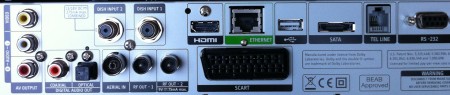
| Outputs | Here’s a list of the connections that are available at the back of a standard Sky+HD box:
SCART, HDMI, RF aerial in, 2 x RF aerial out (modulated), RJ11 telephone, 2 x phono audio out, composite video out, RS232, co-ax and optical audio (for Dolby Digital 5.1), Ethernet (for Sky Anytime+), USB (reserved for future use) and SATA (reserved for future use).
|
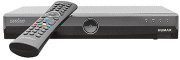
| Dimensions | There are different versions of Sky+ boxes, from different manufacturers. If you know the dimensions of a box we’re missing, please contact us. Here are the box dimensions that we’ve managed to find so far :
|
| Rewind live TV | Sky+ allows you to rewind live TV. It does this by constantly recording whatever channel is active to hard-disk. You can set how much you hold in the ‘rewind’ window from Services>Sky+ setup. The options are 5, 15, 30 or 60 minutes, or you can disable the service if you wish. |
| Connection to phone line | Sky Digital customers get subsidised installation and digibox provided that the box has a connection to your phone line.
More on this subject in our Sky FAQ |
| Buy your own box? | Yes – if you wish, you can buy your own Sky+ or Sky+HD box, rather than having to go through Sky. Note that you will only be able to use Sky+ if you have two separate feeds from the satellite dish, and if your dish has an LNB with multiple outputs – as Sky+ uses two tuners, not one.
Once connected, you’ll need to call Sky Customer Services to get them to “marry” the serial number of your new Sky+ box to your Sky viewing card, and then to activate the Sky+ subscription. Obviously Sky won’t activate a box unless they’re happy that it’s legitimate, and you’re not misusing your account by swapping cards between boxes on a regular basis. If you’re brave, you can pick up a Sky+ box cheaply on Ebay, but you’ll not have much comeback if your second-hand Sky+ is damaged, the disk drive or power supply don’t work, or Sky refuse to activate it for use on your card. |
| Kameleon | One-for-all Kameleon 6 setup code: 1175 |
| Programme padding | 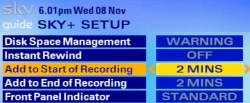 The Sky+ box supports ‘padding’ or recording offset, which is a setting that allows you to add a number of minutes of recording time to the scheduled start and end times of programmes. This means that the box will record a few extra minutes in case a program doesn’t start quite when it should, for occasions where the Sky+ EPG isn’t aware of overruns. To edit the settings, press Services, and select Sky+ setup. The Sky+ box supports ‘padding’ or recording offset, which is a setting that allows you to add a number of minutes of recording time to the scheduled start and end times of programmes. This means that the box will record a few extra minutes in case a program doesn’t start quite when it should, for occasions where the Sky+ EPG isn’t aware of overruns. To edit the settings, press Services, and select Sky+ setup. |
| Cable | 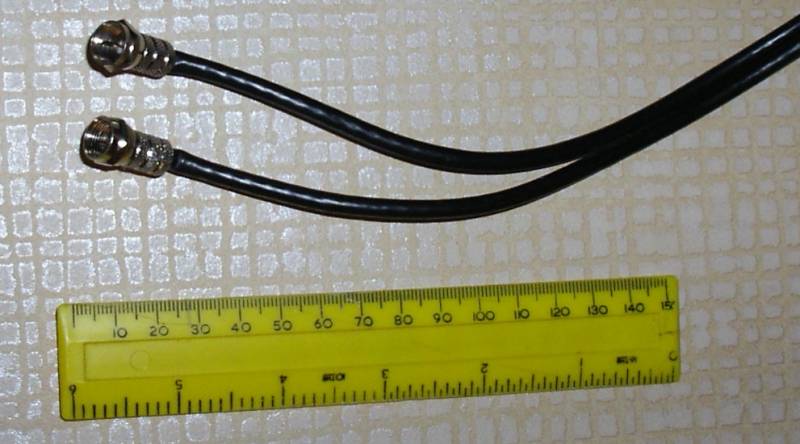 We’ve been asked what the Sky Plus cabling (running from dish to box) looks like. Here’s a photo of our Sky+ cabling. Click the image for a larger photo. We’ve been asked what the Sky Plus cabling (running from dish to box) looks like. Here’s a photo of our Sky+ cabling. Click the image for a larger photo. |
| Remote controls | Problem with your remote? Make sure you’ve put the batteries in correctly, round the right way, and that they’re making contact correctly. Also, make sure the batteries aren’t flat. When you press the buttons, there should be a little red light at the top of the unit that indicates it’s working. TV Remote help.Other problems: If your remote is working, but isn’t controlling the Sky box, you may have pressed the TV button, so press Sky and try again. The only thing that can wrong with a remote control, is if it’s left without batteries for more than ten minutes – if this happens, it may lose it’s ability to control the TV. It should still be fine with Sky / Sky+ though. To get the remote to work with your TV, you need to enter a four digit number that matches your TV manufacturer. Refer to your Sky / Sky+ manual for these codes.
You could also consider a universal controller, that can handle multiple remote control devices. Our favourite is the Kameleon, a stylish multi-device controller that can learn commands from an existing handset, or use one of a number of special codes for situations where you don’t have the original. Also, take a look at the range from Argos or Maplin Electronics. |
| How long are recordings kept? | Sky+ and Sky+HD give you a fair amount of control over how you keep shows on your box. A typical setting is to have Sky+ record shows, and automatically delete shows you’ve watched when your disk is nearly out of space. There’s also an option from the Sky+ planner to mark a recording as one to “Keep” to the system will never automatically tidy it. |
| DVD / CDs | We’ve been asked if the Sky+ boxes will play back DVDs or CDs. The answer is a firm “no”. The Sky+ box doesn’t have a slot for a disk to be inserted – you’ll need a separate DVD player connected to your telly to play DVDs and CDs. |
| Going into Standby | To earn their green credentials, Sky’s set-top boxes have Auto Standby, and switch off to conserve energy. This happens when the box has not been used for two hours after 11pm. Before going to Standby, you’ll see the message “Sky+ is about to go to standby – press backup to continue”.
Recordings will still record when in standby. If you want to turn this feature off, press Services, go to ‘Sky+ Setup’ and set ‘Auto Standby’ to ‘Off’ |
| Add extra channels | Want to add channels to your Sky box manually? See our How To Add Channels guide |
| PIN Protection | For questions about PIN codes and Sky+, and issues around parental control and playback restrictions at certain times of the day, see the answer in our standard Sky F.A.Q |
| Disk running constantly | A question from a site visitor: “The hard disk in my sky + box is continuously running. Could you please tell me how to get over this problem?” If the hard drive in the Sky+ unit is running all the time, it’s probably been set to use Instant Rewind, which constantly records whatever’s being watched, in case you want to rewind what you’re watching. To disable this, press the “Services” button, select Option 5 (Sky+ Setup) and set Instant Rewind to ‘Off’. |
| Hard disk defrag? |  There’s a hidden feature to allow the (advanced) user to perform a tidy on the Sky+ hard disk, which is a little bit like a PC defragment. Many users have found that this has recovered valuable disk space. There’s a hidden feature to allow the (advanced) user to perform a tidy on the Sky+ hard disk, which is a little bit like a PC defragment. Many users have found that this has recovered valuable disk space.
If you want to give it a try, you need to go into the Installer menu (see above).
|
 Connect from one of the Sky+ box’s two SCART sockets to the recorder, then set the recorder to record from its Line In or AUX input, and it should be able to see and record the output of your Sky box
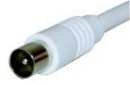 You can connect the output of your Sky digibox to another TV set in the house by running an aerial cable from the Sky box RF output aerial socket to another TV telly. You can also use a
 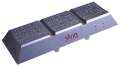 As an alternative, there’s a handy product called Slingbox. If you’ve ever been away from home, and found you’ve forgotten to set Sky+, or you’ve wanted to watch a recording while you’ve been away, then the Slingbox may be the answer. Connect a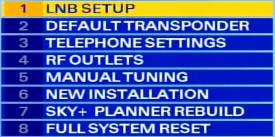
 Replacement: Spare remote controls for Sky and Sky+ are available from
|
Got a question on Sky+ or Sky Digital? Ask in our Sky forum
|
Sky+ Links
- Order Sky + – Details of the Sky TV packages and the special installation offers
- Sky information – Our page of information on Sky
- Sky forum – The area of our forum dedicated to Sky
- PCW Disk Upgrade Info – Advice on upgrading the Sky+ hard disk
- SkyDigital undocumented – Secret keypresses and digibox information.
- PVR explained – Details of Personal Video Recorder (hard-disk systems)

I have recently changed the standard Sky box upstairs to a Sky Hd+. This only has one input cable and I realise that I need two to be able to watch and record at the same time. My question is :- do I have to run a separate cable for input 2 or can I split the one down stairs and run to the box upstairs? I still require both boxes to work independently from each other, or do I need to run another cable from the dish..
when i try to record a radio program i enter all the details channel time and how many time and days i want it recorded
then press yellow to save my choice but it records an hour early this happens on both my sky hd boxes
I have recently changed the standard Sky box upstairs to a Sky Hd+. This only has one input cable and I realise that I need two to be able to watch and record at the same time. Can I use everything needed from apkworlds?