
In our unofficial FAQ, we answer your questions on Sky TV, Sky+ and Sky+HD.
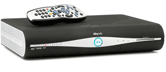
Sky Digital is the UK’s satellite TV provider. To get Sky, you’ll need to have a satellite dish and a special Sky digibox installed at your home, and to subscribe to your chosen Sky packages. Installation of Sky TV requires an engineer to visit.
For full details of the various Sky packages on offer, go to www.sky.com/shop. (Also Sky Ireland).
 Ordering Sky online saves time and money. Go to www.sky.com, choose your package and select an installation date (including weekends). Ordering Sky online saves time and money. Go to www.sky.com, choose your package and select an installation date (including weekends).
The basic Sky service is available for £21.50 a month for the Sky Entertainment pack. A free Sky+ set-top box and standard setup is available when you order online. For more, go to www.sky.com/shop |
General Sky Questions
| Sky coverage | Sky’s site quotes UK coverage of 98% – a far greater percentage than Freeview and cable. What about the other 2%? Technically, the Sky satellite footprint covers the whole of the UK and Ireland, however there are places where you are not able to have a dish or to get a signal, as you need to have a dish pointing at a certain position in the sky. Some properties aren’t allowed to have a dish, some look straight into concrete, some are flats with no opportunity to fix a dish to a south-facing wall, and some properties have hills, mountains or dense trees obscuring line-of-sight to the satellite. Normal procedure is to arrange installation with Sky (via www.sky.com/shop) – if the installer can’t get you a signal, they won’t let you subscribe to Sky. Sky Broadband: If you’re thinking of getting Sky Broadband as a package with your digital TV service, note that Sky’s Broadband service is not available in all parts of the UK. To check if you’re in a Sky Broadband network area, you can check by entering your phone number at sky.com/shop/broadband-talk |
| Sky packages | When you sign up to Sky Digital, you need to select one of the two main channel packages:
You can also add optional “premium packs” (such as Sky Movies or Sky Sports channels). You’ll also get a number of free-to-view channels as well. Sky Digital doesn’t allow you to pick individual channels to subscribe (or not subscribe) to – you select from the preset Entertainment packages. To view these options and to see how much your monthly subscription is likely to be, go to sky.com/shop/tv. If you have any questions about packages that are not answered on this page, call Sky on 08705 800 874, or ask in our Sky forum. Sports fans may also be interested in subscribing to ESPN to get Premier League football, plus a range of European and US sports. More at our ESPN section. Note that Sky often runs offers and discounts, so before you sign up, check our Sky TV Offers section for a summary of the latest special offers. If you’re not happy with the packages, channels or prices offered by Sky – remember that there are alternatives – See our Digital TV Advice page for more. |
| How much? | We’re quite often asked how much is costs to upgrade to a certain package, or how much it costs to upgrade to new hardware or Sky Multiroom. Prices for extra packages and hardware depend on your current package, so it’s best to go to the appropriate upgrade page at Sky to get the accurate price:
|
| Multiroom | If you’re interested in having Sky TV in more that one room, consider getting Sky Multiroom. This gives you a box in each room, so you can watch different Sky channels in different rooms. You will need a Multiroom subscription for each additional box. Details and prices at sky.com/shop/boxes/sky-multiroom
Note that one Sky dish can’t have more than eight ‘feeds’ running from it (and for that you need an Octo LNB on the dish, which are not supplied as standard). That means one dish can’t support more than four Sky+ boxes, or eight standard Sky boxes. More on LNBs. |
| Where is the satellite? | Sky Digital broadcasts from a group of satellites positioned at 28.2ºE and 28.5ºE above the Equator.
Need help finding the satellite? See our Installing a Sky Dish FAQ. |
| Outside the UK | Sky Digital’s terms and conditions state that you can only watch Sky subscription channels if you’re living in the UK (including the Isle of Man and Channel Islands) or the Republic of Ireland. Sky will not accept subscriptions (for their channels, Sky+ and HD services) from outside of these areas – you need a UK postal address.
The main reason that Sky does not sell subscriptions to non-UK residents, is content usage… For example, the BBC is free for UK licence payers, and there are restrictions on their shows being shown outside of the UK. Similarly, if Sky buys a hit show from the US to be shown in the UK, that’s for UK only – overseas broadcasters make their own arrangements. Content and copyright management is a nightmare for broadcasters, and that’s why it’s so hard getting UK TV outside the UK.
We have a page of information on what satellite channels are available without a Sky subscription – see our Free Satellite TV page. British TV outside the UK: Looking to get British telly and not in the UK or Ireland, see our Watching UK TV Abroad page. The Radio&Telly site is intended for UK residents, and we don’t provide any information on how to access Sky Digital outside the UK and Ireland. If you’re interested in accessing Sky outside of the UK and Ireland, perhaps try asking in our Sky forum. Worth considering: If you have a friend in the UK, you may be able to access UK TV over the Internet, using the Slingbox solution. |
| Sky Broadband | Sky Digital is now offering free Broadband to its digital TV customers.
With Sky Broadband, you get a free wireless router, and at some exchanges, you can get speeds of up to 14 Mbps, with no download limits (on the Broadband Unlimited plan). For more, go to sky.com/shop/broadband-talk |
| Indoor Sky dish | Now and again, we’re asked whether it’s possible to get Sky Digital via an indoor dish, or a dish in the loft. These questions normally come from people that are not allowed to install a dish on the outside of their property.
If you’re not able to get a dish installed where you live, you could consider other options such as Freeview, Cable or TV-over-Internet. See our Digital TV Options page for more. If you’re able to get a satellite system installed elsewhere and you have broadband, you could also consider watching satellite on a PC, using Slingbox |
| Other questions | A quick summary of some of the general questions we’ve received:
|
| Moving Home | Moving home and want Sky at your new home? Three easy steps:
|
| Contacting Sky | Note that this website isn’t run by Sky, so please don’t contact us with queries about your account, or to report a technical problem with your Sky service. Instead, try the following numbers:
Other contact details:
You can find more contact information for Sky at www.sky.com and select “Contact us” from the menu |
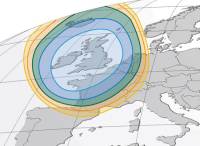 That having been said, a signal from the satellites that distribute Sky Digital can be accessed outside of the UK. Sky Digital is transmitted on SES Astra satellites located at 28.2°E and Eutelsat’s Eurobird 1 satellite located at 28.5°E – these have “footprints” that cover parts of Europe, so the free-to-view channels can be accessed in parts of Europe (with a suitably-sized dish). Pictured on the right is the footprint of the Astra 2D satellite, which provides the BBC Free-to-view channels. You can find coverage maps for the Astra satellite on the
 Connecting Sky
| Sky in other rooms |
If you’re looking to get Sky in other rooms of your house, here are the options:
More on this on our Get Sky in Another Room section |
| Connection to phone line | Even though Sky programmes get delivered via satellite, I understand I have to connect my box to a phone line. Why is this, and what happens if I don’t?
Sky Digital customers get subsidised installation, dish and box provided they keep the box connected to a working phone line. This is so that the box can be used with Interactive services. From the Sky terms and Conditions (June 2008): “We will supply a free Digital Satellite System (Box, Minidish and remote control) provided that you pay for installation (if applicable – see below for the costs of this) and enter into the Interactive Discount Contract with Marketing Contributions Limited . Under this offer you agree to have your Digital Satellite System installed in your home in the UK, Isle of Man or Channel Islands by an authorised installer). You also agree to keep your telephone line (which must be fixed and operational) connected to your Box, and a viewing card in the Box (if you receive one), at all times during the first 12 months following installation. You do not have to subscribe to Sky digital to take up this offer. If you disconnect your telephone line from your Sky Box and fail to re-connect it after being notified by us that you need to do so, you must reimburse us for our costs of providing your Digital Satellite System, which shall not exceed £80.” What about if you don’t have a phone line close to your set-top box? The common solution is to run a telephone extension cable from your home’s Master phone socket – kits are available from Argos and Maplin Electronics.
No phone line? Apparently you can still get Sky installed without a phone line, but you’ll have to pay extra, and you can’t order online – you’ll have to call 08442 411495. You need a BT line to use Sky Broadband and Sky Talk. More at www.sky.com |
| Cables too short | 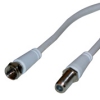 Site visitor Barbara Harrison asks: “We need to move the TV Site visitor Barbara Harrison asks: “We need to move the TVfrom its original position, but the Sky cable is not long enough. Can we buy an extension? Yes you can – you’ll need an “F Plug to F Socket” lead, available from maplin.co.uk . These have a female socket suitable for connecting to your existing lead from the satellite dish, with a male socket at the other end, which connects to the input of your satellite box. The satellite TV cable extension leads are available in 1.5 metre and 5 metre lengths. |
| Modulated output | 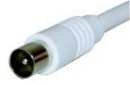 Sky boxes have what’s known as a modulated output , which means you can use an aerial lead to connect to a TV or recorder without using a SCART lead – this is commonly used when you want to feed Sky into another room via an aerial cable. You need to run a co-ax aerial feed from the Sky box RF output to your second TV, recorder or to a PC. When connected in this way, you can then tune the TV or recorder into the output of the Sky box in the same way as you tune your TV set to an ordinary analogue TV signal. You can set the Sky box modulator to output on any channel between 21 and 68 UHF, as follows: Sky boxes have what’s known as a modulated output , which means you can use an aerial lead to connect to a TV or recorder without using a SCART lead – this is commonly used when you want to feed Sky into another room via an aerial cable. You need to run a co-ax aerial feed from the Sky box RF output to your second TV, recorder or to a PC. When connected in this way, you can then tune the TV or recorder into the output of the Sky box in the same way as you tune your TV set to an ordinary analogue TV signal. You can set the Sky box modulator to output on any channel between 21 and 68 UHF, as follows:
|
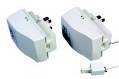 If you don’t fancy running cables around your house, or messing around banging cleats into your skirting board, there is another option – You can use your home mains wiring to connect to your master phone socket. The Wireless Telephone Extender from manufacturer One For All provides an instant phone socket without any wiring, and can turn a standard electrical socket into a phone socket. From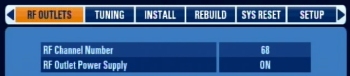
Sky Boxes
| Latest software | Latest versions of Sky and Sky+ software:
To check your version number, use the Services button, System Setup menu, option 5, ‘System Details’. You can force your Sky box to update to the latest software. The procedure can be found on the Satcure FAQ Please visit our Sky forum to discuss version numbers and updates. |
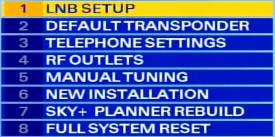
| Installer menu | The technically-minded out there may be interested in the hidden “installer” menu. This secret menu lets you get to some advanced features, such as LNB Setup, RF Outlet setup, manual tuning and Sky+ Planner Rebuild. This engineers menu can be accessed by pressing the following buttons: ‘Services 4 0 1 Select’:
On a Sky+HD box with the new-style EPG, the keypress is Services > 0 0 1 Select |
| Add extra channels | Want to add channels to your Sky box manually? See our How To Add Channels guide |
| Sky+ Manual | If you’re after a Sky user manual for Sky+, you can download a PDF of the manual from Sky’s website. Right-click on the following link, and select “Save Target as”: Sky+ User Guide |
| Dimensions | Need to know how big a Sky set-top box is? There are different versions of Sky boxes, from different manufacturers. If you know the dimensions of a box we’re missing, please contact us. Here are the box dimensions that we’ve managed to find so far :
For more details on the Sky+HD box, see Sky’s HD set-top box site |
| Ventilation | Sky boxes, especially those with a hard-disk inside, such as the Sky+ and Sky+HD boxes can run hot – and they need to breath. From the Sky+ manual:
|
Using Sky
| Remote controls | Problem with your remote? Make sure you’ve put the batteries in correctly, round the right way, and that they’re making contact correctly. Also, make sure the batteries aren’t flat. When you press the buttons, there should be a little red light at the top of the unit that indicates it’s working. Help on remote controls.
Other problems: If your remote is working, but isn’t controlling the Sky box, you may have pressed the TV button, so press Sky and try again. The only thing that can wrong with a remote control, is if it’s left without batteries for more than ten minutes – if this happens, it may lose it’s ability to control the TV. It should still be fine with Sky / Sky+ though. Controlling your TV: To get the remote to work with your TV, you need to tell your Sky remote control which TV you want it to work with. This involves entering a four digit number for the make/model of TV into your Sky remote. The codes relate to different TV manufacturers. Refer to your Sky / Sky+ manual for a list of these codes and step-by-step instructions. You can also find a list of remote control codes via your Sky box – Go to Interactive > Sky Customer Service > Technical assistance.
You could also consider a universal controller, that can handle multiple remote control devices. Our favourite is the Kameleon, a stylish multi-device controller that can learn commands from an existing handset, or use one of a number of special codes for situations where you don’t have the original. Also, take a look at the range from Argos or Maplin Electronics. |
| Surround Sound | Sky Digital transmits some of it’s programming in Dolby Digital 5.1 surround sound. If you have a compatible home cinema system, you should be able to connect your Sky+ or Sky+HD box to take advantage of this superior sound system. To access Surround Sound, go to Services > System setup > Sound settings and select ‘Optical output’ to “Dolby D”
You will need to run an optical audio cable from the ‘Optical out’ socket on your Sky+ or Sky+HD box to your sound system. If you need an optical cable, try TV Cables or Maplin Electronics |
| Recording from Sky | Need help recording Sky programmes? Check out our Recording Satellite TV page. |
| Watch Sky on a PC? | Want to watch or record Sky programmes on your PC? See our Satellite TV on your PC page. |
| Regions | For the particular part of the UK in which you live, BBC and ITV stations broadcast a selection of regional programmes (such as local news). With Sky TV, all of the UK regions are transmitted via their satellites, and the postcode of your Sky Card decides which region you receive.
All of the BBC regions are tucked away at the top end of the EPG, including BBC Scotland, BBC Northern Ireland and BBC Wales. S4C Digidol is available on channel 151, and the regional BBC stations such as BBC Radio Wales & BBC Radio Scotland also feature. The ITV channels also appear, but they’re hidden from the EPG menu, and you have to add them manually. More help: How to add channels to Sky box manually |
| PIN protection | Sky’s system makes use of a PIN code to control viewing of inappropriate content.
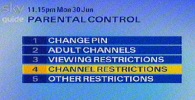
We’ve had reports of people seeing prompts for PIN codes whilst watching programmes, or playing back Sky+ content. According to Sky, by default you should be prompted for a PIN when trying to watch a programme rated 12 or 15 before 20.00, and when trying to watch a programme rated 18 before 22.00 To change or disable these parental control options, go to ‘Services’ > ‘Parental Control’, enter your four digit PIN code and select ‘Other restrictions’. Here you’ll have the option to enable/disable PIN prompts when trying to play back a programme before watershed (Sky+), to demand PIN entry before going online, PIN-protecting recorded programmes on Sky+, and to set spending restrictions. Can’t find your PIN? Sky PIN help |
| Wireless satellite radio | 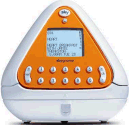 Looking to be able to take Sky radio around the house with you? Sky’s answer is the Sky Gnome – This became available in October 2005, and is a wireless device that receives audio transmitted from the Sky digibox wirelessly. This lets you listen to the Sky Digital radio stations from around the house. The box has a range of about 30 metres, and allows remote channel switching of Sky and Sky+ boxes. Looking to be able to take Sky radio around the house with you? Sky’s answer is the Sky Gnome – This became available in October 2005, and is a wireless device that receives audio transmitted from the Sky digibox wirelessly. This lets you listen to the Sky Digital radio stations from around the house. The box has a range of about 30 metres, and allows remote channel switching of Sky and Sky+ boxes.
Available in Blue and Orange, it runs from rechargeable batteries for up to 8 hours of remote playback of sound. These are sadly no longer available directly from Sky, but you can pick them up quite cheaply on Ebay.co.uk. |
| Sky Reception | Sometimes we hear from people reporting problems with the Sky reception – such as temporary picture drop-out, lockups or the “No Signal” message. Here are a few tips:
If you’re still having problems, contact Sky Customer Services, or ask for advice in our Sky forum |
| Missed Sky shows | Site visitor Debbie asks: “I have just had sky fitted and wondered if it is possible to view any programmes previously shown on Sky One? I am interested in a few series that have been shown but unfortunately I missed out as I didn’t have sky.” Some options:
|
| Default Sky PIN | Your Sky system will have a 4 digit PIN code that you should have been told when you signed up. It seems that in many cases, the default Sky PIN code is the last four digits of your Sky viewing card, which you’re encouraged to change. If you’ve had more than one card, the default PIN will be from your first Sky subscription card.
If you don’t know, or can’t remember, your Sky PIN, you’ll need to call Sky Customer Services to get them to reset the code over-the-air for you. You can also reset your PIN online from Sky’s site |
 Replacement: Spare remote controls for Sky and Sky+ are available from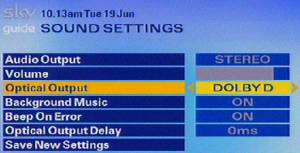
 What’s protected? On our Sky+HD box, here are the options: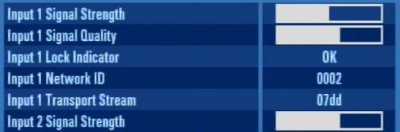
Got a question on Sky Digital? Ask in our Sky forum , or contact us |
Links
- Order Sky TV – Deals of the Sky TV packages, and the special installation offers
- Sky Information – General information about the Sky Digital TV service
- Sky+HD – Details of the high definition TV service from Sky Digital
- Sky+ – Sky’s top- of- the-range digital recorder
- Sky Digital forum – Talk about Sky TV
- SkyDigital undocumented – Secret keypresses and digibox information

2nd tv now has magic eye with red light on but i cant find a channel showing sky which is working in other room what do i do
have recorded a few programmes which l have been able to watch ok
but have just taped GAME OF THRONES but cant watch have to put in pin number for first time??
have a card supplied by you with a pin number on but will not accept it why??
please help
Pin number is default set as last 4 digits of viewing card number, unless they’ve changed this after I left Sky.
All the FTA Indian Channels (AAjtak, News18 India, Geo Tez) etc..on Astra2 28 E have disappeared since last three days without transponder signal 13434 V . Please undertake needful so they can be received all over Europe. JP, BERLIN, GERMANY. I think focus is changed on UK but these channels are top quality news channels and we would like to receive it via satellite.
My+question+is,+I’ve+been+a+customer+with+you+for+30+years+plus,+I+struggle+every+month+to+pay+the+£93+you+charge+me,+on+speaking+to+my+sister+and+friends,+they+have+left+sky+and+gone+to+other+suppliers,+on+returnin+to+you,+they+get+the+Q+box,+sky+cinema,+HD,+for+£52.50+a+month,+yes+sky+cinema+is+for+18+months+then+phone+up+and+they+will+look+at+another+deal.++++++++++++++++++++++++++++++++++++++++++++++++++++++
I+would+like+to+know+what+you+can+do+for+me+as+a+loyal+customer.
Yours+sincerely+
Beverley+sherwin
This site is not Sky. It’s TellyandRadio.co.uk giving you information about satellite TV.
You’ll probably think I’m the owner of it now, when I’m just someone reading your nonsense.
We have received a new router from Plusnet and need to connect our sky+ tv to it. How do I enter the new Wireless/SSID and wireless password?