Radio and Telly
Home
Digital TV
Freeview
Satellite TV
Cable TV
Top Up TV
BT Vision
Digital Switchover
Divider
Glossary
Email alerts
Forum
RSS FeedLatest news
RSS FeedPodcast


TV over the Internet
Slingbox in the UK

The Slingbox made it's appearance in the UK in June 2006... but just what is a Slingbox, and do you need one? Read on...

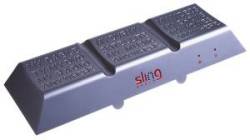
The Slingbox
The Slingbox Classic (2006)
Slingbox Pro
The Slingbox Pro (2007)

Slingbox covered in our podcast: We reviewed the Slingbox back in Show 3, and featured the updated Slingbox Pro in Show 20.


What is the Slingbox?

The Slingbox is a gizmo that connects to both your TV equipment and to a home broadband Internet connection, and lets you watch your home satellite, cable, digital or analogue TV, over the Internet, from anywhere in the world.

With Slingbox connected to a UK home TV setup, you can use SlingPlayer (the Slingbox software) to watch TV, change channels, take control and even record on your home TV recording equipment, over the Internet.

Availability:

The Slingbox Classic is available from the following online retailers:

The Slingbox Solo (an update on the classic, with better video compression) is available from the following online retailers:

The Slingbox Pro (more video inputs) is available from the following online retailers:

With Slingbox, you can watch & control your TV and digital recorder using your home broadband connection, over the Internet. The Slingbox unit also has a built-in digital TV tuner (DVB-T), so can receive Freeview channels.
The Slingbox is perfect for use with a Sky+ box, as you'll be able to set your box to record a show while you're away from home.

Using Slingbox:

As requested by our visitors, here's a quick summary of what you need to do, to get Slingbox running. This is only a high-level summary, to help those thinking of purchasing a Slingbox - see later on this page for more detailed help.

At home

Here's a quick summary of what you need to do at the 'home' end. This is the end where you site the Slingbox unit. You'll need a broadband connection to the Internet, and an ADSL (Broadband) router.
Here's how you'd connect:

  • Connect the Slingbox unit to the piece of TV equipment that you want to control... such as your Sky+ box or a DVD recorder. You can connect via S-Video, composite (phone sockets) or co-ax aerial cable

  • Connect Slingbox to your ADSL broadband router (using an ethernet lead, or you can use wi-fi with an appropriate adapter and wi-fi router)

  • Set up Slingbox, using the supplied Slingbox software. To set up the Slingbox, you need to connect a PC to the Slingbox via your router. You also need to make some changes to your router configuration.

Need a Slingbox? See our Availability section.
Need Broadband?
Try BT Total Broadband (Free wi-fi ADSL router on BT Total Broadband option 2 and 3), Virgin Media or TalkTalk (free Broadband)
Need a Router? Search for "ADSL router" at pcworld.co.uk or Dabs.com

Away

Here's a summary of what you'll need to do to make a connection to your home Slingbox to watch your TV remotely. You'll need a PC or Mac with high-speed Internet access:

  • Download and install the Slingbox software onto the desktop or laptop you want to use, from slingbox.com.

  • Connect the PC or laptop to the Internet

  • Start the Slingbox software, and enter the ID for your Slingbox - this allows the PC software to find your Slingbox on the Internet, and to start the streaming process - then, you're able to watch TV and change channels as required.

Need Broadband? Try BT Broadband or TalkTalk
Need a Laptop or PC? We recommend www.dell.co.uk


FrequencyCast Podcast
Listen to the FrequencyCast UK online radio show
We featured Slingbox in Show 3 of our online radio show.
Listen to the show online, or download it to your MP3 player.

Listen to Show 03 | Latest Show | More Info


Slingbox Classic Specification:

  • Model: Sling Media Slingbox SB150-110 UK
  • Dimensions: 10.6 x 1.6 x 4 inches
  • Inputs: RCA audio (Left/Right phono), Composite video, S-video, Coaxial (aerial)
  • Outputs RCA audio (Left/Right phono), Composite video, S-video, Coaxial (aerial)
  • Internet connection: Requires Broadband. RJ45 ethernet (adapter needed for wifi)
  • Software spec: Windows XP Home/Pro/2000. Also for Mac and mobile

Rear of Slingbox
Slingbox rear: Power, IR, Ethernet, S-video out, video out, co-ax out, co-ax in, S-video in, video in, reset button
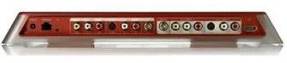
Slingbox Pro - Rear view
Slingbox Pro - Rear view, showing extra sockets for component and composite inputs


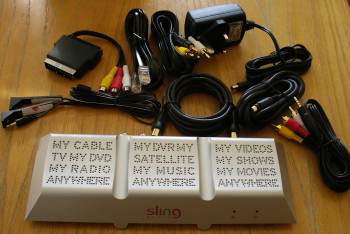
What's supplied with the Slingbox Classic:

Two sets of A/V (phono cables), SCART-to-A/V Phono adapter, S-Video cable, IR control cable, Ethernet cable, co-ax aerial cable, power supply, quick-start guide

Slingbox box contents

User comments

Some comments on Slingbox from visitors to our site:

  • I live in Norway (ex pat) and have been trying for a long time to get UK TV. I can get most channels via Sky, but not BBC and ITV (the ones I really want). I have tried in vain for such a long time, then I heard about slingbox. I had doubts but I decided to give it a try. I called my brother in the UK and sent him to buy one, we spent a couple of hours on the phone (Norway to the UK) and got it working the same day! I have my pc connected to my 37 inch flat screen tv via wireless LAN and get great quality pictures. Thank you Slingbox, thank you very very much for giving me back UK TV. (Pete Myring, Jun 2007)

  • We live in Rome and before moving tried to find out if we could get Sky UK. After loads of searching the only way we could get the true UK service was to have a 3½ or possibly 4 meter dish! Saw the Slingbox and thought i'd give it a try. It is excellent, and we now have two set up back at home in the UK (one on our Sky+ and one connected to a DVD Recorder). Not only can we get UK TV via our media PC in Roma (on a 32" LCD TV, connected via wireless to a TI 2mb service which averages out at 500-600kb!), but also when out and about on my Windows mobile phone on wireless. (Gary, Jul 2007)

  • What a product! I work away from home and spend 4 days per month at home.. I was about to cancel my Sky subscription when I found out about this nifty device.. Well done, it's a bonus being able to change the channel. The picture quality is awesome as well.. 10/10 . (Russell Heath, Feb 2008)

  • I was a bit concerned about it at first, as here in Australia the internet speeds are not very good, but I was pleasantly surprised. It was a little bit jittery when I first changed channels, but soon settled down to a good clear stream.  Was a little bit blurry when i went to full screen but still watchable, but on the smaller screen it was great.. Sound was good too. (Louise, Oct 2007)

  • John Plumb accessed a UK Slingbox feed in Vienna, and reported: "Overall, I am very impressed with the Slingbox. After each channel change, the system takes 1-2 minutes 'optimizing' at around 375kbps. The picture then settled down, on most channels, to similar quality to watching a DVD on PC. In a nutshell, I want one!"

  • My daughter lives in Luxembourg and "normal" tv is available by cable. To obtain English speaking channels, a satellite dish is necessary. This is impossible for her given the location of her apartment. The Slingbox service is marvelous although there is a "freeze" from time to time after about a couple of hours viewing. (I suspect that this may be due to the broadband supplier in the Grand Duchy). Neverthelss the project has been well worth while and I commend it to others. (David Colton, Dec 2007)

Got a Slingbox and have an opinion? Send us your comments


Basic setup (Freeview)

There's a number of configurations you can use with the Slingbox, but we'll list a basic one here, to help those looking to get a feel for how to set up a Slingbox. This is the setup to use if you want to get Freeview sent over Slingbox for access via the web.

You need: A TV aerial feed, a mains power supply, an ADSL router that's connected to the Internet and has a spare Ethernet (RJ45) port, a PC (to configure your router)

  1. Download the Slingbox software onto a PC that's connected to the same router as the one you want to connect with. The software is not supplied on CD with the Slingbox, so download it from www.slingmedia.com/software
  2. Connect the TV aerial into the Slingbox aerial in socket
  3. Connect the Slingbox Ethernet socket to a spare socket on your router, using the supplied Ethernet lead
  4. Plug the power supply into the mains, then into the Slingbox
  5. Run the Slingbox setup software. Here's what should happen: The software finds and detects the Slingbox - it checks the firmware version and updates the Slingbox if needed. You may get messages about no A/V source being connected - but for this config, that's fine.
  6. When complete, you may get another message about no A/V source - continue and there'll be an option to select the input type. Here, select "Antenna (Free to air)", then press Scan TV channels. This may take a few minutes. Ours found 40 channels.
  7. Set up the router config. The Slingbox software will try to use UPnP to configure your router automatically - for routers that don't support UPnP, you'll have to manually configure your router. We had to do this, and it means setting your router to allow incoming Internet requests through to the Slingbox IP address and port number. If you're up on how your router works, and how to set up Port Forwarding, this is something that you'll be familiar with - if not, the provided help can guide you (the Help button opens a fairly comprehensive help page on the Slingbox site).
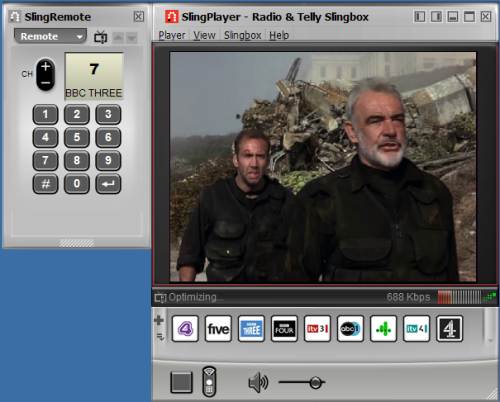
Slingbox player in action
The Slingbox player in action

Got a question?

If you're thinking of buying, and have a question about what Slingbox offers, ask in our TV Technical Forum and we'll try to help

FAQ

Some common questions we're received on the Slingbox:

Software versions

As of 29 Sept 2007, the UK Slingbox Classic version numbers are:

  • PC Slingbox Player version: 1.5.0.322
  • Firmware: v1.0.33 (Dated 22/06/2007)

Check downloads.slingmedia.com/page/uk for Slingbox software and firmware updates. Software updates from the UK Slingbox site normally include firmware updates, but you can also update firmware from the Sling Player (Slingbox menu > Directory > Edit > Configuration tab).

If you know of a newer version, please let us know.

Slingbox Software Platforms

Currently, the Sling Player is available for the following Operating Systems:

  • PC: Windows XP, Windows Vista and Windows 2000.
  • Mac: A version for Mac OS X 10.3.9 or later, is available.
  • Pocket PC / Windows Mobile: Versions available for Windows Mobile and Windows Smartphone. More
  • Symbian OS: A Series 60 client is available, targetted initially at the Nokia E65 and Nokia N73. More
  • Palm OS: At of June 2007, a beta version for Palm OS devices is available. More
Cost of using Slingbox?

We've been asked about the cost of using Slingbox, so here are some useful bits of info:

  • There's no subscription or usage fee for using the Slingbox hardware or service.
  • The SlingPlayer PC software is free
  • You make a one-off payment for the Slingbox hardware
  • You will need to have broadband at the 'home' end. Normal Broadband fees will apply
  • You will need Internet access to be able to connect to your Slingbox remotely over the Internet. Again, normal Internet fees from your Internet Provider will apply.
  • You'll need to pay any costs associated with your TV service. There's no subscription fee for terrestrial TV / Freeview, but if you're planning to access UK pay channels, you'll have to pay subscription fees to Sky or Cable
  • If connecting to a Slingbox in the UK, the household must have a valid UK Television Licence.
Slingbox on a Windows PC

Slingbox Player software runs on the following Windows platforms:

  • Windows XP SP2 / Windows Media Center
  • Windows 2000
  • Windows Vista
Slingbox on a Pocket PC

Slingbox on Windows MobileThere's a mobile player for Slingbox, that's been released to run on the Windows Pocket PC 2003 / Windows Mobile v5.0 platform, for use by those with Microsoft-powered PDAs.

This is available for download from the Slingbox site (on the US software download page, not the UK download page). It's a 30 day evaluation version, and it costs $29 to register after the 30 day trial.

We installed the US version, and it seems to work perfectly well with our UK PAL Slingbox, allowing us to watch and control our setup - pictured to the right, is us setting Sky+ via the onscreen remote control over a wi-fi connection on the Internet. Great for setting shows when out and about. Tests were done in January 2007 using SlingPlayer Mobile v1.1.0.95 running on an o2 XDA Orbit Pocket PC with a UK Slingbox running firmware v1.0.31.

If you're looking for a Windows Mobile device with an Internet connection In the UK, you might want to consider a device like one of the T-Mobile MDA range, on the T-Mobile Web ' n' Walk tariff, which offers some of the best data transfer deals at the moment. See t-mobile.co.uk.

Mobile phone network

We've been asked if it's possible to watch TV via Slingbox over the mobile phone network, either using GPRS or 3G Internet connection. From our tests, the answer is 'technically, yes'. We've been able to connect to a Slingbox using a Qtek s200 Windows Mobile device, using o2's Mobile Web GPRS service, and a connection is made successfully - unfortunately, the bandwidth of GPRS isn't good enough to allow streaming video to work smoothly, so although you can watch TV over GPRS, it's very choppy. It's certainly good enough to allow setting of Sky+ over GPRS though, which is great.

If you're looking at using a Slingbox over a mobile phone network, you need something with a higher bandwidth than GPRS, and in the UK, we're talking about the 3G network. 3G offers data transfer at a much faster rate (speeds of up to 384kbps), which supports streaming video over the mobile network. The downside, is that costs for using 3G to view streaming video aren't cheap, and you should check with your network operator to determine the price you'll be paying. With GPRS or 3G, you normally pay by the megabyte downloaded, or a fixed monthly usage fee
.

T-Mobile USB modemFast Mobile Internet? If you want to connect to your Slingbox on the move, it might be worth looking at T-Mobile Web 'n' Walk offering - Their 3G network covers a reasonable amount of the UK. At the time of writing, their Web 'n' Walk Professional tariff provides high speed mobile Internet access access using a USB modem or a 3G data card. Speeds of up to 1.8Meg are possible. More at www.t-mobile.co.uk

Slingbox on a Symbian Mobile

In late 2006, a version of the Sling Player for Symbian smartphones was launched. At the time of writing, the Symbian version is available for OS v9.1, specifically for the Nokia E65 handset.

Three X-SeriesCheck out UK operator 3's X Series for details of a package offering Slingbox on a high-speed mobile network and a Symbian phone.

Connecting with wi-fi

The Slingbox is supplied with an Ethernet port, so you need to get an ethernet-to-wifi adapter. These are commonly referred to as "Game Adapters", as they're most commonly used to connect boxes like the Microsoft X-box to a wireless network.

Belkin Ethernet adapterWe managed to get our system setup with wi-fi quite easily - We're using the Belkin Wireless G Ethernet Adapter (Model F5D7330) - At the time of writing, the cheapest we could find were at Misco and PC World

To get set up, we first had to connect the Ethernet Adapter to our router, and use the supplied software to set up the Ethernet adapter (setting the IP and WEP encryption). Once done, we then connected the Ethernet Adapter to the Slingbox by ethernet cable, and ran the Slingbox configuration software again from our PC. The software picked up the Slingbox over the wi-fi network (via the router), and let us view TV wirelessly. The slightly more challenging bit, was to get this setup to be accessible outside of our local network - for this, we had to open up 'port forwarding' via our router - it's important to note that you forward to the Slingbox IP and port, and not the IP of the Ethernet Adapter.

If you need help, see our Problems FAQ, or try asking in the FileSaveAs networking forum

Network cabling

HomePlugIf you want to connect your Slingbox to your Broadband router, you need to use the Slingbox Ethernet connector... But what if your Slingbox is in a different room to the router? You could use wifi, or you could consider using a Homeplug / Powerline adapter. These use your existing in-house electrical wiring - just plug your Slingbox into a Homeplug, and plug the homeplug into the mains. Another Homeplug is needed near the router - sending the network traffic via the mains socket, and connecting over the mains.
Pictured here is the MicroLink dLAN HomePlug Ethernet adapter - which is available from Maplin (Cat: A70CX), as well as Dabs.com and BT Shop.


Problems with remote connection

Sometimes it can be frustrating when you can't establish a connection from the outside world to your home slingbox. Here are a couple of bits of help:

  • When trying to connect from work, some users have reported that they can't get a connection - with messages such as "Make sure the Slingbox you are watching is on, set up for remote viewing, and not blocked by firewall/NAT settings 0x8007274C. One common fix appears to be to change the port number from the default value of 5001 (often blocked firm's IT departments), to port 443 (the port used for secure web pages). This seems to overcome the problem for a lot of users
  • If using Wi-fi, the problem could be related to your setup, or wifi settings. Our sister site, FileSaveAs, offers some help with this - not for the Slingbox, but for wi-fi webcams. See the guidance on that site's Wifi webcam page , or try asking in the FileSaveAs networking forum

Slingbox and Sky Satellite TV

Sky HD BoxSlingbox works very well with Sky Digital, the UK's satellite TV provider - the output of your Sky or Sky+ box can be connected to a Slingbox, and can then be sent over the Internet. Typically, you'll need to take a feed from one of the Sky box's RF (aerial) outputs and connect to the aerial input on the Slingbox. Make sure the Sky box RF modulator is on.

We've been asked if it's possible to use Slingbox so that someone at home in the UK can watch one channel using a Sky / Sky+ box, while someone else remotely accesses a different Sky channel. The answer is no, as the Sky boxes can only output one TV channel at a time - and so both local and remote viewers will only be able to watch the same channel at the same time.

If there is a requirement for you to be able to watch one Sky channel remotely, while someone locally watches a different Sky channel, you will need two Sky digiboxes - you could purchase Sky Multi-room - which gives you an extra Sky box.

If it's not practical to get two Sky boxes, you may find that the channel you're trying to watch remotely, is available on Freeview. Note that the UK version of the Slingbox has a built-in Freeview receiver, that can get 35 free-to-view TV channels via a standard home TV aerial. You can watch these Freeview channels remotely over the Internet without disrupting the home-end's Sky viewing. To get the Freeview channels, you need to be in an area of Freeview coverage, and to connect a TV aerial to the Slingbox. Getting Freeview on a Slingbox is detailed elsewhere on this page.

Slingbox and Sky+

Slingbox can be used to control Sky+ boxes remotely perfectly - watching recording, setting up recordings and watching TV.
One user's reported having a problem setting up remote control for Sky+, so we thought we'd provide a walkthrough of how to set up Sky+ using the Slingbox Audio / Video setup wizard, part of the Slingbox Player software
:

  • Select United Kingdom, press 'Next'
  • Select 'Coaxial/RF' (assuming you're using the aerial feed), press 'Next'
  • Select 'External box', and set the 'Signal output channel' to the Sky+ RF output channel, then press 'Next'
  • Select 'Digital Video Recorder', press 'Next'
  • Select 'Sky', press Next and on the next screen, select 'Sky+', press 'Next'
  • You're then prompted to test the remote control. Once you're happy, press 'Next'
  • No need to adjust leading zeros or speed in our case. You can then test channel changing. Tick the 'changed channel' box when you're happy, and press 'Next'
  • Press 'Next' again, then Finish the wizard

Slingbox and HD

We've been asked if there are any limitations if upgrading to Sky HD (high definition), and using Slingbox.
As far as we understand it - a Sky HD box still has outputs that can be fed into a Slingbox. The Slingbox doesn't support a high-definition input, so streaming of HD video over the Internet with a Slingbox isn't supported, but non-HD content can be streamed. As HD only makes up a very tiny percentage of Sky's output at the moment, this is unlikely to be a limitation at this stage.


Manual The manual for the UK Slingbox is available for download as a PDF from uk.slingmedia.com/page/downloads.html

Slingbox on Cable

Slingbox is compatible with UK cable TV , i.e. Virgin Media (formerly NTL / Telewest)

Picture problems

If you're experiencing picture problems, such as break-ups, image freezes or juddery video, here's a few things to try. Note that most video streaming problems relate to the speed of the Internet connection at each end, so try to address this first:

  • First, try testing the speed of your download connection - Speed Test
  • Make sure the speed at the Upload end is good enough
  • Make sure there are no applications either at the upload or download end that are using the Internet connection, as these can eat the bandwidth

Some other things to try:

  • Make sure you have the latest version of the Sling Player, and your Slingbox is running the latest firmware
  • Go to Player > Slingplayer options, and play around with the settings. Make sure 'High Quality (LAN) is disabled, and enable 'Enable SlingStream smoothing'. You can also try reducing the encoding rates. The application help can help.
  • Reduce the video size (from the Player's View menu)
Slingbox on a LAN

We received the following question: "I am interested in purchasing a Slingbox to access TV via PCs on my home network. Is it possible to configure the Slingbox this way, without having to connect over broadband? It would make an ideal way of watching TV on a PDA whilst at home"

The answer is yes - Slingbox functions well over a network (connected via the same router). As data speeds are better than over Broadband, you get a more stable picture.

UK TV Licence

We've been asked if you need a UK TV licence when using a Slingbox to watch UK TV content.

Under the Communications Act 2003, you need a valid TV licence to receive or record TV programmes. The UK Slingbox comes into this category, as it has a UK TV tuner on board, so is capable of receiving TV programmes.

There's an interesting article on the What Satellite and Digital TV website that reports that, as the Slingbox isn't battery powered, to watch TV via a Slingbox, you need a licence for the new location, as the TV licence covers a location, not a person.

If you have any doubt about licensing and Slingbox, play safe and check at the TV Licensing site.

Changing channels We've been asked whether, if you're connected remotely, you can change channels on a set-top box such as Sky... and if so, how...
The answer is yes, you can change channels of external equipment. You have an on-screen remote control that sends remote commands to your Slingbox. The Slingbox comes with two infrared transmitters that you position in line-of-sight of the infrared senor on your set-top box, so when you press on the virtual remote control the command is send over the Internet to Slingbox, and then via IR to the equipment you're controlling.
Other video sources

We've been asked if the Slingbox can be used to transmit other sources, such as the output from a games machine like the Nintendo Wii, over the Internet. The answer is, as long as the video source is capable of outputting video (see spec), yes - the video and audio can be sent. The downside is that you will almost certainly not be able to control something like a games console over the connection, as the Slingbox handles remote control by sending commands using infrared.

Quality of streaming video

We're quite often asked about the quality of streaming video over Slingbox, or whether someone overseas on a slow connection will be able to get a high enough throughput to make Slingbox workable. The only real way of getting a feel for the quality and speed of Slingbox video is to see how your PC or Mac handles streaming video. If it can't cope with streaming video, from a site like BBC News, then Slingbox will be a problem too.

To give our site visitors an idea, we've used our webcam to take a couple of movies to demonstrate Slingbox in action - the quality of our AVI isn't great, but it'll give you an idea of the Slingbox experience on a PC. Test was done using a UK Slingbox on a broadband connection with a 4Meg throughput:

The best way to assess Slingbox is to access a real Slingbox feed. As far as we can tell, there isn't a test feed of Slingbox video available from the UK, but, try asking in our forum - it may be possible for one of the forum regulars to let you have access to their Slingbox briefly for a trial.

If you're interested in the technical properties of the Slingbox video stream, you might find our screenshot of the Encoding options screen of interest - all values set to maximum, to highlight the max range.

Speed and bandwidth

We've been asked a few questions about data transfer rates, picture quality, and how watching video over Internet with a Slingbox affects Broadband accounts that have download usage restrictions (e.g. a 5 Gig a month download usage cap).

To help explain this, we need to explain the factors that affect video quality using Slingbox - A bit technical, but bear with us. The key factor is the number of bits that can be sent from Slingbox-to-Player. This is measured in kilobits per second, and the playback video quality and screen size decide how many kilobits per second are needed to get a watchable picture on your PC.

It's important to understand that the upload speed from the Slingbox to the Internet, and the download speed of the Internet connection at the Player end, both affect the overall transfer rate... and it's the lowest number of the two speed values that's the important one - for example if you can only upload at 500kbps, an 8meg download at the other end won't help you get more than 500kbps of data downloaded.

To get an acceptable picture, the Player needs to be getting between 250-750kilobits per second downloaded over the 'net from a Slingbox.

Regarding broadband accounts with usage restrictions, again, this depends on how much data you're able to download. Assuming a constant video download rate of 500kbps, this would equate to 0.225 Gigabytes of data per hour - In other words, just under 4 and a half hours of video equals 1 gigabyte of download.

The maths: 500kbits/sec x 3600 seconds an hour / 8 (to get from megabits to megabytes) - Megabytes per hour.

Remember it's normally your download that's capped, not your upload - so the place that you watch the Slingbox output is where the download limit could bite you, not the place where you upload. If you're worried about your cap, consider shifting Broadband providers, perhaps to BT Total Broadband Option 3, or one of the Tiscali packages - both offering unlimited downloads.

It's possible to set the Sling Player to reduce the data rate, so if you're prepared to live with a reduction of quality (less refreshes and a smaller playback window), then you can drop the data transfer rate, reducing the amount of megabytes downloaded when watching your Slingbox.

Dialup? We've also been asked if it's possible to watch Slingbox over a dial-up connection - As we've established above, a watchable picture needs at least 250-500kbps, and a dialup connection is only 56kbps. By reducing the playback screen size and dropping the quality to the lowest setting, you may just be able to get Slingbox to work, but you won't be impressed by the results.

Multiple PCs

Q. Can I watch two channels at the same time over a Slingbox?

No - A Slingbox can only stream one channel at a time - To watch two different channels over the Internet at the same time, you'll need two Slingboxes

Q. Can two people watch the output of Slingbox at the same time?

No - A Slingbox only supports a single active connection

Q. Can I have the Slingbox software on two different PCs and access the same Slingbox?

There's no restrictions on how many PCs or Macs the Sling Player can be installed onto, so you could have a PC in the US and in, say, Spain, both able to access a Slingbox in the UK. As per the above question - note that two Players can't access the same Slingbox at the same time.

Slingbox on a TV not a PC

Q. Can the Slingbox work on a television screen (not a PC screen) anywhere in the world?

The Slingbox allows you to view TV via the Internet on a PC (or supported mobile phone), and not a TV set. This is because you need the Sling Player software to watch the output. In 2007, Slingbox announced plans to release a box called a SlingCatcher that will support playback of a Slingbox on a TV, not a PC - this is likely to be available in the UK in 2008 (delayed) .

In the meantime, it is possible to connect a PC or laptop's output to a TV - some TVs (such as the Sony KDL32-S2010) have a "PC Input" that can take a feed from a PC or laptop, otherwise there are a number of PC-to-TV converters out there, such as the Kworld PC to TV Converter USB. Take a look at Maplin Electronics for various converters and connectors.

Alternatives to Slingbox

We've been asked about of some of the alternatives to Slingbox. Here are a few thoughts:

  • Sony LocationFreeSony's LocationFree: This box offers a similar service to Slingbox The Location Free box lets you watch live TV, play back recorded programmes and control your digital recorder, all from a PC, laptop or PSP (Sony PlayStation Portable). Big difference between LocationFree and Slingbox, is that LocationFree has built-in wireless technology (wifi), whereas Slingbox requires a wired connection, or a separate wi-fi adapter. Note too that the LocationFree is only licensed for use on one desktop computer, and to use from multiple PCs, you'll need to buy extra software licences - this isn't an issue for Slingbox. The LocationFree box is more expensive than Slingbox, but a very viable alternative. Available from Play.com , Amazon.co.uk or Comet

  • Orb on a PC - Both Slingbox and LocationFree are hardware solutions - boxes that connect to your TV setup and the Internet. An alternative, and cheaper, option, is Orb.
    Tv Anywhere USB This is a software solution that runs on a PC with a TV card installed/connected. You can use Orb to schedule recordings onto the PC's hard disk. The Orb software runs in the background on your PC, and from another PC, you can connect in, watch live TV from the remoter machine's web browser, and even play audio and video from your PC remotely, and it requires the following: A PC with an Internet connection. To use Orb, you must have a suitable TV card, be prepared to leave your PC on, running the Orb software and connected to the Internet. You also need to connect a TV aerial (for analogue TV or Freeview) into the input of the PC TV card.
    For more, see FrequencyCast's TV Control page
    .

Recording Slingbox

A question from site visitor James: "I live in New Zealand, and am interested in getting UK Freeview via Slingbox. But, with a typical 12 hour time difference it means that I would have to watch through the night! Can I record the stream from Slingbox in the Sling Player or do I need to record locally at the slingbox end and then use sling player to play the recorded content?"

The Slingbox itself doesn't have any storage space, so can't record content. The Sling Player software for the PC and Mac doesn't appear to have any kind of recording option, so there doesn't seem to be a way of recording Slingbox content remotely for later playback. There are a couple of possible solutions:

  • For the UK end, get a Freeview PVR (or Sky+) and connect this to your Slingbox. You can then use the Sling Player software to access the PVR or Sky+ box, either to set a show to be recorded on the PVR, or to stream a recorded TV programme.
  • One other option is to make use of the Sling Catcher product, which will output a Slingbox feed to a TV instead of a PC - presumably, if it's able to output to a TV, it'll be possible to connect it to a VCR or DVD recorder.

Anyone out there have anything to add on this topic? Let us know.

UK Slingbox outside the UK

We've been asked a couple of times if it's possible to use a UK Slingbox outside of the UK.

The UK Slingbox uses 240VAC for power, comes with a PAL TV tuner, and is optimised for the UK television frequency range. If the country you're planning to use a Slingbox supports these specifications, then it should work. We're not experts in overseas TV systems, so you may find it best to ask about suitability in a specific country in the Slingbox forum. More on using a Freeview receiver abroad in our Freeview Box Overseas FAQ.

Infrared Remote eyes Slingbox remote eyesWe've been asked for more details on how the Slingbox is able to control devices. The Slingbox's built-in Freeview tuner can be controlled by the Sling Player software - but what about other devices that you want to control remotely? Well, the Slingbox comes with two infrared eyes. These plug in to the back of the Slingbox and need to be lined up in front of the infrared window on the device you want to control. There are two eyes, to allow you to control two devices, or to improve infrared signal to one device. They can be stuck in place with supplied sticky pads. Click on the picture to the right to see a close-up of the Slingbox infrared extenders.
Reset the Slingbox To reset the Slingbox back to factory defaults, hold down the Reset button for five seconds. The lights on the front will flash left-to-right quickly, and then slowly, and the restart takes around 30 seconds.

Power

The Slingbox is mains-powered, and is supplied with a mains transformer. One recurring question asked by visitors to the site is: "Does the Slingbox have to be plugged in to work?" As with all electrical equipment, the Slingbox requires power to work. If you unplug the Slingbox from the mains supply, it won't work. Note that the router (that connects to your broadband) will also require power and won't work without a power supply.

The supplied mains adapter with the UK Slingbox is rated as follows: 100-2540VAC, 50/60Hz, 0.45A. Output is 6V at 2.45A.

Freeview Questions

Some questions we've been asked about using a UK Slingbox with Freeview.

Q. I have a Freeview box connected to my TV. If I connect Slingbox, could I watch one Freeview channel while there is a different freeview channel on my TV? Would I need another aerial connection?

A. As the Slingbox has a built-in Freeview tuner, it can be used to transmit Freeview without interrupting anything you're viewing on your TV. All you need to do is connect an aerial feed to the Slingbox. You won't need another aerial - you should be able to use the existing aerial, using an aerial splitter.

Q. I already have a Freeview box. How will this work?

A. The Slingbox has a built-in Freeview tuner, so it's easiest to use the built-in one (as there's less cabling to connect). All you need to do, is connect a TV aerial to the Slingbox aerial input. If for some reason, you'd prefer to use your own Freeview box, then this can be connected too.

Q. I can't get some Freeview channels on my Slingbox

A. As with any digital TV receiver, you need a good enough signal to get Freeview channels. See our Reception page for help on this.

Q. I can't get Freeview's radio stations over Slingbox

A. We agree, it's odd, but the built-in Freeview receiver inside the Slingbox can't tune in to the radio stations broadcast over Freeview. No idea why not. One option is to connect a Freeview , Virgin Media or Sky box (one that's capable of getting radio) to the Slingbox, then tune the set-top box into the station you want to listen to, and listen through the Slingbox. Alternatively, see some other ideas on our Internet Radio page.

Q. Will the UK Freeview receiver in the Slingbox work in other countries?

A. We're not 100% sure, but we suspect the UK Slingbox is set only to work on the UK Freeview frequency range. See our FAQ entry: Freeview overseas


Other questions

A collection of other questions we've been asked:

Q. If I'm accessing Slingbox remotely and want to change channels, will this affect what's being viewed at the 'home' end?

A. This depends on how you've set up the system at the 'home' end - If the remote person is using the Freeview receiver that's built-in to the UK version of Slingbox, then changing the Freeview channels won't disturb what's being watched on the home TV - as the Slingbox Freeview tuner is just feeding the remote end. If the remote viewer is watching, say, the output from a Sky box remotely, then as a Sky box can only output one feed at a time, changing the channel remotely will affect the home viewer's use of that equipment. See our Slingbox Sky answer for more on Slingbox and Sky.

Q. Is the Slingbox player available for purchase - is it a separate piece of equipment or is it anyone's laptop or computer screen?

A. The Slingbox is a piece of hardware that's available for purchase - this plugs into your TV setup and to the Internet. The Slingbox Player is a bit of software that's available for download from www.slingmedia.com - the software has to be installed on the PC where you want to watch TV.

Q. Do I need a static IP address for Slingbox? My home IP changes whenever I connect, so my IP address changes.

A. No, you don't need a static IP address (although you can use one if you want). Each Slingbox has a "finder id", which is a unique number - boxes can be found when connected to the Internet regardless of the home machine's IP address.

Q. Is the Slingbox available in USA or Mexico?

A. Yes, the Slingbox is available in the USA and Mexico. The US version is designed with connectors for the US, works on US power supplies, uses NTSC (not PAL), and doesn't support Freeview.

Q. Can I use a US Slingbox in the UK?

A. The answer appears to be yes, but there are some differences... The UK mains voltage is 240VAC, so you'll need a power converter to step up from the lower US voltage. You may also need SCART-to-A/V cables for use with UK equipment that has SCART sockets. Remote control codes for UK equipment may not be supported on the US player. The UK uses PAL encoding and the US uses NTSC, so there may be some image/quality issues. The UK model comes with a built-in Freeview receiver (to receive 35 free digital TV channels) - the US model does not.

Q. Can I use Slingbox to relay TV from one room in the house to another?

A. Yes. You can use Slingbox to relay a TV signal to a PC or Mac connected to a home network. If you want a solution that allows you to relay TV signals to other TV sets wirelessly (TV not PC). when consider a video sender

Q. Can I view Slingbox full-screen on my PC?

Yes - via the View menu, or by using the shortcut: Alt-Enter. You have the option to watch full-screen, or in a resizable window that you can drag around your PC screen.

Q. Do I need a fixed IP address to use the Slingbox?

A. No. Slingbox uses something called a Finder ID. The Slingbox transmits this to a central location, and the Sling Player uses the Finder ID to identify the IP address of the Slingbox hardware.

Q. My Sky+ box switches off automatically overnight. Can I still use a Slingbox?

A. Sure. When you use Slingbox with Sky, you need to attach infrared extenders, so that an IR command can be sent from the Slingbox. Sky boxes go into a powersave mode overnight (environmental reasons). Pressing the Sling Player's Sky Power On button will do the same as pressing the Power On on a standard Sky remote

Got a question about Slingbox? Ask in our TV Forum and we'll try to help


Links

  • IPTV - Our page of info on TV over the Internet
  • Slingbox on Podcast - Slingbox featured in show 3 of our podcast
  • Remote Control - Information on taking control of your TV over the Internet
  • On your PC - How to get TV and radio on your PC

Sky+ Special offer

Is this page correct? Something wrong or missing on this page? Report a site problem
Please help us correct the problem and to keep the site up-to-date
.

If you're looking for help, please don't use this option - instead ask in our forum

Copyright © 2002-2008 Radio & Telly. Terms