
Got a TV set that doesn’t have a SCART socket and looking to connect a set-top box? We can help…
I have an old TV – how can I get digital TV?
If you have an old TV, you can still use this to get digital TV. You’ll need to buy a digital TV set-top box and connect it to your TV. Normally you’d use a SCART lead to do this, but some old TV sets don’t have a SCART socket. All is not lost…
Types of connector
If you’re looking to connect a piece of equipment to your TV set, chances are that connection will be made using one of the following four types of connector. There are other types, but these are the most common.
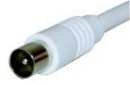 Co-ax aerial connector |
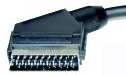 SCART connector |
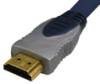 HDMI connector |
 Component video connectors |
I only have a TV aerial socket, what do I do?
You can connect most types of set-top box, DVD player, video recorder, etc, but the output of the box must be “modulated”.
|

What does “modulated” mean?
The way that a good old analogue telly works, is that you connect an aerial, then tune in each of the presets to a channel – i.e. “BBC1 on channel 1”, “ITV on channel 3, etc.
What you’re actually doing is tuning in each preset to a channel that’s broadcasting between 21 and 65 on the UHF band. Each of the main 5 TV channels will be on a channel from 21 to 65.
If you have a piece of equipment that you can to connect to a TV via an aerial socket – what you want it to do is “modulate” – which means to make its signal appear as a channel from 21 to 65. Once a box “modulates” its output, then you tune your TV into the channel number of the box.
Practical example: Connecting a video recorder. Most video recorders have a “modulator”. Often, they used to “modulate” on channel 37, but there was normally a way of changing this. When you connected a video recorder to your TV, you would then tune a preset (like button 8) to the video recorder’s channel, channel 37.
OK – I understand modulated – what next?
You need to connect whatever equipment you want to your TV set, making sure it’s modulated, then tune in your TV to the equipment.
Here is some general information on equipment that has a modulator:
- Sky Digital: Good news. All of Sky’s set-top boxes have modulated aerial outputs. (Sky RF Modulator help)
- Virgin Media: Most Virgin Media boxes have a modulated aerial output
- BT Vision: BT Vision’s original, grey-coloured, V+ box has an RF modulated aerial output (BT Vision Modulator help). The newer black box does not.
- Freeview: Most basic boxes do not support a modulated output. If you’re looking for a Freeview box that does have a modulated output, we recommend the TVonics MFR200.
- Freesat: The most common Freesat boxes from Humax, the Foxsat range, do not have a modulated aerial output.
- Video recorders: Most VCRs do have a modulated aerial output
- DVD Player: Most DVD players do not have a modulated aerial output

The Icecrypt T5000 – Freeview box for TVs without a SCART socket.
I have a box that doesn’t have a modulator!
All is not lost – there are three options:
- Replace it with a box that has a modulator (not always practical, but it’s an option)
- Connect the box to the TV via a video recorder (see below)
- Get a device called an RF modulator (see below)
Buy an RF modulator
If your TV doesn’t have a SCART socket, then you can get an ‘RF Modulator box‘ – it converts a SCART feed to an aerial feed. It creates a “Modulated” TV channel that your TV can tune into. Plug a SCART socket in one end, and an aerial lead to your TV in the other, and then tune in the TV.
We recommend the Universal RF Modulator from Maplin Electronics (Code VH89W). There’s also one on offer at Tvcables.
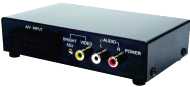
Universal RF Modulator from Maplin
Using a video recorder to modulate
If you have a piece of equipment without a modulator, you can connect it to your TV via a video recorder that has a modulator. Let’s take the example of a Freeview box that only has a SCART output:
- Connect the Freeview box to the video recorder using a SCART lead
- Connect the video recorder to the TV using an aerial lead
- Tune in one of the TV’s channel presets to the video recorder’s modulated aerial channel number (as if you were watching a video)
 Now, set the video recorder so it’s showing the input from the SCART (labeled something like Av1, Ext or AUX (possibly with the symbol on the right).
- You should now be able to see the output of your Freeview box on the telly, going via the video recorder
Confused? Help us make this page easier to understand. Contact Us |
Related pages
- Not enough SCART sockets? Get a SCART Switch Box

My Freeview tv has a scart socket.
My Bush video tape recorder was fine on the analogue system, on a previous tv – but can this recorder be connected to this digital tv? If so can you tell me the stages how to do this in very easy to understand terminology please?
Hello i have a tv / dvd i have broken the ariel connector in the side of my tv,the tv / dvd dose not have a scart lead so i cannot connect a freeview box etc to get a reception on my tv,i can only use the dvd player,im confused as to what module to buy,so i can plug my outside ariel into my tv / dvd could anyone pleasde advice me ty Alison
bought 44 inch tv no freeview no scart sockets no hdmi sockets attached house arielcoming up no signal stuck can you help thanks
my new tv has no scart connection but my dvd player has a scart conection how can i get it to conect
Hi,
My old and very excellent Humax PVR was connected by a scart cable to my old TV, but my new TV only has HDMI sockets. Is there any way I can connect the Humax to the new TV?
Has anybody answered your question yet? I have exactly the same issue as you do!
I want to know what kind of television I should buy as I don’t know a thing about Tvs . I have a satellite dish and the cables all installed I just need to buy a free sat box but don’t know what tv I should get as the scart cables and what not make no sense to be any suggestions on a tv I should buy that would go with a mahhattnan free sat box thanks
Have a Bush TV that was on sky, but want to put it normal analogue tv. For some unknown reason am getting “no signal”.
Can you help please?
Hi I wonder if you can help
I have bought a new tele with no scart and now I have problem connecting my Italian sat boxbecause it has a scart only .
What adapter can I bay ?
Hi+ive+a+Goodman’s+free+sat+box+connects+with+a+scart+ive+a+new+TV+arriving+it+doesn’t+have+a+scart+socket+just+HDMI+which+my+box+doesn’t+have+,do+i+need+to+get+a+new+hd+box+?