
This section contains answers to questions commonly asked by visitors to this site. If your question isn’t answered here, please post it to our visit our forum, and we’ll try to help.
| How do radio stations know who’s listening? | Both the commercial radio and BBC radio stations use a body called RAJAR to conduct independent audience research. This is normally done by RAJAR representatives handing out diaries on a door-to-door basis during sampling periods.
Listeners place ticks in columns of the diary to indicate which station they’ve listen to, and RAJAR compile the results, informing stations of the ratings. Ratings are collated four times a year. For details, see www.rajar.co.uk |
| How do stations get their news? | Local radio newsrooms have fallen victim to cutbacks over the years and are considerably smaller and less well-resourced as they used to be. For many stations, days of a crowded newsroom, lots of reporters and support staff, plus roving radio cars, are a thing of the past.
Stations may now only offer a local new service during peak hours, switching to a network news service off-peak. BBC local stations tend to be better able to offer local news than their commercial counterparts, and can call on the resources of the BBC News service. Commercial radio stations typically get their news from Independent Radio News (IRN), a service which supplies news to over 250 local commercial stations. More: IRN and Sky Radio News |
| How do stations get their Travel news? | Local radio source their travel news in several ways, but most commonly, they’ll make use of the services of a dedicated company that provide voice and text reports to radio stations. Many stations in the UK get their travel news from a company called Trafficlink (now branded as Inrix), who provide travel news feeds, text services and broadcasters from their operations centres.
Some stations have their own in-house travel staff as well, to add a local voice to reports – typically this will only be during the peak breakfast and drivetime shows. Travel is gathered from various sources, including: local police, motorway control, rail companies, courier/taxi firms, listener “jamlines”, and spotter planes. In the 1980s and 1990s, AA Roadwatch provided travel news to stations from studios in Stanmore. The service ceased some time back
|
| The 2015 FM Switchoff? | The Digital Britain report published in June 2009 talks about a “Digital Radio Upgrade” plan to be complete by the end of 2015. This would involve existing FM and AM stations moving to D.A.B by 2015, and the space on the FM band being used for low-powered community radio stations.
More details on the FM Switchoff on our FM Radio Switchoff page or at radioswitch.co.uk. |
| How do stations keep their clocks accurate? | 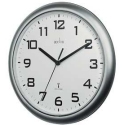 Radio stations use radio-controlled clocks that are synchronised to atomic clocks via the MSF time signal, which is an over-the-air signal picked up by special radio-controlled receivers. Radio stations use radio-controlled clocks that are synchronised to atomic clocks via the MSF time signal, which is an over-the-air signal picked up by special radio-controlled receivers.
It’s now possible to buy such clocks for use in the home for under £10 – Handy for accurate time-keeping, and for auto-correction when the clocks go back or forward. See our section on radio-controlled time for more information. |
| DAB vs Digital TV? | A common area of confusion. in the last few years, a host of new “digital” radio stations have appeared. There is common confusion over what exactly “digital” stations are, and where you can find them. The following all class as digital stations:
Some stations broadcast on all of these formats, including the national digital radio services from the BBC. If you’re looking for more radio choice, you may find that the station you’re looking for is available on all of the three options, otherwise consider whether listening to radio through your TV suits your requirements, or whether a portable DAB receiver more suits your needs. |
| Radio listings | Looking for listings of upcoming radio programmes? Try a powerful listings program for your PC, mobile phone or pocket computer. Listings are uploaded over the Internet. The advantages are: searchable, cheap, greater listings, configurable.
See our dedicated TV and Radio guides section. |
| Distant stations | What happens if you want to listen to a specific station, but you’re out of the area? Suppose you’re a fan of a local radio station, then you move away from the area… or perhaps you want to listen to a local station from work… maybe you’ve even moved countries and want to keep in touch with news from your home town… There are a few options to try:
|
| Can I use my UK DAB receiver overseas? | The UK uses Band III (Band 3), while other parts of the world use the lower-performance L Band (1452-1490MHz). The UK may be extended to cover L Band in the future. Most DAB radios available to the UK support Band III only. If in doubt, check the manufacturers website.
For details of which countries use Band III and L Band, see the DAB Ensembles site. Note that we’re not aware of any UK stations being transmitted overseas on DAB. Worldwide travellers may still be better off with shortwave or satellite services to receive UK stations abroad. If you can add anything to this section, please let us know. For more on DAB digital radio, see our DAB Digital Radio Explained page. |
| Radio on your PC? | If you’re looking to listen or record radio onto your PC, you’ll need an internal card or an external USB receiver. Note that a Freeview TV card or USB box can also receive radio stations, and offers both radio and TV for your PC – worth a look.
For more on listening and recording radio on your PC, see our Radio on your PC page. |
| Internet radio? | Thanks to the Internet, you can now tune in to radio stations from around the country and around the world over the Internet. Get yourself a broadband connection, and there’s a host of radio stations to choose – you can even start your own Internet radio station for next to nothing.
For more, see our Internet Radio page, or consider getting a Revo wi-fi Internet Radio There’s also the newish form of broadcasting, known as Podcasting, where you create downloadable on-demand radio shows. |
| Music copyright | If you know a little about music copyright, you may know that each time a piece of music is played to an audience, a royalty payment is due. In the UK, there are three main bodies that are responsible for collecting royalty fees from radio stations and apportioning the money to their members. They are as follows:
Most music radio stations own a ‘blanket’ licence, that allows them to play whatever music they wish, in return for an annual licence fee (based on audience size and revenue). To allow the likes of PRS to apportion the revenue, PRS asks each station to return a detailed summary of what was broadcast, via a series of random “sampling periods”, where all music played including jingles, advert music, and even the presenter singing, gets logged and returned to PRS for analysis. |
| What was that song? | If you’ve heard a song but don’t know the title or artist, there is a service out there that may be of use. Shazam allows you to dial a number from your mobile, hold the mobile so it can hear the track, and then get the information on title and artist back as a text message. The fastkey number is 2580, and you can find more details on this service at www.shazam.com
Once you have a title and/or artist – try Amazon.co.uk |
| How do I start my own radio station? | We’re often asked how easy it is to set up and run a radio station.
There’s a lot to consider: Licensing, music royalties, technical, programming, commercials, transmission, legal, etc. We’ve now created a dedicated page with information on how to set up a radio station, whether it’s an online Internet station, or a mainstream FM community radio station. For our look at setting up your own venture, see our Start A Radio Station section. There’s also our page on information on how to set up a streaming radio service. We also have a guide to the cost of setting up a community radio station in the UK You could also consider creating a podcast – see our DIY Podcast section for notes on how to get started as a podcaster. |
| Why do some radio stations sound louder than others? | Many radio stations use what’s known as multi-band dynamic audio processing to make their overall sound consistent and “loud”. This processing alters the original sound to give a station’s output more “punch”. For many who prefer their audio “natural”, this processing is unwanted and obtrusive.
For more information on this, see our Why do some radio stations seem louder than others? page. |
| Why is there a time lag with digital radio? | One of the slightly annoying things you may notice about digital radio, is that there’s a time delay in the digital transmissions – sometimes up to a couple of seconds. This can be a pain if you are listening to a digital service with an analogue service in another room,or you’re using the BBC pips to set your watch.
For details on the cause, see our Digital Time lag page. |
| How do I get a job in radio? | Getting a job in the UK radio industry can be challenging.
Check out our Work in Radio page for guidance on where to start |
 Stations that broadcast on audio channels of
  to order the CD, or download the song legally with
 | Got a question or need more info? Please ask in our forum |
